How to harden Apache web server security
Hardening Apache reduces the chance that an exposed site leaks version details, serves unintended files, or accepts request types the application never meant to handle. A stronger baseline turns routine internet scanning into blocked requests instead of easy reconnaissance.
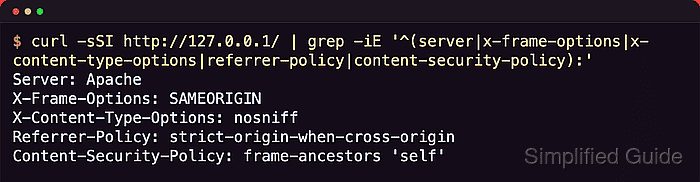
Most Apache hardening lives in a few places: global includes that control headers and protocol behavior, <VirtualHost> or <Directory> blocks that narrow what a site serves, and targeted probes that confirm the final response matches the intended policy. Security improves fastest when those controls are explicit instead of inherited accidentally from old snippets or forgotten .htaccess files.
Examples below use the Debian or Ubuntu layout with /etc/apache2/, apache2ctl, and the apache2 service name. On RHEL-family systems, the equivalent tree is usually /etc/httpd/ with the httpd unit name. Re-test each hardening layer after it is added, because Apache merges configuration sections and a broad request-space rule can unintentionally weaken a filesystem deny if it is placed too broadly.
Steps to secure Apache web server:
- Inventory the active Apache surface before changing it.
$ sudo apache2ctl -M
Loaded Modules:
 core_module (static)
 so_module (static)
 watchdog_module (static)
 http_module (static)
 log_config_module (static)
 logio_module (static)
 version_module (static)
 unixd_module (static)
 systemd_module (static)
 access_compat_module (shared)
 alias_module (shared)
 auth_basic_module (shared)
 authn_core_module (shared)
 authn_file_module (shared)
 authz_core_module (shared)
 ##### snipped #####

$ curl -sSI https://host.example.net/
HTTP/1.1 200 OK
Date: Sat, 06 Jun 2026 08:20:00 GMT
Server: Apache/2.4.66 (Ubuntu)
Content-Type: text/html
Start by finding what the server actually exposes to clients, not only what the config is supposed to do. Modules, response headers, and vhost mapping usually reveal the quickest hardening wins.
Use a2dismod on Debian or Ubuntu, or the platform module configuration on other systems, to remove modules the site does not need.
Related: How to view a list of modules in Apache
Related: How to enable or disable Apache modules
Related: How to test Apache configuration - Move the baseline hardening rules into a dedicated Apache include instead of scattering them across unrelated vhost files or .htaccess.
$ sudoedit /etc/apache2/conf-available/zz-security-hardening.conf
$ sudo a2enmod headers
Enabling module headers.
To activate the new configuration, you need to run:
  service apache2 restart

$ sudo a2enconf zz-security-hardening
Enabling conf zz-security-hardening.
To activate the new configuration, you need to run:
  service apache2 reload
# Reduce banner leakage.
ServerTokens Prod
ServerSignature Off

# Block TRACE explicitly.
TraceEnable Off

# Send core browser-facing policies on normal and error responses.
Header always set X-Frame-Options "SAMEORIGIN"
Header always set X-Content-Type-Options "nosniff"
Header always set Referrer-Policy "strict-origin-when-cross-origin"
Header always set Content-Security-Policy "frame-ancestors 'self'"

# Fail oversized requests quickly when the application does not need them.
LimitRequestBody 1048576
The zz- prefix makes this include load after the packaged /etc/apache2/conf-enabled/security.conf file on Debian and Ubuntu, so ServerTokens Prod is the final value. If you prefer to edit the packaged security snippet directly, keep only one final value for each directive.
On RHEL-family systems, place the same block in /etc/httpd/conf.d/zz-security-hardening.conf/ and skip the a2enconf step.
ServerTokens Prod and ServerSignature Off reduce easy fingerprinting, but they do not replace patching or module cleanup.
If another later-loaded file sets ServerTokens, ServerSignature, TraceEnable, or the same headers again, Apache uses the last directive it reads.
If the application already sends Content-Security-Policy, merge frame-ancestors into the existing policy instead of emitting a second conflicting header.
- Keep per-directory overrides off unless a specific application still requires them.
<Directory /var/www/html>
    AllowOverride None
</Directory>
AllowOverride None keeps security policy in the main Apache config, avoids per-request .htaccess filesystem lookups, and makes the effective rules easier to audit. If one path still needs overrides, scope them to that directory instead of reopening the whole document root.
- Deny unused methods, directory indexes, and common sensitive-file leaks in the same pass.
<VirtualHost *:80>
    ServerName host.example.net
    DocumentRoot /var/www/html

    <Location "/">
        <LimitExcept GET POST>
            Require all denied
        </LimitExcept>
    </Location>

    <Directory /var/www/html/downloads>
        Options -Indexes
    </Directory>
</VirtualHost>

<FilesMatch "^\.">
    Require all denied
</FilesMatch>

<DirectoryMatch "(^|/)\.(git|svn|hg|bzr)(/|$)">
    Require all denied
</DirectoryMatch>
TRACE is controlled separately by TraceEnable Off, not by <LimitExcept>. Add OPTIONS when browser clients need CORS preflight, and keep methods such as PUT, PATCH, or DELETE only where the application really uses them.
After adding a broad <Location> or vhost-wide method allowlist, re-test hidden-file and admin-endpoint rules. Apache merges configuration sections, so a request-space rule can unintentionally weaken a filesystem deny if it is placed too broadly.
- Force HTTPS, set an explicit TLS policy, and add HSTS only after external HTTPS behavior is stable.
$ curl -sSI http://host.example.net/
HTTP/1.1 301 Moved Permanently
Location: https://host.example.net/

$ openssl s_client -connect host.example.net:443 -servername host.example.net -tls1
##### snipped #####
no protocols available
# Inside the TLS virtual host or SSL include.
SSLProtocol -all +TLSv1.2 +TLSv1.3
SSLUseStapling On
SSLStaplingCache "shmcb:/var/run/apache2/stapling_cache(128000)"
Current mod_ssl still benefits from an explicit SSLProtocol policy when the goal is a hardened TLS 1.2/1.3-only edge rather than the broad default protocol set.
Enable Strict-Transport-Security only after HTTPS redirects, certificate renewal, and subdomain coverage are confirmed stable, because browsers cache the policy.
Related: How to redirect HTTP to HTTPS in Apache
Related: How to enable HSTS in Apache
Related: How to configure TLS ciphers in Apache
Related: How to enable OCSP stapling in Apache - Keep administrative URLs and server-generated status pages blocked or allowlisted.
$ curl -sSI -H 'Host: host.example.net' http://127.0.0.1/server-status
HTTP/1.1 403 Forbidden
Apply IP allowlists, authentication, or both to endpoints such as /server-status, /server-info, internal dashboards, and framework debug paths. If the site sits behind a reverse proxy, validate the effective client-IP handling before trusting an allowlist.
- Add abuse controls that fit the real workload instead of letting the default server accept every expensive request.
Keep LimitRequestBody as small as the application allows, and use connection or request-rate controls for hostile clients or hotlinked assets. A hardened configuration should fail oversized or abusive requests quickly, not after they have consumed worker time or disk.
When the site faces untrusted traffic with application-specific attack patterns, deploy ModSecurity or an upstream WAF in detection mode first and tune before blocking live traffic.
- Review the security-relevant logs before the next reload window.
Access logs, audit logs, and rotation policy determine whether blocked methods, denied files, and repeated probes are still visible when an incident needs reconstruction. Keep the logging scope high enough to explain denials without flooding disk or hiding useful events in noise.
- Validate the final configuration from both Apache and the client side.
$ sudo apache2ctl configtest
Syntax OK

$ sudo systemctl reload apache2

$ curl -sSI https://host.example.net/
HTTP/1.1 200 OK
Date: Sat, 06 Jun 2026 08:24:44 GMT
Server: Apache
X-Frame-Options: SAMEORIGIN
X-Content-Type-Options: nosniff
Referrer-Policy: strict-origin-when-cross-origin
Content-Security-Policy: frame-ancestors 'self'
Last-Modified: Sat, 06 Jun 2026 08:24:43 GMT
ETag: "13-6539182690013"
Accept-Ranges: bytes
Content-Length: 19
Content-Type: text/html

$ curl -sS -D - -o /dev/null -X TRACE https://host.example.net/
HTTP/1.1 405 Method Not Allowed
Date: Sat, 06 Jun 2026 08:24:44 GMT
Server: Apache
X-Frame-Options: SAMEORIGIN
X-Content-Type-Options: nosniff
Referrer-Policy: strict-origin-when-cross-origin
Content-Security-Policy: frame-ancestors 'self'
Allow:
Content-Length: 262
Content-Type: text/html; charset=iso-8859-1

$ curl -sSI https://host.example.net/.env
HTTP/1.1 403 Forbidden
Date: Sat, 06 Jun 2026 08:24:44 GMT
Server: Apache
X-Frame-Options: SAMEORIGIN
X-Content-Type-Options: nosniff
Referrer-Policy: strict-origin-when-cross-origin
Content-Security-Policy: frame-ancestors 'self'
Content-Type: text/html; charset=iso-8859-1
Probe the public hostname, not only localhost, so the checks pass through the real TLS vhost, reverse proxies, and CDN layers. Add a request to a directory without an index file and any protected admin path that matters to the site.
Related: How to test Apache configuration
Related: How to manage the Apache web server service