Use Apache basic authentication when a staging site, admin directory, or temporary maintenance path must ask for credentials before the application handles the request. The browser receives a 401 Unauthorized response with a WWW-Authenticate challenge until a listed user supplies a valid password.
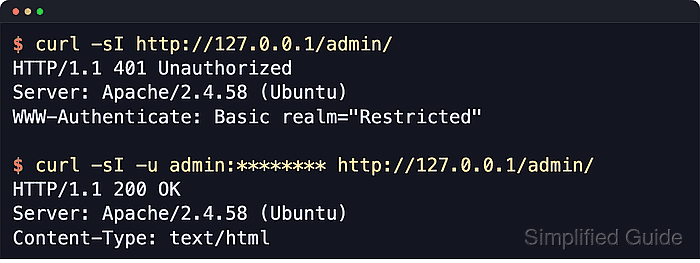
Apache provides the challenge through mod_auth_basic. A file-backed setup also needs mod_authn_file to read the htpasswd database and mod_authz_user to honor Require valid-user or a named user rule. Keep the rule in the matching virtual host or included site file when you control the server, because Apache reads that configuration once at startup and reload time.
Basic authentication protects the path boundary, not the password in transit. Publish the protected URL only over HTTPS, keep the password file outside the document root, and use .htaccess only when the main configuration is not available. .htaccess authentication directives require AllowOverride AuthConfig for the affected directory.
Related: How to harden Apache web server security
Related: How to redirect HTTP to HTTPS in Apache
Related: How to test Apache configuration
Steps to enable basic authentication in Apache:
- Install the password-file utility if htpasswd is not already present.
$ sudo apt install --assume-yes apache2-utils
On RHEL-family systems, install httpd-tools.
- Enable the authentication and authorization modules.
$ sudo a2enmod auth_basic authn_file authz_user
Considering dependency authn_core for auth_basic:
Module authn_core already enabled
Module auth_basic already enabled
Module authn_file already enabled
Considering dependency authz_core for authz_user:
Module authz_core already enabled
Module authz_user already enabled
On RHEL-family systems, packaged httpd module files commonly load these modules without a2enmod.
- Create the password file outside the web root and add the first user.
$ sudo htpasswd -cB /etc/apache2/.htpasswd user
New password:
Re-type new password:
Adding password for user user
The -c option creates a new file and truncates an existing one. Omit -c when adding another user.
-B stores a bcrypt hash. Use htpasswd -i for automation that reads from stdin, and avoid -b unless the environment is tightly controlled because it exposes the password on the command line.
- Set the password file owner so Apache can read it.
$ sudo chown root:www-data /etc/apache2/.htpasswd
Replace www-data with the active Apache runtime group on the host, such as apache on RHEL-family systems.
- Restrict password file permissions.
$ sudo chmod 0640 /etc/apache2/.htpasswd
If the Apache runtime user cannot read the password file, requests to the protected path can return 500 Internal Server Error and log an authentication provider failure.
- Open the site config that serves the protected path.
$ sudo vi /etc/apache2/sites-available/www.example.net.conf
- Add the authentication block inside the matching VirtualHost.
<VirtualHost *:80>
    ServerName www.example.net
    DocumentRoot /var/www/html

    <Directory "/var/www/html/admin">
        AuthType Basic
        AuthName "Restricted"
        AuthBasicProvider file
        AuthUserFile /etc/apache2/.htpasswd
        Require valid-user
    </Directory>
</VirtualHost>
Use Require user user instead of Require valid-user when only one named account should pass. Use Location instead of Directory for a URL path that is not served from the filesystem, such as a proxied admin endpoint.
- Test the Apache configuration before applying the change.
$ sudo apache2ctl configtest
Syntax OK
Use sudo apachectl -t or sudo httpd -t on platforms that ship those control names instead.
Related: How to test Apache configuration
- Reload Apache to apply the authentication rules.
$ sudo systemctl reload apache2
Use sudo apache2ctl graceful when systemd is not managing the service. On RHEL-family systems, the unit name is commonly httpd.
- Confirm the protected path challenges an unauthenticated request.
$ curl -I --silent --show-error --header 'Host: www.example.net' http://127.0.0.1/admin/
HTTP/1.1 401 Unauthorized
Date: Sat, 06 Jun 2026 07:26:25 GMT
Server: Apache/2.4.66 (Ubuntu)
WWW-Authenticate: Basic realm="Restricted"
Content-Type: text/html; charset=iso-8859-1
The WWW-Authenticate header proves Apache is asking the client for the configured realm before serving the path.
- Confirm valid credentials reach the protected content.
$ curl -I --silent --show-error --header 'Host: www.example.net' --user user:******** http://127.0.0.1/admin/
HTTP/1.1 200 OK
Date: Sat, 06 Jun 2026 07:26:25 GMT
Server: Apache/2.4.66 (Ubuntu)
Last-Modified: Sat, 06 Jun 2026 07:26:24 GMT
ETag: W/"b-65390b1d629e0"
Accept-Ranges: bytes
Content-Length: 11
Content-Type: text/html
Expose the protected path through HTTPS before giving the URL to other users. The local HTTP check only proves that Apache challenges and accepts credentials in the configured path.
Tool: HTTP Header Checker

Mohd Shakir Zakaria is a cloud architect with deep roots in software development and open-source advocacy. Certified in AWS, Red Hat, VMware, ITIL, and Linux, he specializes in designing and managing robust cloud and on-premises infrastructures.


