A TLS cipher change usually follows a scanner finding, compliance baseline, or certificate rollout where the server must stop offering weak or unwanted suites. In Apache, the cipher policy controls what HTTPS clients can negotiate after the protocol version has been selected, so the change must be validated with both a configuration test and a live TLS handshake.
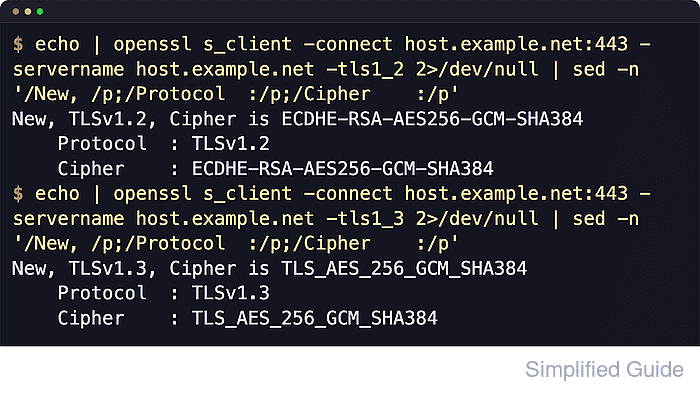
HTTPS in Apache is handled by mod_ssl on top of OpenSSL. In current Apache HTTP Server 2.4 builds, SSLCipherSuite SSL … applies to SSL protocols up to and including TLS 1.2, and SSLCipherSuite TLSv1.3 … applies to TLS 1.3 when the linked SSL library supports that protocol.
Examples below use the Debian and Ubuntu layout with /etc/apache2/, the apache2 systemd unit, and the apache2ctl wrapper. RHEL-family systems usually use /etc/httpd/ plus apachectl or httpd instead. Restricting protocols or ciphers can block older browsers, older Java runtimes, load balancers, or API clients, and the negotiated TLS 1.2 suite still depends on whether the server presents an RSA or ECDSA certificate.
Related: Test Apache configuration
Related: Enable or disable Apache modules
Tool: TLS Handshake Trace
Steps to configure TLS ciphers in Apache:
- Show the active HTTPS virtual host file before editing it.
$ sudo apache2ctl -S
VirtualHost configuration:
*:80                   host.example.net (/etc/apache2/sites-enabled/000-default.conf:1)
*:443                  host.example.net (/etc/apache2/sites-enabled/host.example.net.conf:2)
ServerRoot: "/etc/apache2"
Main DocumentRoot: "/var/www/html"
Main ErrorLog: "/var/log/apache2/error.log"
Mutex ssl-cache: using_defaults
Mutex default: dir="/run/apache2/" mechanism=default
PidFile: "/run/apache2/apache2.pid"
##### snipped #####
Use sudo apachectl -S or sudo httpd -S on platforms that do not ship apache2ctl.
- List the TLS 1.2 cipher names supported by the local OpenSSL build so the configured list matches real library names.
$ openssl ciphers -s -v -tls1_2 'ECDHE-ECDSA-AES256-GCM-SHA384:ECDHE-RSA-AES256-GCM-SHA384:ECDHE-ECDSA-CHACHA20-POLY1305:ECDHE-RSA-CHACHA20-POLY1305:ECDHE-ECDSA-AES128-GCM-SHA256:ECDHE-RSA-AES128-GCM-SHA256'
ECDHE-ECDSA-AES256-GCM-SHA384  TLSv1.2 Kx=ECDH     Au=ECDSA Enc=AESGCM(256)            Mac=AEAD
ECDHE-RSA-AES256-GCM-SHA384    TLSv1.2 Kx=ECDH     Au=RSA   Enc=AESGCM(256)            Mac=AEAD
ECDHE-ECDSA-CHACHA20-POLY1305  TLSv1.2 Kx=ECDH     Au=ECDSA Enc=CHACHA20/POLY1305(256) Mac=AEAD
ECDHE-RSA-CHACHA20-POLY1305    TLSv1.2 Kx=ECDH     Au=RSA   Enc=CHACHA20/POLY1305(256) Mac=AEAD
ECDHE-ECDSA-AES128-GCM-SHA256  TLSv1.2 Kx=ECDH     Au=ECDSA Enc=AESGCM(128)            Mac=AEAD
ECDHE-RSA-AES128-GCM-SHA256    TLSv1.2 Kx=ECDH     Au=RSA   Enc=AESGCM(128)            Mac=AEAD
The -tls1_2 filter keeps this check aligned with the SSLCipherSuite SSL … line used later. TLS 1.3 uses separate suite names.
The negotiated TLS 1.2 suite must match the server certificate type. A host using an RSA certificate will negotiate the RSA entries from the list, not the ECDSA entries.
- Open the active HTTPS virtual host file.
$ sudo vi /etc/apache2/sites-available/host.example.net.conf
Global policy can live in /etc/apache2/mods-available/ssl.conf or the equivalent httpd SSL config when the same cipher rules must apply to every HTTPS virtual host.
- Set the protocol and cipher policy inside the <VirtualHost *:443> block.
<IfModule mod_ssl.c>
<VirtualHost *:443>
    ServerName host.example.net

    SSLEngine On
    SSLProtocol -all +TLSv1.2 +TLSv1.3
    SSLHonorCipherOrder On

    SSLCipherSuite SSL ECDHE-ECDSA-AES256-GCM-SHA384:ECDHE-RSA-AES256-GCM-SHA384:ECDHE-ECDSA-CHACHA20-POLY1305:ECDHE-RSA-CHACHA20-POLY1305:ECDHE-ECDSA-AES128-GCM-SHA256:ECDHE-RSA-AES128-GCM-SHA256
    SSLCipherSuite TLSv1.3 TLS_AES_256_GCM_SHA384:TLS_CHACHA20_POLY1305_SHA256:TLS_AES_128_GCM_SHA256

    SSLCertificateFile /etc/apache2/ssl/host.example.net.crt
    SSLCertificateKeyFile /etc/apache2/ssl/host.example.net.key
</VirtualHost>
</IfModule>
Removing TLS 1.0 or TLS 1.1 support and narrowing the cipher list can break older browsers, older Java runtimes, load balancers, or API clients.
If apache2ctl configtest reports an unknown protocol or rejects the TLS 1.3 line, remove +TLSv1.3 and the SSLCipherSuite TLSv1.3 … directive and keep the TLS 1.2 policy only.
Current Apache 2.4 builds can configure TLS 1.3 suites directly with SSLCipherSuite TLSv1.3 …. Older examples often use SSLOpenSSLConfCmd Ciphersuites instead.
An “Invalid command 'SSLCipherSuite'” error usually means mod_ssl is not loaded.
- Validate the updated Apache configuration.
$ sudo apache2ctl configtest
Syntax OK
sudo apache2ctl -t performs the same syntax check. Use sudo apachectl -t or sudo httpd -t on other platforms.
Related: How to test Apache configuration
- Reload Apache so new connections use the updated cipher policy.
$ sudo systemctl reload apache2
When systemd is not managing the service, use sudo apache2ctl graceful or the platform-equivalent reload command.
- Confirm a TLS 1.2 handshake negotiates one of the configured TLS 1.2 suites.
$ openssl s_client -brief -connect host.example.net:443 -servername host.example.net -tls1_2 < /dev/null
Connecting to 192.0.2.40
CONNECTION ESTABLISHED
Protocol version: TLSv1.2
Ciphersuite: ECDHE-RSA-AES256-GCM-SHA384
Peer certificate: CN=host.example.net
Hash used: SHA256
Signature type: rsa_pss_rsae_sha256
Verification: OK
Supported Elliptic Curve Point Formats: uncompressed:ansiX962_compressed_prime:ansiX962_compressed_char2
Peer Temp Key: X25519, 253 bits
DONE
With an RSA certificate, seeing an ECDHE-RSA-… suite here is expected even when ECDSA suites appear earlier in the configured list.
- Confirm a TLS 1.3 handshake negotiates one of the configured TLS 1.3 suites.
$ openssl s_client -brief -connect host.example.net:443 -servername host.example.net -tls1_3 < /dev/null
Connecting to 192.0.2.40
CONNECTION ESTABLISHED
Protocol version: TLSv1.3
Ciphersuite: TLS_AES_256_GCM_SHA384
Peer certificate: CN=host.example.net
Hash used: SHA256
Signature type: rsa_pss_rsae_sha256
Verification: OK
Negotiated TLS1.3 group: X25519MLKEM768
DONE
Available TLS 1.3 suites are limited to the standard names exposed by the linked OpenSSL library.
- Scan the public endpoint from another host to confirm the offered suites and server-side order.
$ nmap --script ssl-enum-ciphers -p 443 host.example.net
Starting Nmap 7.98 ( https://nmap.org ) at 2026-06-06 04:05 +0000
Nmap scan report for host.example.net (192.0.2.40)
Host is up (0.000033s latency).

PORT    STATE SERVICE
443/tcp open  https
| ssl-enum-ciphers:
|   TLSv1.2:
|     ciphers:
|       TLS_ECDHE_RSA_WITH_AES_256_GCM_SHA384 (ecdh_x25519) - A
|       TLS_ECDHE_RSA_WITH_CHACHA20_POLY1305_SHA256 (ecdh_x25519) - A
|       TLS_ECDHE_RSA_WITH_AES_128_GCM_SHA256 (ecdh_x25519) - A
|     compressors:
|       NULL
|     cipher preference: server
|   TLSv1.3:
|     ciphers:
|       TLS_AKE_WITH_AES_256_GCM_SHA384 (X25519MLKEM768) - A
|       TLS_AKE_WITH_CHACHA20_POLY1305_SHA256 (X25519MLKEM768) - A
|       TLS_AKE_WITH_AES_128_GCM_SHA256 (X25519MLKEM768) - A
|     cipher preference: server
|_  least strength: A

Nmap done: 1 IP address (1 host up) scanned in 0.14 seconds
The cipher preference: server line confirms the server is choosing the preferred suite order for the negotiated set.
nmap uses TLS_AKE_WITH_* labels for TLS 1.3 suites, which correspond to the configured TLS_AES_* and TLS_CHACHA20_* names. The key exchange group label can vary by OpenSSL and nmap build.

Mohd Shakir Zakaria is a cloud architect with deep roots in software development and open-source advocacy. Certified in AWS, Red Hat, VMware, ITIL, and Linux, he specializes in designing and managing robust cloud and on-premises infrastructures.


