Public Apache sites that accept untrusted requests need a request-inspection layer before traffic reaches the application. ModSecurity can apply local rules and the OWASP ModSecurity Core Rule Set at the web tier, so suspicious payloads can be logged or rejected before application code handles them.
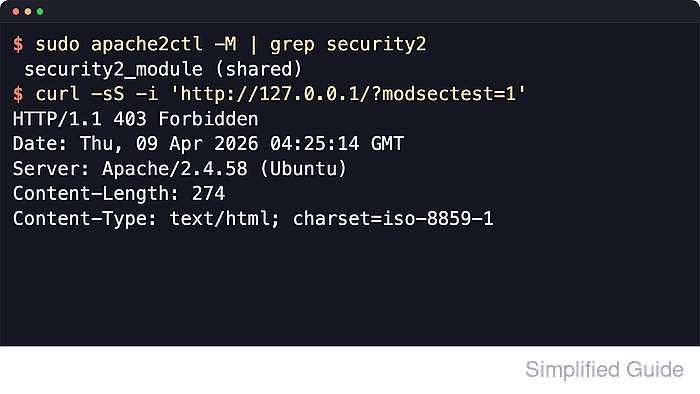
On current Ubuntu and Debian packaging, the libapache2-mod-security2 package loads security2_module for Apache and the security2.conf module file under /etc/apache2/mods-available includes local files from /etc/modsecurity plus the packaged OWASP ModSecurity Core Rule Set loader. The recommended base policy file is modsecurity.conf-recommended under /etc/modsecurity, and the packaged CRS setup file is crs-setup.conf under /etc/modsecurity/crs.
CRS rules can block real login flows, uploads, JSON APIs, or admin forms until exclusions are tuned, so the safest first pass keeps SecRuleEngine in DetectionOnly mode and confirms matches in the audit log before enforcement is turned on. A local test rule makes it possible to prove that logging works, then prove that blocking works, and then remove the temporary rule before leaving the server in production service.
Related: How to enable or disable Apache modules
Related: How to test Apache configuration
Steps to enable ModSecurity in Apache:
- Open a terminal session with an account that can use sudo.
- Install the ModSecurity Apache module and the packaged CRS rules.
$ sudo apt update
Get:1 http://security.ubuntu.com/ubuntu resolute-security InRelease [137 kB]
Get:2 http://archive.ubuntu.com/ubuntu resolute InRelease [136 kB]
Get:3 http://archive.ubuntu.com/ubuntu resolute-updates InRelease [137 kB]
##### snipped
Reading package lists...

$ sudo apt install --assume-yes libapache2-mod-security2 modsecurity-crs
Reading package lists...
Building dependency tree...
Reading state information...
The following additional packages will be installed:
  apache2 apache2-bin apache2-data apache2-utils liblua5.1-0 libyajl2
##### snipped
Setting up modsecurity-crs (3.3.8-1) ...
Setting up apache2 (2.4.66-2ubuntu2.2) ...
Setting up libapache2-mod-security2 (2.9.12-2build1) ...
apache2_invoke: Enable module security2
Current Ubuntu releases already pull in modsecurity-crs when libapache2-mod-security2 is installed, but installing both package names keeps the intent explicit.
- Confirm the security2 module is enabled.
$ sudo a2enmod security2
Considering dependency unique_id for security2:
Module unique_id already enabled
Module security2 already enabled
The package usually enables security2 during installation. Re-running a2enmod confirms the state and restores the module if it had been disabled earlier. A separate headers step is not required for the base ModSecurity and CRS enablement path.
- Create the active ModSecurity policy file from the packaged template if it does not exist yet.
$ sudo cp --update=none /etc/modsecurity/modsecurity.conf-recommended /etc/modsecurity/modsecurity.conf
Using --update=none keeps an existing tuned file in place instead of overwriting it.
- Confirm the initial rule engine mode is DetectionOnly.
$ sudo grep '^SecRuleEngine' /etc/modsecurity/modsecurity.conf
SecRuleEngine DetectionOnly
If the copied file shows On or Off instead, change it before the first reload: sudo sed --in-place 's/^SecRuleEngine .*/SecRuleEngine DetectionOnly/' /etc/modsecurity/modsecurity.conf.
- Confirm the packaged CRS loader is still present in the Apache module config.
$ sudo cat /etc/apache2/mods-available/security2.conf <IfModule security2_module> # Default Debian dir for modsecurity's persistent data SecDataDir /var/cache/modsecurity # Include all the *.conf files in /etc/modsecurity. # Keeping your local configuration in that directory # will allow for an easy upgrade of THIS file and # make your life easier IncludeOptional /etc/modsecurity/*.conf # Include OWASP ModSecurity CRS rules if installed IncludeOptional /usr/share/modsecurity-crs/*.load </IfModule> - Confirm the packaged CRS setup file and loader file are available.
$ sudo ls -l /etc/modsecurity/crs/crs-setup.conf /usr/share/modsecurity-crs/owasp-crs.load
-rw-r--r-- 1 root root 35452 Jan 10 09:34 /etc/modsecurity/crs/crs-setup.conf
-rw-r--r-- 1 root root   373 Jan 10 09:34 /usr/share/modsecurity-crs/owasp-crs.load
Keep the packaged CRS defaults for the first pass. Application-specific exclusion packages and other baseline tuning live in the CRS setup file.
- Test the Apache configuration for syntax errors before loading the module and policy.
$ sudo apache2ctl -t
Syntax OK
Related: How to test Apache configuration
- Restart Apache so the enabled module and active policy file are loaded.
$ sudo systemctl restart apache2
- Confirm security2_module is now loaded.
$ sudo apache2ctl -M
Loaded Modules:
 core_module (static)
 so_module (static)
##### snipped
 reqtimeout_module (shared)
 security2_module (shared)
 setenvif_module (shared)
 status_module (shared)
 unique_id_module (shared)
- Create a temporary local test rule that matches the query parameter modsectest=1.
$ sudo tee /etc/modsecurity/local-test.conf >/dev/null <<'EOF'
SecRule ARGS:modsectest "@streq 1" "id:10001,phase:2,deny,status:403,log,msg:'ModSecurity local test rule hit'"
EOF
Keep one-off local rule IDs unique. The local reservation range is 1 through 99999, so do not reuse IDs from packaged rule sets or third-party vendors.
- Test the configuration again after adding the local rule file.
$ sudo apache2ctl -t
Syntax OK
Related: How to test Apache configuration
- Reload Apache to pick up the new local rule without dropping active connections.
$ sudo systemctl reload apache2
- Record the active audit log path from the policy file.
$ sudo grep '^SecAuditLog ' /etc/modsecurity/modsecurity.conf
SecAuditLog /var/log/apache2/modsec_audit.log
- Send a request that should match the local rule while the engine is still in DetectionOnly mode.
$ curl --silent --show-error -i 'http://127.0.0.1/?modsectest=1'
HTTP/1.1 200 OK
Date: Sat, 06 Jun 2026 07:37:38 GMT
Server: Apache/2.4.66 (Ubuntu)
Last-Modified: Sat, 06 Jun 2026 07:37:36 GMT
ETag: "29b0-65390d9edd548"
Accept-Ranges: bytes
Content-Length: 10672
Vary: Accept-Encoding
Content-Type: text/html

##### snipped
DetectionOnly logs the match but still serves the response.
- Confirm the local rule hit was written to the audit log.
$ sudo grep "ModSecurity local test rule hit" /var/log/apache2/modsec_audit.log
Message: Warning. String match "1" at ARGS:modsectest. [file "/etc/modsecurity/local-test.conf"] [line "1"] [id "10001"] [msg "ModSecurity local test rule hit"]
Apache-Error: [file "apache2_util.c"] [line 286] [level 3] ModSecurity: Warning. String match "1" at ARGS:modsectest. [file "/etc/modsecurity/local-test.conf"] [line "1"] [id "10001"] [msg "ModSecurity local test rule hit"] [hostname "127.0.0.1"] [uri "/"] [unique_id "aiPOQp3P3PZyEAguPfHYJwAAAFY"]
Application-specific exclusion packages can be enabled from the CRS setup file, while site-specific local overrides can stay in separate files under /etc/modsecurity.
- Switch the rule engine from DetectionOnly to enforcement mode.
$ sudo sed --in-place 's/^SecRuleEngine .*/SecRuleEngine On/' /etc/modsecurity/modsecurity.conf
Turning the engine on can block legitimate requests until exclusions are tuned. Keep a quick rollback path available.
- Verify that the policy now shows SecRuleEngine On.
$ sudo grep '^SecRuleEngine' /etc/modsecurity/modsecurity.conf
SecRuleEngine On
- Test the configuration before applying enforcement.
$ sudo apache2ctl -t
Syntax OK
Related: How to test Apache configuration
- Reload Apache to apply enforcement.
$ sudo systemctl reload apache2
- Verify that the same request is now blocked with HTTP 403.
$ curl --silent --show-error -i 'http://127.0.0.1/?modsectest=1'
HTTP/1.1 403 Forbidden
Date: Sat, 06 Jun 2026 07:37:38 GMT
Server: Apache/2.4.66 (Ubuntu)
Content-Length: 314
Content-Type: text/html; charset=iso-8859-1

##### snipped
- Remove the temporary local test rule once validation is complete.
$ sudo rm --force /etc/modsecurity/local-test.conf
- Reload Apache so the temporary rule is no longer active.
$ sudo systemctl reload apache2
- Confirm the temporary test request returns to a normal response after cleanup.
$ curl --silent --show-error -i 'http://127.0.0.1/?modsectest=1'
HTTP/1.1 200 OK
Date: Sat, 06 Jun 2026 07:37:39 GMT
Server: Apache/2.4.66 (Ubuntu)
Last-Modified: Sat, 06 Jun 2026 07:37:36 GMT
ETag: "29b0-65390d9edd548"
Accept-Ranges: bytes
Content-Length: 10672
Vary: Accept-Encoding
Content-Type: text/html

##### snipped
After the temporary rule is removed, only the packaged CRS rules and any real local policy files remain active. That is the right time to keep tuning exclusions before relying on enforcement for production traffic.

Mohd Shakir Zakaria is a cloud architect with deep roots in software development and open-source advocacy. Certified in AWS, Red Hat, VMware, ITIL, and Linux, he specializes in designing and managing robust cloud and on-premises infrastructures.


