An Nginx site that reaches production with default banners, broad locations, loose headers, and no request limits gives scanners more information and lets preventable traffic reach the application. Hardening the active server block makes those requests fail at the web-server boundary before they touch PHP, upstream services, or private files under the document root.
Most hardening work in Nginx happens in a small set of directives applied at the http, server, and location levels. Response headers, TLS settings, request filtering, access rules, and rate limits are all enforced before an upstream application handles the request, so a clean Nginx policy can reduce exposure without changing the application itself.
Packaged layouts vary between /etc/nginx/nginx.conf, /etc/nginx/conf.d, and /etc/nginx/sites-enabled, but the same pattern still applies: edit the active configuration, test it with nginx -t, and reload only after the syntax check passes. Stage risky controls such as HSTS, Content-Security-Policy, and request throttling carefully so real clients, uploads, and third-party integrations are not blocked by an over-tight first rollout.
Related: How to configure Let's Encrypt SSL in Nginx
Related: How to redirect HTTP to HTTPS in Nginx
Related: How to enable HSTS in Nginx
Related: How to configure TLS ciphers in Nginx
Related: How to enable OCSP stapling in Nginx
Steps to improve Nginx security:
- Review the active configuration tree and create a rollback archive before changing hardening directives.
$ sudo tar -C /etc -czf nginx-backup-$(date +%F).tgz nginx
$ sudo nginx -T | less
nginx -T prints the merged running configuration so included files and inherited directives can be found before edits begin.
- Disable the Server version signature so Nginx stops advertising its exact release in headers and built-in error pages.
# inside the http, server, or location context
server_tokens off;
Current Nginx still defaults server_tokens to on. off removes the version string, while the commercial-only string form can replace the header entirely.
- Add baseline response headers at the server level so normal pages, redirects, and error responses carry the same browser-side restrictions.
server {
    add_header X-Content-Type-Options "nosniff" always;
    add_header X-Frame-Options "SAMEORIGIN" always;
    add_header Referrer-Policy "strict-origin-when-cross-origin" always;
    add_header Permissions-Policy "geolocation=(), microphone=(), camera=()" always;
}
add_header values are inherited only when the nested block defines no add_header directives of its own. If a deeper location already sets headers, repeat the security headers there or use add_header_inherit merge; on Nginx 1.29.3 and newer.
Introduce Content-Security-Policy only after asset loading and third-party integrations are verified, because a strict policy can break scripts, fonts, or embedded services.
- Enforce HTTPS correctly on the TLS listener and redirect cleartext traffic to it.
server {
    listen 80;
    server_name example.com www.example.com;
    return 301 https://$host$request_uri;
}

server {
    listen 443 ssl;
    server_name example.com www.example.com;

    ssl_protocols TLSv1.2 TLSv1.3;
    ssl_session_cache shared:SSL:10m;
    ssl_session_timeout 10m;

    ssl_stapling on;
    ssl_stapling_verify on;
    ssl_trusted_certificate /etc/ssl/certs/ca-certificates.crt;
    resolver 1.1.1.1 1.0.0.1 valid=300s;
}
The old standalone ssl on; directive was removed in Nginx 1.25.1. Use the ssl parameter on the listen directive instead.
OCSP stapling needs a trusted issuer chain and a working resolver. Enable HSTS only after HTTPS, redirects, and certificate renewal are already stable.
Related: How to configure Let's Encrypt SSL in Nginx
Related: How to redirect HTTP to HTTPS in Nginx
Related: How to enable HSTS in Nginx
Related: How to configure TLS ciphers in Nginx
Related: How to enable OCSP stapling in Nginx - Block filesystem paths that should never be downloaded from the document root.
http {
    disable_symlinks on from=$document_root;
}

server {
    location ~ /\.(?!well-known) {
        deny all;
    }

    location ~* \.(?:bak|old|orig|swp|tmp)$ {
        deny all;
    }
}
disable_symlinks on from=$document_root; tells Nginx to deny files reached through symlinks under the document root. If the application intentionally uses symlinks, if_not_owner is a safer compromise.
The hidden-file rule must continue to exempt /.well-known/ or ACME HTTP-01 validation and other standards-based discovery paths will fail.
- Protect private or administrative locations with an IP allow-list, basic authentication, or both.
location /admin/ {
    satisfy any;
    allow 203.0.113.0/24;
    deny all;

    auth_basic "Restricted";
    auth_basic_user_file /etc/nginx/.htpasswd;
    auth_delay 250ms;
}
With satisfy any;, allow-listed source addresses bypass the password challenge. Omit that line when both the IP match and the password challenge should be required.
auth_delay adds a short delay to 401 Unauthorized responses to make timing-based password probing less useful.
- Limit methods only on the locations that need it instead of trying to harden every server block the same way.
location /login/ {
    limit_except GET POST OPTIONS {
        deny all;
    }
}
Allowing GET also allows HEAD automatically. Keep OPTIONS when the location must answer browser CORS preflight requests.
- Keep request body and header limits close to real application needs so oversized or slow abusive requests are rejected at the edge.
http {
    client_max_body_size 10m;
    client_body_timeout 15s;
    client_header_timeout 15s;
    large_client_header_buffers 4 8k;
}
Current Nginx defaults client_max_body_size to 1m and large_client_header_buffers to 4 8k. Requests above the body limit return 413 Request Entity Too Large, while a single oversize header field or request line fails before the upstream application sees it.
Related: How to limit request sizes in Nginx
- Apply request throttling to high-risk locations such as logins, token endpoints, or expensive search routes.
http {
    limit_req_zone $binary_remote_addr zone=perip:10m rate=5r/s;
}

server {
    location /login/ {
        limit_req zone=perip burst=10 nodelay;
        limit_req_status 429;
    }
}
Rejected requests default to 503 Service Unavailable unless limit_req_status is set. When the package version supports it, limit_req_dry_run on; is useful for observing the hit rate before real enforcement begins.
Related: How to prevent DoS abuse in Nginx
Related: How to block user agents in Nginx
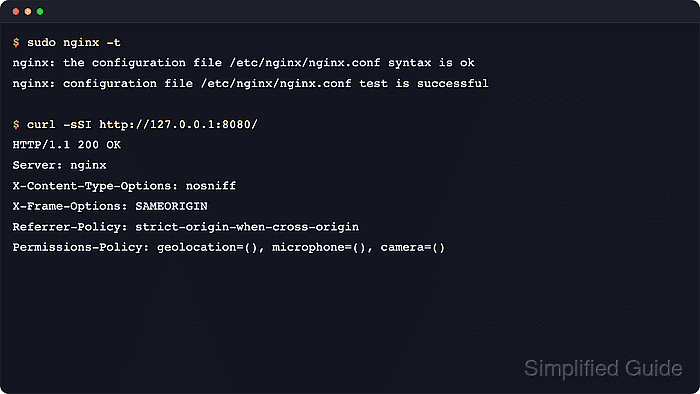
Related: How to enable a web application firewall for Nginx - Test the merged configuration and reload only after Nginx accepts every directive.
$ sudo nginx -t
nginx: the configuration file /etc/nginx/nginx.conf syntax is ok
nginx: configuration file /etc/nginx/nginx.conf test is successful

$ sudo systemctl reload nginx
$ sudo systemctl is-active nginx
active
Use sudo nginx -s reload when systemd is not managing the service.
Related: How to test Nginx configuration
Related: How to manage the Nginx service - Verify the public behavior from a client perspective after the reload.
$ curl -sSI http://127.0.0.1:8080/
HTTP/1.1 200 OK
Server: nginx
Date: Sat, 06 Jun 2026 11:47:56 GMT
Content-Type: text/html
Content-Length: 3
Last-Modified: Sat, 06 Jun 2026 11:47:56 GMT
Connection: keep-alive
ETag: "6a2408ec-3"
X-Content-Type-Options: nosniff
X-Frame-Options: SAMEORIGIN
Referrer-Policy: strict-origin-when-cross-origin
Permissions-Policy: geolocation=(), microphone=(), camera=()
Accept-Ranges: bytes

$ curl -sSI http://127.0.0.1:8080/.env
HTTP/1.1 403 Forbidden
Server: nginx
Date: Sat, 06 Jun 2026 11:47:56 GMT
Content-Type: text/html
Content-Length: 146
Connection: keep-alive
X-Content-Type-Options: nosniff
X-Frame-Options: SAMEORIGIN
Referrer-Policy: strict-origin-when-cross-origin
Permissions-Policy: geolocation=(), microphone=(), camera=()

$ curl -sS -D - -o /dev/null -X TRACE http://127.0.0.1:8080/login/
HTTP/1.1 405 Not Allowed
Server: nginx
Date: Sat, 06 Jun 2026 11:47:56 GMT
Content-Type: text/html
Content-Length: 150
Connection: close
X-Content-Type-Options: nosniff
X-Frame-Options: SAMEORIGIN
Referrer-Policy: strict-origin-when-cross-origin
Permissions-Policy: geolocation=(), microphone=(), camera=()
Use the real hostname, or add a matching Host header or --resolve entry, when 127.0.0.1 does not select the target virtual host. A blocked method may return 403 or 405 depending on how the location is defined.
- Add deeper inspection and log retention only where the site needs more than edge controls and baseline headers.

Mohd Shakir Zakaria is a cloud architect with deep roots in software development and open-source advocacy. Certified in AWS, Red Hat, VMware, ITIL, and Linux, he specializes in designing and managing robust cloud and on-premises infrastructures.


