Request floods, aggressive scraping, and repeated login attempts can exhaust upstream workers, database pools, or bandwidth long before Nginx itself falls over. Applying limits at the Nginx edge rejects abusive bursts early so the protected application spends less time and memory on traffic that is already misbehaving.
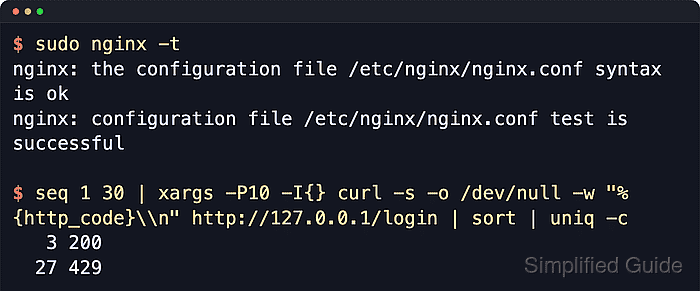
Nginx uses limit_req_zone plus limit_req to control request rate, and limit_conn_zone plus limit_conn to cap concurrent requests tied to the same key. In most deployments that key is $binary_remote_addr, stored in shared memory so every worker can enforce the same counters across protected server or location blocks.
Sample limits below are intentionally strict so the reject path is easy to validate during setup. Raise the rate, burst, and connection caps after testing, especially when legitimate users share one public IP through NAT, mobile carriers, or another proxy; when Nginx sits behind a load balancer, restore the real client address before applying limits, and note that limit_req_status plus limit_conn_status still default to 503 unless changed explicitly.
Related: How to improve Nginx security
Related: How to block user agents in Nginx
Steps to prevent DoS abuse in Nginx:
- Open the Nginx configuration file that owns the http block.
$ sudoedit /etc/nginx/nginx.conf
Packaged installs often keep the main file at /etc/nginx/nginx.conf and load additional snippets from /etc/nginx/conf.d/ or /etc/nginx/sites-enabled/.
- Define shared-memory zones and explicit rejection codes inside the http block.
http {
    limit_req_zone  $binary_remote_addr  zone=req_per_ip:10m  rate=1r/s;
    limit_conn_zone $binary_remote_addr  zone=conn_per_ip:10m;

    limit_req_status  429;
    limit_conn_status 429;

    ##### snipped #####
}
limit_req_status and limit_conn_status default to 503, so set them explicitly when 429 Too Many Requests is the clearer client-facing result.
The example rate above is deliberately low for validation. Increase it before production traffic uses the protected route.
- Restore the real client address before enforcing limits when Nginx receives traffic from another proxy or load balancer.
http {
    set_real_ip_from  10.0.0.0/8;
    set_real_ip_from  192.168.0.0/16;
    real_ip_header    X-Forwarded-For;
    real_ip_recursive on;

    ##### snipped #####
}
Trust only the networks or addresses that actually belong to the proxy tier. A broad set_real_ip_from range lets clients spoof the limiter key.
The upstream realip module is not built by default for custom source builds, although common distro packages usually include it.
Tool: NGINX Proxy Headers Checker - Apply a request-rate limit to the endpoint that is most likely to be abused.
location = /login {
    limit_req zone=req_per_ip burst=2 nodelay;
    proxy_pass http://127.0.0.1:8080;
}
Drop nodelay when brief bursts should be queued and drained instead of being rejected immediately.
Per-IP limits that are too strict can block legitimate users behind shared office, school, carrier, or CDN egress addresses.
- Apply a concurrent-request limit to a long-lived or expensive path.
location /download/ {
    limit_conn conn_per_ip 1;
}
Place limit_conn in the server block when the whole virtual host needs a cap, or keep it on a narrow location when only specific downloads, uploads, long polls, or proxied APIs need protection.
limit_conn counts a connection only after the request header has been fully read, and for HTTP/2 plus HTTP/3 each concurrent request is counted as a separate connection.
- Test the configuration syntax before applying the new limits.
$ sudo nginx -t
nginx: the configuration file /etc/nginx/nginx.conf syntax is ok
nginx: configuration file /etc/nginx/nginx.conf test is successful
Related: How to test Nginx configuration
- Reload Nginx so the new limiters become active.
$ sudo systemctl reload nginx
Use sudo nginx -s reload on hosts that do not manage Nginx with systemd.
Related: How to manage the Nginx service
- Send a short burst of requests from one client with ApacheBench.
$ ab -n 20 -c 10 http://127.0.0.1/login
This is ApacheBench, Version 2.3 <$Revision: 1923142 $>
##### snipped #####
Concurrency Level:      10
Complete requests:      20
Failed requests:        17
   (Connect: 0, Receive: 0, Length: 17, Exceptions: 0)
Non-2xx responses:      17
##### snipped #####
Non-2xx responses should appear after the burst exceeds the configured rate and burst allowance. ApacheBench can also count the different 429 response body length as a Length failure.
Use the real protected hostname instead of 127.0.0.1 when the limiter lives in a non-default virtual host.
- Hold one slow request open, then confirm that a second concurrent request is rejected by the connection cap.
# terminal 1
$ curl --limit-rate 1k http://127.0.0.1/download/big.bin -o /dev/null

# terminal 2
$ curl -s -o /dev/null -w "%{http_code}\n" http://127.0.0.1/download/big.bin
429
Use a large file, upload, long-poll, or proxied response that stays open long enough for the second request to overlap the first one.
- Review the access log while tuning the rate, burst, and connection caps.
$ sudo cat /var/log/nginx/access.log
127.0.0.1 - - [06/Jun/2026:11:28:27 +0000] "GET /login HTTP/1.0" 200 9 "-" "ApacheBench/2.3"
127.0.0.1 - - [06/Jun/2026:11:28:27 +0000] "GET /login HTTP/1.0" 429 169 "-" "ApacheBench/2.3"
##### snipped #####
127.0.0.1 - - [06/Jun/2026:11:28:28 +0000] "GET /download/big.bin HTTP/1.1" 429 169 "-" "curl/8.18.0"
Persistent 429 entries during normal traffic usually mean the example thresholds are still too low for the real workload.

Mohd Shakir Zakaria is a cloud architect with deep roots in software development and open-source advocacy. Certified in AWS, Red Hat, VMware, ITIL, and Linux, he specializes in designing and managing robust cloud and on-premises infrastructures.


