Nginx access and error logs can grow quickly on busy sites, and unchecked growth turns a useful record into a disk-space problem. A working rotation policy keeps the active logs writable, preserves enough history for troubleshooting and security review, and compresses older copies before they crowd the rest of the filesystem.
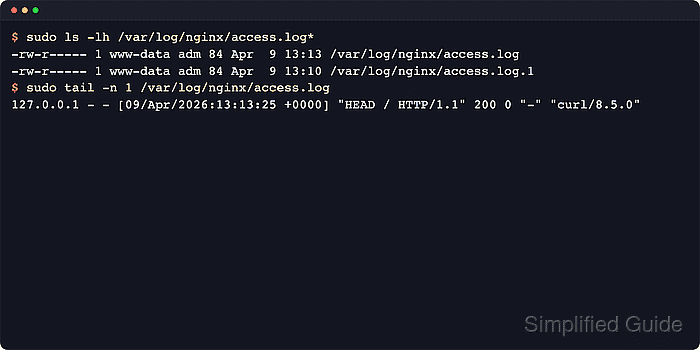
On Linux systems, logrotate usually handles that by renaming the current log file, creating a new file, and compressing older rotations on a schedule. Because Nginx keeps log files open, the rotation workflow also has to tell the master process to reopen them. Current Nginx control documentation still uses the USR1 signal for that reopen step, and the current Debian and Ubuntu package wires it through the postrotate block in /etc/logrotate.d/nginx.
The examples use the current Debian and Ubuntu package layout with /etc/logrotate.d/nginx, /var/log/nginx, and the nginx service name. If a site writes logs outside /var/log/nginx, add a separate stanza or widen the matched path deliberately instead of assuming the default wildcard is enough. Avoid copytruncate on busy servers, and use nginx -s reopen when a container, chroot, or custom policy prevents the packaged postrotate helper from reopening logs.
Steps to configure log rotation for Nginx:
- Open a terminal session with an account that can use sudo.
- List the active access_log and error_log directives so the real file paths are clear before editing the rotation policy.
$ sudo grep --recursive --line-number --extended-regexp 'access_log|error_log' /etc/nginx/nginx.conf /etc/nginx/conf.d /etc/nginx/sites-enabled
/etc/nginx/nginx.conf:5:error_log /var/log/nginx/error.log;
/etc/nginx/nginx.conf:41:	access_log /var/log/nginx/access.log;
Update the logrotate path match if any server block writes to a different directory or filename pattern.
Related: How to test Nginx configuration
- Review the current Nginx logrotate policy.
$ sudo cat /etc/logrotate.d/nginx
/var/log/nginx/*.log {
	daily
	missingok
	rotate 14
	compress
	delaycompress
	notifempty
	create 0640 www-data adm
	sharedscripts
	prerotate
		if [ -d /etc/logrotate.d/httpd-prerotate ]; then \
			run-parts /etc/logrotate.d/httpd-prerotate; \
		fi \
	endscript
	postrotate
		invoke-rc.d nginx rotate >/dev/null 2>&1
	endscript
}
The postrotate reopen action is required. Current logrotate documentation still defines sharedscripts as “run once for the whole stanza”, which avoids sending multiple reopen signals when both access and error logs rotate together.
- Edit the policy so the retention period, compression, ownership, and reopen action match the deployment.
/var/log/nginx/*.log {
    daily
    missingok
    rotate 14
    compress
    delaycompress
    notifempty
    create 0640 www-data adm
    sharedscripts
    prerotate
        if [ -d /etc/logrotate.d/httpd-prerotate ]; then \
            run-parts /etc/logrotate.d/httpd-prerotate; \
        fi \
    endscript
    postrotate
        invoke-rc.d nginx rotate >/dev/null 2>&1
    endscript
}
Add maxsize 100M when daily rotation is not enough, or change rotate 14 to keep more or fewer archives.
Keep the create owner and group aligned with the packaged service account on the target host. Common values are www-data adm on Debian and Ubuntu and nginx adm or nginx root on other distributions.
- Add a separate stanza for any site logs that live outside /var/log/nginx.
/srv/www/example.com/logs/*.log {
    weekly
    rotate 8
    compress
    delaycompress
    missingok
    notifempty
    create 0640 www-data adm
    sharedscripts
    postrotate
        /usr/sbin/nginx -s reopen
    endscript
}
Use the narrowest path that matches only the Nginx logs for that site.
Avoid copytruncate on busy servers because log lines can be lost between the copy and truncate phases. Reopening with USR1 keeps the rotation explicit and matches the upstream Nginx control workflow.
- Run a dry run to validate the policy without changing files.
$ sudo logrotate --debug /etc/logrotate.d/nginx
warning: logrotate in debug mode does nothing except printing debug messages!  Consider using verbose mode (-v) instead if this is not what you want.

reading config file /etc/logrotate.d/nginx
Reading state from file: /var/lib/logrotate/status
state file /var/lib/logrotate/status does not exist
Allocating hash table for state file, size 64 entries

Handling 1 logs

rotating pattern: /var/log/nginx/*.log after 1 days empty log files are not rotated, (14 rotations), old logs are removed
considering log /var/log/nginx/access.log
Creating new state
  log does not need rotating (log has already been rotated)
considering log /var/log/nginx/error.log
Creating new state
  log does not need rotating (log has already been rotated)
Use the custom policy path instead when validation is aimed at a separate stanza for non-default log locations.
- Send one local request so a fresh host has a non-empty access log to rotate.
$ curl -I -sS http://127.0.0.1/
HTTP/1.1 200 OK
Server: nginx/1.28.3 (Ubuntu)
Date: Sat, 06 Jun 2026 11:30:26 GMT
Content-Type: text/html
Content-Length: 615
Last-Modified: Sat, 06 Jun 2026 11:30:24 GMT
Connection: keep-alive
ETag: "6a2404d0-267"
Accept-Ranges: bytes
Use the real site hostname or a matching Host header when 127.0.0.1 does not hit the virtual host being validated.
- Force one rotation during a maintenance window to confirm the stanza behaves as expected.
$ sudo logrotate --verbose --force /etc/logrotate.d/nginx
reading config file /etc/logrotate.d/nginx
Creating stub state file: /var/lib/logrotate/status
acquired lock on state file /var/lib/logrotate/status
Reading state from file: /var/lib/logrotate/status
Allocating hash table for state file, size 64 entries

Handling 1 logs

rotating pattern: /var/log/nginx/*.log forced from command line empty log files are not rotated, (14 rotations), old logs are removed
considering log /var/log/nginx/access.log
Creating new state
  log needs rotating
considering log /var/log/nginx/error.log
Creating new state
  log does not need rotating (log is empty)
running prerotate script
rotating log /var/log/nginx/access.log, log->rotateCount is 14
##### snipped #####
renaming /var/log/nginx/access.log to /var/log/nginx/access.log.1
creating new /var/log/nginx/access.log mode = 0640 uid = 33 gid = 4
running postrotate script
Forced rotation renames files immediately. Run it when a manual reopen or brief validation request will not interfere with active incident work.
- If the packaged postrotate helper is unavailable or blocked, reopen the logs directly from the Nginx master process.
$ sudo nginx -s reopen
2026/06/06 11:30:27 [notice] 3550#3550: signal process started
Current Debian and Ubuntu packages normally do this through invoke-rc.d nginx rotate. The direct reopen command is most useful in containers, chroots, or custom stanzas where the service wrapper is not managing the process.
- Confirm that the current log file and its first rotated copy both exist.
$ sudo ls -lh /var/log/nginx/access.log* /var/log/nginx/error.log*
-rw-r----- 1 www-data adm  0 Jun  6 11:30 /var/log/nginx/access.log
-rw-r----- 1 www-data adm 85 Jun  6 11:30 /var/log/nginx/access.log.1
-rw-r----- 1 www-data adm  0 Jun  6 11:30 /var/log/nginx/error.log
With delaycompress enabled, the newest rotated copy stays uncompressed until the next rotation cycle.
- Send another local request so the active access log receives a fresh line after rotation.
$ curl -I -sS http://127.0.0.1/
HTTP/1.1 200 OK
Server: nginx/1.28.3 (Ubuntu)
Date: Sat, 06 Jun 2026 11:30:27 GMT
Content-Type: text/html
Content-Length: 615
Last-Modified: Sat, 06 Jun 2026 11:30:24 GMT
Connection: keep-alive
ETag: "6a2404d0-267"
Accept-Ranges: bytes
- Confirm that the fresh request is written to the current access log instead of the rotated file.
$ sudo cat /var/log/nginx/access.log
127.0.0.1 - - [06/Jun/2026:11:30:27 +0000] "HEAD / HTTP/1.1" 200 0 "-" "curl/8.18.0"
If new lines keep landing in access.log.1 or error.log.1 after a rotation, the reopen step did not reach the Nginx master process. Fix the postrotate command or run sudo nginx -s reopen and test again.

Mohd Shakir Zakaria is a cloud architect with deep roots in software development and open-source advocacy. Certified in AWS, Red Hat, VMware, ITIL, and Linux, he specializes in designing and managing robust cloud and on-premises infrastructures.


