OCSP stapling lets Nginx send certificate revocation status during the TLS handshake, so browsers and other clients do not have to query the certificate authority separately. That removes an extra network lookup from new HTTPS connections and keeps certificate-status checks closer to the server already handling the session.
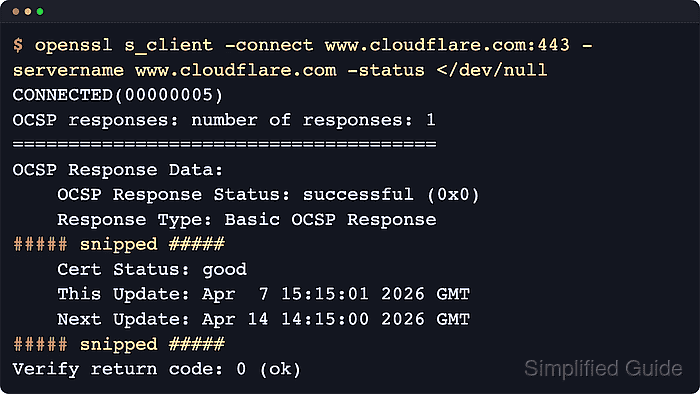
When stapling is enabled, Nginx fetches the certificate's OCSP response from the responder URL published by the issuing CA, caches that response, and attaches it to later handshakes. The feature is controlled by ssl_stapling and ssl_stapling_verify, and successful verification depends on both DNS resolution for the responder hostname and a trusted CA bundle supplied through ssl_trusted_certificate.
Packaged installations usually keep the main configuration under /etc/nginx and let you place the resolver directive either globally in the http block or inside a single TLS server block. OCSP stapling only affects the system that terminates HTTPS, so a load balancer, reverse proxy, or CDN in front of Nginx must staple responses itself if it handles the public handshake. A private CA, an incomplete issuer chain, or a certificate with no advertised OCSP responder URL can prevent stapling from working even when the syntax is valid.
Steps to enable OCSP stapling in Nginx:
- Confirm the active certificate publishes an OCSP responder URL.
$ openssl x509 -in /etc/letsencrypt/live/example.com/fullchain.pem -noout -ocsp_uri
http://ocsp.example-ca.net/
If this command prints no URL, the certificate does not support OCSP lookups and Nginx cannot staple a response for it.
- Open the file that contains the TLS server block for the site.
$ sudoedit /etc/nginx/sites-available/example.com.conf
Common virtual host locations include /etc/nginx/sites-available and /etc/nginx/conf.d.
- Confirm the ssl_certificate directive points to a full chain file for the site certificate.
server {
    listen 443 ssl;
    server_name example.com;

    ssl_certificate     /etc/letsencrypt/live/example.com/fullchain.pem;
    ssl_certificate_key /etc/letsencrypt/live/example.com/privkey.pem;

    ##### snipped #####
}
The full chain file should contain the server certificate followed by any intermediate CA certificates that clients need to build trust.
- Add the stapling directives and point ssl_trusted_certificate at a CA bundle that can validate the responder chain.
server {
    ##### snipped #####

    ssl_stapling on;
    ssl_stapling_verify on;
    ssl_trusted_certificate /etc/ssl/certs/ca-certificates.crt;

    ##### snipped #####
}
With ssl_stapling_verify on, the trusted file must let Nginx build trust from the issuing CA to a trusted root. On Debian and Ubuntu this is commonly /etc/ssl/certs/ca-certificates.crt, while RHEL-family systems often use /etc/pki/tls/certs/ca-bundle.crt. If your CA is private or your OS bundle does not contain the needed chain, use a dedicated PEM file with the issuer, root, and any required intermediate CA certificates.
- Add a resolver directive that can resolve the certificate authority responder hostname.
server {
    ##### snipped #####

    resolver 1.1.1.1 1.0.0.1 valid=300s;
    resolver_timeout 5s;

    ##### snipped #####
}
If multiple TLS virtual hosts need the same DNS settings, placing resolver in the http block avoids repeating it in every server block.
Blocking outbound DNS or the responder's HTTP requests from the Nginx host prevents stapling from being refreshed.
- Test the Nginx configuration before reloading the service.
$ sudo nginx -t
nginx: the configuration file /etc/nginx/nginx.conf syntax is ok
nginx: configuration file /etc/nginx/nginx.conf test is successful
If the test warns that ssl_stapling was ignored, re-check the certificate's OCSP URL, the ssl_trusted_certificate path, and whether the resolver can resolve the responder hostname from the Nginx host.
Related: How to test Nginx configuration
- Reload the Nginx service to apply the updated TLS settings.
$ sudo systemctl reload nginx
On systems without systemd, a graceful reload can be triggered with sudo nginx -s reload.
Related: How to manage the Nginx service
- Verify that the TLS handshake now includes a stapled OCSP response.
$ openssl s_client -connect example.com:443 -servername example.com -status </dev/null
CONNECTED(00000003)
OCSP response:
======================================
OCSP Response Data:
    OCSP Response Status: successful (0x0)
    Response Type: Basic OCSP Response
##### snipped #####
    Cert Status: good
##### snipped #####
Verify return code: 0 (ok)
OpenSSL output can label the responder section as OCSP response: or OCSP responses: number of responses: 1 depending on the build. Successful stapling is proved by a responder section with OCSP Response Status: successful (0x0) and Cert Status: good.
For certificates with the must-staple TLS feature, do not leave the site in production until this verification step returns a successful stapled response.
- Check the Nginx error log when the handshake does not include a stapled response.
$ sudo cat /var/log/nginx/error.log
##### snipped #####
2026/04/09 12:52:08 [warn] 2894#2894: "ssl_stapling" ignored, no OCSP responder URL in the certificate "/etc/letsencrypt/live/example.com/fullchain.pem"
2026/04/09 12:53:17 [warn] 2894#2894: "ssl_stapling" ignored, issuer certificate not found for certificate "/etc/letsencrypt/live/example.com/fullchain.pem"
2026/04/09 12:53:17 [warn] 2894#2894: no resolver defined to resolve ocsp.example-ca.net while requesting certificate status, responder: ocsp.example-ca.net
2026/04/09 12:54:21 [warn] 2894#2894: "ssl_stapling" ignored, host not found in OCSP responder "ocsp.example-ca.net/" in the certificate "/etc/letsencrypt/live/example.com/fullchain.pem"
##### snipped #####
Look for ssl_stapling, OCSP, issuer certificate, resolver, and responder-host warnings to pinpoint whether the failure is caused by the certificate, the trust chain, or outbound name resolution.
Tool: SSL OCSP Checker

Mohd Shakir Zakaria is a cloud architect with deep roots in software development and open-source advocacy. Certified in AWS, Red Hat, VMware, ITIL, and Linux, he specializes in designing and managing robust cloud and on-premises infrastructures.


