Suspicious traffic often appears in the Nginx access log before a scanner, credential probe, or exploit attempt becomes an application incident. A focused audit turns raw request lines into evidence about source addresses, targeted paths, unusual methods, response codes, and payload patterns that deserve follow-up.
The ngx_http_log_module writes access logs through access_log and formats each row through log_format. The default format remains combined when no custom format is named, and packaged Debian and Ubuntu installations commonly write the main log to /var/log/nginx/access.log. A server or location block can override that path, and some deployments send logs to syslog, stderr, a container stream, or a central collector instead of a regular file.
Security review works best when the log destination, format, proxy chain, and retention window are clear before filtering begins. Rotated and compressed logs may contain the earlier part of an incident, while the first address field may be a reverse proxy rather than the real client unless trusted proxy handling rewrites it. Treat matches as leads, then confirm them against the matching Nginx error log, WAF audit log, firewall record, or application log before blocking real traffic.
Steps to audit Nginx access logs for security threats:
- Identify the active access-log destination before searching a guessed path.
$ sudo nginx -T
nginx: the configuration file /etc/nginx/nginx.conf syntax is ok
nginx: configuration file /etc/nginx/nginx.conf test is successful
##### snipped #####
http {
    access_log /var/log/nginx/access.log;
    include /etc/nginx/conf.d/*.conf;
    include /etc/nginx/sites-enabled/*;
}
##### snipped #####
access_log can be set in the http, server, or location context, and more than one active log can exist at the same configuration level. Audit the final destination shown by the effective configuration.
Related: How to test Nginx configuration
- List the current and rotated access-log files so the available review window is clear.
$ sudo ls -lh /var/log/nginx/access.log*
-rw-r----- 1 www-data adm 1.3K Jun  6 12:14 /var/log/nginx/access.log
-rw-r----- 1 www-data adm 1.3K Jun  6 00:00 /var/log/nginx/access.log.1
-rw-r----- 1 www-data adm 390B Jun  5 00:00 /var/log/nginx/access.log.2.gz
Use zgrep or zless on compressed rotations so earlier probe traffic is not missed after log rotation.
- Confirm the field order with one known or obvious request line before trusting field-based filters.
$ sudo grep -F '/.env' /var/log/nginx/access.log
203.0.113.45 - - [06/Jun/2026:12:14:03 +0000] "GET /.env HTTP/1.1" 404 162 "-" "Mozilla/5.0"
In the predefined combined format, the client address is the first field, the request line is quoted, and the status code follows the request. If a custom log_format changes the order, adjust the field positions in later checks.
- Check compressed rotations for the same probe when the incident window may have crossed a rotation boundary.
$ sudo zgrep -F '/wp-login.php' /var/log/nginx/access.log.2.gz
203.0.113.45 - - [06/Jun/2026:12:14:01 +0000] "GET /wp-login.php HTTP/1.1" 404 162 "-" "Mozilla/5.0"
- Count requests by source address to find noisy scanners and abusive clients.
$ sudo awk '{hits[$1]++} END {for (ip in hits) print hits[ip], ip}' /var/log/nginx/access.log
6 203.0.113.45
3 198.51.100.23
2 192.0.2.50
1 66.249.66.1
If Nginx is behind a load balancer, CDN, or another reverse proxy, confirm whether the first field is the real client before blocking an address.
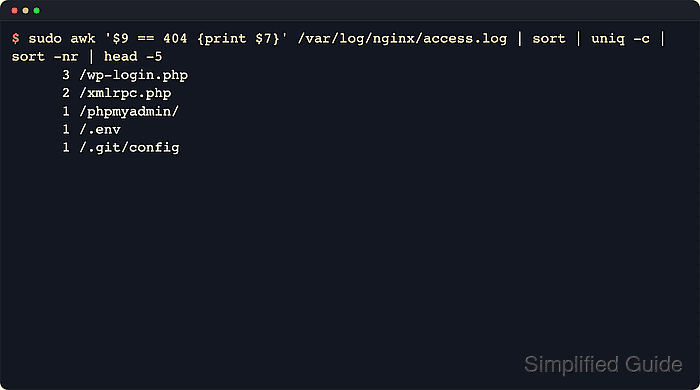
- Count missing paths to see which applications, admin panels, or files are being probed.
$ sudo awk '$9 == 404 {miss[$7]++} END {for (uri in miss) print miss[uri], uri}' /var/log/nginx/access.log
1 /wp-login.php
1 /xmlrpc.php
1 /.env
1 /.git/config
1 /product?id=1%20union%20select%201,2,3
1 /%2e%2e%2f%2e%2e%2fetc%2fpasswd
Clusters of missing WordPress paths, repository files, environment files, admin panels, backup files, or framework setup paths usually indicate reconnaissance rather than normal browsing.
- Count HTTP methods so unexpected verbs stand out.
$ sudo awk '{method=$6; gsub(/"/, "", method); methods[method]++} END {for (method in methods) print methods[method], method}' /var/log/nginx/access.log
9 GET
1 POST
1 OPTIONS
1 PROPFIND
Rare methods such as PROPFIND, PUT, DELETE, TRACE, or CONNECT often come from WebDAV probes, scanners, or misconfigured clients.
- Review authentication and authorization failures for password spraying or permission probing.
$ sudo awk '$9 == 401 || $9 == 403 {print $1, $7, $9}' /var/log/nginx/access.log
192.0.2.50 /admin/ 403
192.0.2.50 /login 401
Repeated 401 responses against login paths can indicate credential stuffing, and repeated 403 hits against admin or status URLs can indicate restricted-resource enumeration.
- Search for common sensitive files and application probes with fixed string matches.
$ sudo grep -F -e '/wp-login.php' -e '/xmlrpc.php' -e '/.env' -e '/.git' -e '/phpmyadmin' /var/log/nginx/access.log
203.0.113.45 - - [06/Jun/2026:12:14:01 +0000] "GET /wp-login.php HTTP/1.1" 404 162 "-" "Mozilla/5.0"
203.0.113.45 - - [06/Jun/2026:12:14:02 +0000] "GET /xmlrpc.php HTTP/1.1" 404 162 "-" "Mozilla/5.0"
203.0.113.45 - - [06/Jun/2026:12:14:03 +0000] "GET /.env HTTP/1.1" 404 162 "-" "Mozilla/5.0"
203.0.113.45 - - [06/Jun/2026:12:14:04 +0000] "GET /.git/config HTTP/1.1" 404 162 "-" "Mozilla/5.0"
Any 200, 204, or 206 response for high-risk paths such as /.env or /.git needs immediate investigation because the request may have reached sensitive content instead of a harmless 404.
- Search for encoded payloads that suggest XSS, SQL injection, traversal, or command-injection testing.
$ sudo grep -Ei '(%3cscript|<script|union(%20|\+)+select|\.\./|%2e%2e%2f|%2fetc%2fpasswd)' /var/log/nginx/access.log
203.0.113.45 - - [06/Jun/2026:12:14:05 +0000] "GET /product?id=1%20union%20select%201,2,3 HTTP/1.1" 404 162 "-" "Mozilla/5.0"
203.0.113.45 - - [06/Jun/2026:12:14:06 +0000] "GET /%2e%2e%2f%2e%2e%2fetc%2fpasswd HTTP/1.1" 404 162 "-" "Mozilla/5.0"
198.51.100.23 - - [06/Jun/2026:12:14:07 +0000] "GET /search?q=%3Cscript%3Ealert(1)%3C%2Fscript%3E HTTP/1.1" 404 162 "-" "curl/8.7.1"
Keep the pattern set focused on the application. Broad payload searches are useful for triage, but normal query text can create false positives.
- Build a short suspect list by counting sources that hit the high-risk patterns.
$ sudo awk 'tolower($0) ~ /(wp-login\.php|xmlrpc\.php|\.env|\.git|phpmyadmin|union(%20|\+)+select|%2e%2e%2f|%2fetc%2fpasswd|%3cscript|<script)/ {hits[$1]++} END {for (ip in hits) print hits[ip], ip}' /var/log/nginx/access.log
6 203.0.113.45
1 198.51.100.23
Use this as a review list before exporting evidence or adding a temporary deny rule.
- Pivot into one suspect address and review the paths and status codes together.
$ sudo awk '$1 == "203.0.113.45" {print $7, $9}' /var/log/nginx/access.log
/wp-login.php 404
/xmlrpc.php 404
/.env 404
/.git/config 404
/product?id=1%20union%20select%201,2,3 404
/%2e%2e%2f%2e%2e%2fetc%2fpasswd 404
Replace 203.0.113.45 with an address from the suspect list. Use documentation-range addresses in shared notes and incident examples unless the real address is authorized for disclosure.
- Narrow the access log to the incident minute before correlating with other systems.
$ sudo grep -F '[06/Jun/2026:12:14:' /var/log/nginx/access.log
203.0.113.45 - - [06/Jun/2026:12:14:01 +0000] "GET /wp-login.php HTTP/1.1" 404 162 "-" "Mozilla/5.0"
203.0.113.45 - - [06/Jun/2026:12:14:02 +0000] "GET /xmlrpc.php HTTP/1.1" 404 162 "-" "Mozilla/5.0"
203.0.113.45 - - [06/Jun/2026:12:14:03 +0000] "GET /.env HTTP/1.1" 404 162 "-" "Mozilla/5.0"
##### snipped #####
Matching on [DD/Mon/YYYY:HH:MM: stays aligned with the Nginx timestamp format and makes cross-correlation with firewall, WAF, or application logs easier.
- Correlate denied requests with the Nginx error log before treating the pattern as confirmed evidence.
$ sudo grep -F 'access forbidden by rule' /var/log/nginx/error.log
2026/06/06 12:14:10 [error] 3268#3268: *6 access forbidden by rule, client: 192.0.2.50, server: _, request: "GET /admin/ HTTP/1.1", host: "example.com"
Matching timestamps, client addresses, request paths, and response codes across the access and error logs is stronger evidence than one pattern match by itself.
Use the journal or the central log collector instead when the deployment sends errors to stderr or syslog rather than /var/log/nginx/error.log.
Related: How to block user agents in Nginx
Related: How to restrict access by IP in Nginx

Mohd Shakir Zakaria is a cloud architect with deep roots in software development and open-source advocacy. Certified in AWS, Red Hat, VMware, ITIL, and Linux, he specializes in designing and managing robust cloud and on-premises infrastructures.


