Redirecting plain HTTP requests to HTTPS closes the unencrypted path to a site, so logins, cookies, API calls, and other request data stop crossing port 80 in cleartext. It also gives browsers, caches, and search engines one canonical scheme instead of leaving the same site reachable over two URLs.
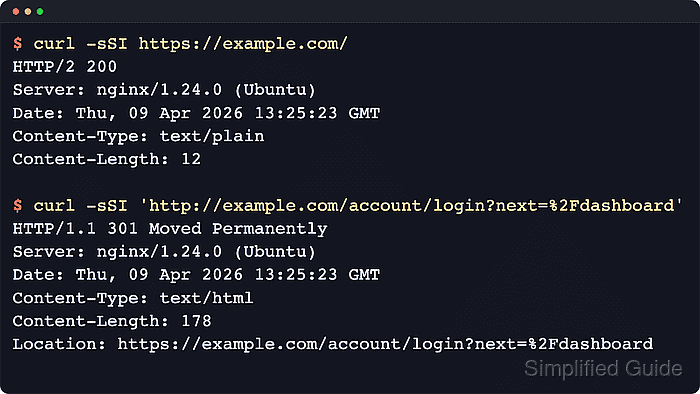
In Nginx, the usual pattern is a dedicated port 80 server block that answers first and immediately returns a redirect to the matching HTTPS URL. The return directive is simpler than rewrite for a full-site scheme change, and $request_uri keeps the original path and query string intact.
The secure site on port 443 should already be working before the redirect is enabled, including the expected hostnames and certificate. If plain HTTP must stay reachable for ACME HTTP-01 validation or load balancer health checks, carve out only those exceptions before the catch-all redirect, and remember that 301 responses can stay cached by browsers long after the configuration changes.
Related: How to improve Nginx security
Related: How to configure Let's Encrypt SSL in Nginx
Related: How to enable HSTS in Nginx
Steps to redirect HTTP to HTTPS in Nginx:
- Confirm that the intended HTTPS site already answers over TLS.
$ curl -sSI https://example.com/
HTTP/1.1 200 OK
Server: nginx/1.28.3 (Ubuntu)
Date: Sat, 06 Jun 2026 11:35:44 GMT
Content-Type: text/plain
Content-Length: 12
A successful 200, 301, or 302 from the expected HTTPS site is fine here. The important detail is that the TLS virtual host already works before HTTP is forced to it.
- Open the Nginx site configuration file that currently handles the hostname.
$ sudoedit /etc/nginx/sites-available/example.com
Site files are commonly stored under /etc/nginx/sites-available with symlinks in /etc/nginx/sites-enabled, or directly under /etc/nginx/conf.d.
- Add or adjust the dedicated port 80 server block so it only redirects requests to HTTPS.
server {
    listen 80;
    server_name example.com www.example.com;

    return 301 https://$host$request_uri;
}
Replace https://$host with a fixed hostname such as https://example.com when the secure site must always land on one canonical host, or when this block can answer unmatched hosts as the port 80 default.
Use return 308 when preserving the original POST or PUT method matters, or 302 temporarily while testing so a cached permanent redirect does not hide later changes.
If a trusted reverse proxy or load balancer already terminates TLS in front of Nginx, place the redirect there or key it off the trusted forwarded scheme header instead of assuming the local listener sees the original request scheme.
- Test the Nginx configuration before reloading the service.
$ sudo nginx -t
nginx: the configuration file /etc/nginx/nginx.conf syntax is ok
nginx: configuration file /etc/nginx/nginx.conf test is successful
Related: How to test Nginx configuration
- Reload Nginx to apply the validated redirect rule.
$ sudo systemctl reload nginx
Use sudo nginx -s reload on systems where systemd is not managing the service.
Related: How to manage the Nginx service
- Confirm that the service stayed up after the reload.
$ sudo systemctl is-active nginx
active
If the unit reports failed or inactive, inspect the service log or journal before retrying the reload.
Related: How to manage the Nginx service
- Verify that an HTTP request now returns a permanent redirect to the matching HTTPS URL, with the path and query string preserved.
$ curl -sSI 'http://example.com/account/login?next=%2Fdashboard'
HTTP/1.1 301 Moved Permanently
Server: nginx/1.28.3 (Ubuntu)
Date: Sat, 06 Jun 2026 11:35:44 GMT
Content-Type: text/html
Content-Length: 178
Connection: keep-alive
Location: https://example.com/account/login?next=%2Fdashboard
Use curl, a private browser window, or a cleared browser cache while testing because browsers often cache 301 redirects aggressively.
Tool: HTTP Redirect Checker

Mohd Shakir Zakaria is a cloud architect with deep roots in software development and open-source advocacy. Certified in AWS, Red Hat, VMware, ITIL, and Linux, he specializes in designing and managing robust cloud and on-premises infrastructures.


