How to improve Nginx performance
Nginx performance work goes wrong when changes are made before the bottleneck is known. A server that handles static files, reverse-proxied application traffic, or short TLS requests needs a repeatable benchmark and live connection counters so each tuning change can be tied to latency, throughput, errors, or worker pressure.
Nginx uses an event-driven worker model, so the useful tuning path starts with worker capacity, file-descriptor headroom, connection reuse, and response work that can be avoided. Compression, protocol negotiation, TLS session reuse, static-file metadata caching, shared response caching, and access-log handling should each be measured separately instead of applied as one large bundle.
Examples use the common Linux packaging layout with /etc/nginx/nginx.conf, systemctl, and local-only status checks. Upstream documentation for 1.29.7 changed two long-standing reverse-proxy assumptions because proxy_http_version now defaults to 1.1 and upstream keepalive caching is enabled by default. Keep stub_status restricted to trusted admin access, test with nginx -t before each reload, and treat HTTP/3 as optional because the upstream module is still experimental and not built into every Nginx package.
Related: How to benchmark Nginx with wrk
Related: How to enable the Nginx stub_status page
Related: How to test Nginx configuration
Steps to improve Nginx performance:
- Capture a repeatable throughput and latency baseline before changing anything.
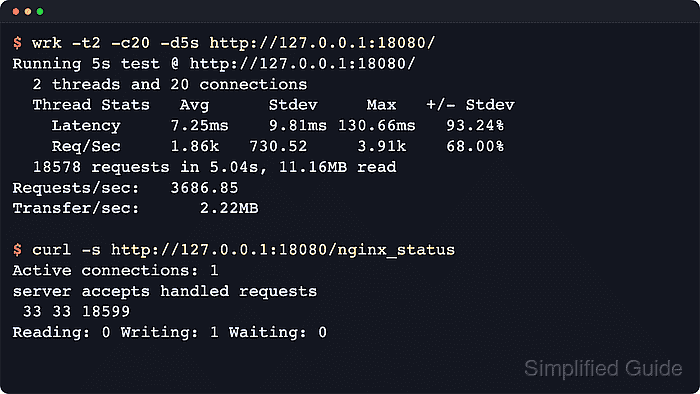
$ wrk -t2 -c20 -d5s http://host.example.net/
Running 5s test @ http://host.example.net/
  2 threads and 20 connections
  Thread Stats   Avg      Stdev     Max   +/- Stdev
    Latency     7.25ms    9.81ms 130.66ms   93.24%
    Req/Sec     1.86k   730.52     3.91k    68.00%
  18578 requests in 5.04s, 11.16MB read
Requests/sec:   3686.85
Transfer/sec:      2.22MB
Keep the same URL, Host header, cookies, thread count, concurrency, and duration for every comparison run. Benchmark a representative endpoint that reaches Nginx, not a CDN-served asset or admin page that hides the work being tuned.
Related: How to benchmark Nginx with wrk
- Check live connection counters during the same traffic window.
$ curl -s http://127.0.0.1/nginx_status
Active connections: 1
server accepts handled requests
 33 33 18599
Reading: 0 Writing: 1 Waiting: 0
Never expose stub_status to the public internet. Restrict the status location to 127.0.0.1, ::1, or a tightly controlled admin source list.
If nginx -t reports an unknown stub_status directive, the package was built without --with-http_stub_status_module.
- Review the loaded configuration before editing so duplicate directives and included snippets are visible.
$ sudo nginx -T
nginx: the configuration file /etc/nginx/nginx.conf syntax is ok
nginx: configuration file /etc/nginx/nginx.conf test is successful
# configuration file /etc/nginx/nginx.conf:
user www-data;
worker_processes auto;
pid /run/nginx.pid;

events {
    worker_connections 1024;
}

http {
    keepalive_timeout 65;
    gzip on;
    ssl_session_cache shared:SSL:10m;
    ##### snipped #####
}
nginx -T validates the config and prints the active include tree. Use it to find the actual directive layer before changing /etc/nginx/nginx.conf, /etc/nginx/conf.d/, or a virtual-host include.
Related: How to test Nginx configuration
- Set worker_processes to auto in the main context unless the service runs under a stricter CPU quota.
user www-data;
worker_processes auto;
pid /run/nginx.pid;
The upstream default remains worker_processes 1, while auto detects the available CPU cores and is a better starting point on most dedicated hosts.
In containers or cgroups with a CPU quota lower than the visible core count, use an explicit worker count that matches the quota.
- Raise worker_connections only when the service and operating system can supply enough open files.
events {
    worker_connections 4096;
}
worker_connections is a per-worker limit and includes upstream sockets as well as client sockets. The real ceiling cannot exceed the current open-file limit, so higher connection limits usually need a matching service or OS file-descriptor increase.
- Shorten idle client keepalive time only enough to release unused connection slots.
http {
    keepalive_timeout 15s 15s;
    keepalive_requests 1000;
    ##### snipped #####
}
Lower keepalive_timeout values reduce how long idle clients occupy worker connection slots. keepalive_requests periodically closes long-lived keepalive connections so per-connection memory is released.
Align this value with any frontend load balancer or CDN idle timeout. A timeout that is shorter than the path in front of Nginx can create avoidable client resets.
Related: How to enable keepalive in Nginx
- Review reverse-proxy connection reuse before copying older upstream snippets.
upstream app_backend {
    server 127.0.0.1:9000;
    # keepalive 32;  # override current default or support older Nginx
}

location / {
    proxy_pass http://app_backend;
    # proxy_http_version 1.1;       # needed before Nginx 1.29.7
    # proxy_set_header Connection "";  # needed before Nginx 1.29.7
}
Starting with 1.29.7, upstream keepalive is enabled by default with keepalive 32 local, and HTTP proxying defaults to HTTP/1.1. Older builds still need explicit upstream keepalive, proxy_http_version 1.1;, and a cleared Connection header for HTTP upstream reuse.
Related: How to configure Nginx as a reverse proxy
Related: How to enable keepalive in Nginx - Compress text responses and verify the client receives compressed content.
$ curl -I --silent -H 'Accept-Encoding: gzip' http://127.0.0.1/
HTTP/1.1 200 OK
Server: nginx/1.28.3 (Ubuntu)
Date: Sat, 06 Jun 2026 11:34:58 GMT
Content-Type: text/html
Last-Modified: Sat, 06 Jun 2026 11:34:58 GMT
Connection: keep-alive
ETag: W/"6a2405e2-a1"
Content-Encoding: gzip
Gzip or Brotli helps most with HTML, CSS, JavaScript, JSON, XML, and similar text responses. Avoid spending CPU on already-compressed assets such as JPEG, PNG, WebP, MP4, and ZIP files.
- Enable HTTP/2 on the HTTPS listener when browsers fetch many parallel assets over TLS.
server {
    listen 443 ssl;
    http2 on;

    server_name host.example.net;
    ##### snipped #####
}
The dedicated http2 on; directive was added in 1.25.1. On older builds, keep the older listen 443 ssl http2; form.
HTTP/3 can be tested separately after HTTP/2 is stable, but the upstream HTTP/3 module is experimental and requires a compatible build, TLS library, and network path.
Related: How to enable HTTP/2 in Nginx
Related: How to enable HTTP/3 in Nginx - Confirm that clients negotiate HTTP/2 after the listener change.
$ curl -I --silent --http2 https://host.example.net/
HTTP/2 200
server: nginx/1.28.3 (Ubuntu)
date: Sat, 06 Jun 2026 11:34:58 GMT
content-type: text/html
content-length: 161
last-modified: Sat, 06 Jun 2026 11:34:58 GMT
etag: "6a2405e2-a1"
accept-ranges: bytes
If the response still shows HTTP/1.1, the request is not reaching an HTTP/2 listener, the build lacks the required module, or the TLS path does not support ALPN negotiation.
- Enable a shared TLS session cache on busy HTTPS hosts.
ssl_session_cache shared:SSL:10m;
ssl_session_timeout 10m;
The upstream Nginx docs list ssl_session_cache none as the default. A shared cache is more efficient than the built-in per-worker cache, and one megabyte stores roughly 4000 sessions.
- Use open_file_cache when Nginx repeatedly serves local static files from disk.
open_file_cache max=10000 inactive=30s;
open_file_cache_valid 1m;
open_file_cache_min_uses 2;
open_file_cache_errors on;
Nginx can cache file descriptors, directory existence, file metadata, and selected lookup errors instead of asking the kernel for the same information on every request.
If files change outside the normal deploy path, keep open_file_cache_valid short enough that stale metadata does not outlive the expected update window.
- Cache only responses that are safe to share between users.
Never place authenticated, personalized, or token-bearing responses into a shared cache without deliberate exclusions. Even short microcache windows can break per-user dashboards, CSRF token flows, and highly dynamic APIs.
Related: How to enable caching in Nginx
Related: How to enable microcaching in Nginx - Compare before-and-after access-log latency and error rates for the same traffic window.
Use the same parser, time range, endpoint grouping, latency basis, and 5xx threshold when comparing results. Changing any of those inputs can make a tuning change look better or worse than it is.
- Reduce access-log overhead only when measurement shows logging is part of the bottleneck.
Buffered logging, shorter formats, or exact-path exclusions can help on noisy endpoints. Avoid broad access_log off; rules unless the loss of incident and troubleshooting evidence is acceptable for that location.
- Test the configuration before applying the changes.
$ sudo nginx -t
nginx: the configuration file /etc/nginx/nginx.conf syntax is ok
nginx: configuration file /etc/nginx/nginx.conf test is successful
Related: How to test Nginx configuration
- Reload Nginx after the syntax test passes.
$ sudo systemctl reload nginx
On non-systemd hosts, use sudo nginx -s reload to signal the running master process.
Related: How to manage the Nginx service
- Re-run the same benchmark and compare the same counters.
$ wrk -t2 -c20 -d5s http://host.example.net/
Running 5s test @ http://host.example.net/
##### snipped #####
Requests/sec:   4124.67
Transfer/sec:      2.48MB
A successful tuning change improves latency, throughput, or connection pressure without increasing errors, worker exhaustion, upstream resets, or timeout messages. If the benchmark improves but error logs show resets or backend failures, roll back the last change and test again.
Related: How to benchmark Nginx with wrk
- Confirm the status endpoint still shows idle capacity after the comparison run.
$ curl -s http://127.0.0.1/nginx_status
Active connections: 1
server accepts handled requests
 42 42 20715
Reading: 0 Writing: 1 Waiting: 0
High Writing counts, rising active connections, or a growing gap between accepted and handled requests during the same benchmark can mean workers, file descriptors, upstreams, or downstream clients are still saturated.