Enabling HTTP/3 in Nginx lets browsers move requests onto QUIC, which usually recovers faster than long-lived TCP sessions after packet loss, network handoffs, or other unstable last-mile conditions. A site that already serves HTTPS can add HTTP/3 on the same hostname and port instead of creating a separate endpoint for modern clients.
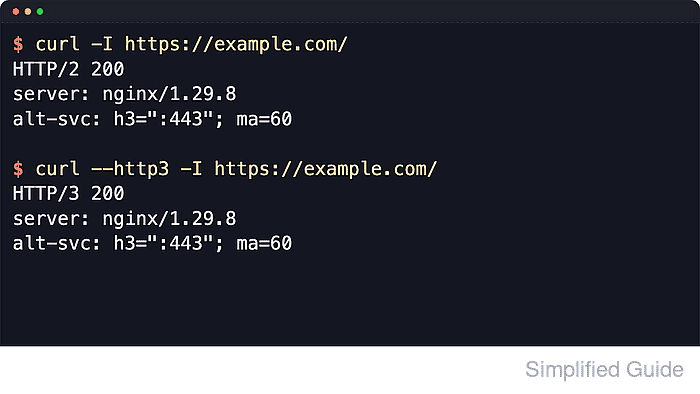
Current Nginx releases expose HTTP/3 through the ngx_http_v3_module and a quic listener on the same port as regular HTTPS. Browsers still reach the normal TLS listener first, learn that h3 is available from the Alt-Svc response header, and then reconnect over UDP when the path and client both support it.
The rollout only works when the running build includes --with-http_v3_module, TLSv1.3 remains enabled, and the full network path allows both TCP and UDP on port 443. Upstream Nginx still marks the module experimental, and package builds can differ, so confirm the running binary before editing a production virtual host. Current syntax also separates http2 on; from the listen directive, and clients cache Alt-Svc advertisements, so start with a short ma value and clear the header during rollback with Alt-Svc: clear or ma=0.
Related: How to improve Nginx performance
Related: How to enable HTTP/2 in Nginx
Steps to enable HTTP/3 in Nginx:
- Confirm that the site already serves HTTPS on TCP 443.
$ curl -I https://example.com/
HTTP/2 200
server: nginx/1.31.1
content-type: text/html
##### snipped #####
HTTP/3 discovery still starts on the regular HTTPS listener, so certificate or hostname problems must be fixed before QUIC negotiation can work.
- Verify that the running Nginx build includes the HTTP/3 module.
$ nginx -V
nginx version: nginx/1.31.1
built with OpenSSL 3.5.6 7 Apr 2026
TLS SNI support enabled
configure arguments: --prefix=/etc/nginx --sbin-path=/usr/sbin/nginx
##### snipped #####
--with-http_ssl_module --with-http_v2_module --with-http_v3_module
##### snipped #####
If the configure arguments do not include --with-http_v3_module, the installed build cannot accept listen ... quic and the configuration test will fail until Nginx is replaced with a QUIC-capable package or build.
- Find the HTTPS server block that serves the target hostname.
$ sudo nginx -T
nginx: the configuration file /etc/nginx/nginx.conf syntax is ok
nginx: configuration file /etc/nginx/nginx.conf test is successful
##### snipped #####
server {
    listen 443 ssl;
    listen [::]:443 ssl;
    server_name example.com www.example.com;
    ##### snipped #####
}
Use sudo nginx -T when possible because it shows the flattened running configuration instead of only one include path at a time.
- Update the HTTPS server block so it keeps the regular TLS listeners, adds QUIC listeners on the same port, and advertises h3 with Alt-Svc.
server {
    listen 443 ssl;
    listen [::]:443 ssl;
    listen 443 quic reuseport;
    listen [::]:443 quic reuseport;

    http2 on;

    server_name example.com;

    ssl_certificate /etc/letsencrypt/live/example.com/fullchain.pem;
    ssl_certificate_key /etc/letsencrypt/live/example.com/privkey.pem;

    add_header Alt-Svc 'h3=":443"; ma=60' always;

    ##### snipped #####
}
Current Nginx releases use http2 on; instead of the older listen 443 ssl http2; syntax. The HTTP/3 module defaults to http3 on;, so the essential enablement change is the listen ... quic sockets plus the Alt-Svc header.
Use a short ma such as 60 during rollout. After the path is stable, raise it to a longer cache lifetime such as 86400. If a broader http block sets http3 off;, override it in this server block with http3 on;. Do not disable TLSv1.3 because QUIC requires it.
- Test the updated configuration before reloading the service.
$ sudo nginx -t
nginx: the configuration file /etc/nginx/nginx.conf syntax is ok
nginx: configuration file /etc/nginx/nginx.conf test is successful
If the test fails with an unknown quic or http3 directive, the installed Nginx build or TLS library does not support the configuration yet.
- Reload Nginx to apply the configuration change.
$ sudo systemctl reload nginx
Reloading applies the new listeners without dropping active connections, but a failed reload can still leave the old configuration in place, so always keep the successful nginx -t result immediately before it.
- Confirm that Nginx is listening on UDP 443 for QUIC.
$ sudo ss --udp --listening --numeric --processes 'sport = :443' State Recv-Q Send-Q Local Address:Port Peer Address:Port Process UNCONN 0 0 0.0.0.0:443 0.0.0.0:* users:(("nginx",pid=1324,fd=6)) UNCONN 0 0 [::]:443 [::]:* users:(("nginx",pid=1324,fd=7)) - Allow inbound UDP 443 through the firewall path to the server.
On UFW:
$ sudo ufw allow 443/udp
Rule added
On firewalld:$ sudo firewall-cmd --permanent --add-port=443/udp success $ sudo firewall-cmd --reload success
Cloud security groups and load balancers commonly require a separate rule for 443/udp. - Verify that the Alt-Svc header is present on the normal HTTPS response.
$ curl -I https://example.com/
HTTP/2 200
server: nginx/1.31.1
alt-svc: h3=":443"; ma=60
##### snipped #####
Tool: HTTP Header Checker
- Verify actual HTTP/3 negotiation with an HTTP/3-capable client.
$ curl --http3-only -I https://example.com/
HTTP/3 200
server: nginx/1.31.1
alt-svc: h3=":443"; ma=60
##### snipped #####
Many current distro curl packages still omit HTTP/3 support. If --http3-only is rejected as an unknown option, use a newer curl build or confirm the browser request in a network inspector and check that the negotiated protocol is h3.

Mohd Shakir Zakaria is a cloud architect with deep roots in software development and open-source advocacy. Certified in AWS, Red Hat, VMware, ITIL, and Linux, he specializes in designing and managing robust cloud and on-premises infrastructures.


