Benchmarking Nginx with wrk turns tuning changes into a repeatable baseline, so changes to workers, keepalive reuse, compression, caching, or proxy settings can be compared with measured request rate and latency instead of intuition.
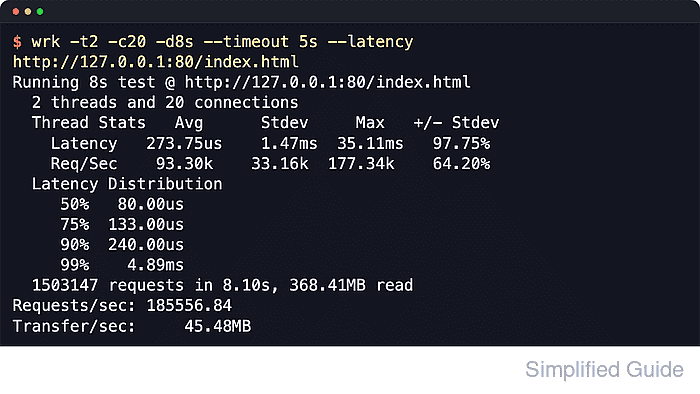
The wrk client opens many concurrent HTTP connections and repeatedly requests one URL while reporting throughput, latency, transfer rate, and timeout evidence. The most useful runs target one stable final URL with fixed headers, because redirects, changing response bodies, or inconsistent request options make results difficult to compare across test windows.
Synthetic load can saturate the client host before it saturates Nginx, and even a short run can disturb shared environments. Use a separate load-generator host when possible, benchmark the final 200 OK URL with an explicit port and path, and pair the wrk output with server-side checks such as stub_status, access-log review, or application metrics so a faster result is not hiding timeouts or 4xx and 5xx responses.
Related: How to improve Nginx performance
Related: How to enable the Nginx stub_status page
Tool: HTTP Access Latency Log Analyzer
Steps to benchmark Nginx with wrk:
- Choose the exact benchmark URL and confirm that it returns 200 OK without a redirect.
$ curl -I -sS http://127.0.0.1:80/index.html
HTTP/1.1 200 OK
Server: nginx/1.28.3 (Ubuntu)
Date: Sat, 06 Jun 2026 03:38:02 GMT
Content-Type: text/html
Content-Length: 14
Last-Modified: Sat, 06 Jun 2026 03:38:01 GMT
Connection: keep-alive
ETag: "6a239619-e"
Accept-Ranges: bytes
Use the final URL that wrk will hit, including the explicit port, path, and any required Host header or authentication header. The upstream wrk usage examples also target an explicit host:port/path URL.
- Record the Nginx build or configuration under test before taking a baseline.
$ nginx -V
nginx version: nginx/1.28.3 (Ubuntu)
built with OpenSSL 3.5.5 27 Jan 2026
TLS SNI support enabled
##### snipped
If the test compares configuration changes, save the active config snapshot separately with sudo nginx -T and sanitize sensitive upstream names, IP addresses, or file paths before sharing it.
- Confirm that the optional stub_status endpoint is reachable before relying on it during the benchmark.
$ curl -sS http://127.0.0.1:80/nginx_status
Active connections: 1
server accepts handled requests
 2 2 2
Reading: 0 Writing: 1 Waiting: 0
The official Nginx documentation notes that stub_status is provided by ngx_http_stub_status_module and must be present in the build. If this endpoint is not available yet, configure it first.
- Run a short warm-up so caches, open file state, and keepalive reuse settle before the timed run.
$ wrk -t2 -c20 -d3s http://127.0.0.1:80/index.html
Running 3s test @ http://127.0.0.1:80/index.html
  2 threads and 20 connections
  Thread Stats   Avg      Stdev     Max   +/- Stdev
    Latency   168.80us  465.91us  11.26ms   97.37%
    Req/Sec    77.98k    21.33k  119.20k    70.00%
  464952 requests in 3.00s, 114.40MB read
Requests/sec: 154920.33
Transfer/sec:     38.12MB
Warm-up numbers are disposable. The goal is to stabilize the target before the saved baseline.
- Capture the baseline benchmark with latency reporting enabled and save the result to a file.
$ wrk -t2 -c20 -d8s --timeout 5s --latency http://127.0.0.1:80/index.html | tee wrk-baseline.txt
Running 8s test @ http://127.0.0.1:80/index.html
  2 threads and 20 connections
  Thread Stats   Avg      Stdev     Max   +/- Stdev
    Latency   200.96us  603.99us  14.72ms   97.41%
    Req/Sec    71.95k    15.36k  103.96k    68.12%
  Latency Distribution
     50%  108.00us
     75%  159.00us
     90%  246.00us
     99%    2.33ms
  1144679 requests in 8.00s, 281.64MB read
Requests/sec: 143012.98
Transfer/sec:     35.19MB
The wrk command-line options documented upstream make --latency print percentile data and --timeout record stalled responses as timeouts instead of waiting indefinitely.
Do not run this kind of load test against a shared production endpoint without an approved test window, capacity headroom, and a rollback plan.
- Poll stub_status during the run or immediately after it to correlate client-side numbers with server-side connection state.
$ curl -sS http://127.0.0.1:80/nginx_status
Active connections: 1
server accepts handled requests
 1632 1632 1609658
Reading: 0 Writing: 1 Waiting: 0
accepts, handled, and requests show cumulative traffic, while Reading, Writing, and Waiting show the current connection mix. A sharp rise in active connections or writing sockets during a test can point to saturation or slow upstream responses.
- Change one Nginx setting at a time, reload if needed, and rerun the exact same wrk command into a new result file.
$ wrk -t2 -c20 -d8s --timeout 5s --latency http://127.0.0.1:80/index.html | tee wrk-after-change.txt
Keep the URL, headers, duration, threads, and connections identical between comparison runs so the server change is the only real variable.
Related: How to improve Nginx performance
- Check every saved result for socket errors, timeout counts, or non-success status evidence before comparing speed.
$ cat wrk-after-change.txt
Running 8s test @ http://127.0.0.1:80/index.html
  2 threads and 20 connections
  Thread Stats   Avg      Stdev     Max   +/- Stdev
    Latency   234.34us  578.85us  14.07ms   95.87%
    Req/Sec    62.60k    14.74k   99.09k    63.75%
  Latency Distribution
     50%  120.00us
     75%  189.00us
     90%  344.00us
     99%    2.61ms
  997119 requests in 8.01s, 245.33MB read
  Socket errors: connect 0, read 0, write 0, timeout 20
Requests/sec: 124429.62
Transfer/sec:     30.62MB
Do not treat a run as better just because Requests/sec improved. Discard or investigate runs that print Socket errors, timeout counts, Non-2xx or 3xx responses, or matching 4xx and 5xx signals in the access logs.
- Increase concurrency in small steps only after the baseline is stable and error-free.
$ wrk -t4 -c100 -d8s --timeout 5s --latency http://127.0.0.1:80/index.html | tee wrk-c100.txt
Jumping straight to very high connection counts can move the bottleneck to the client host, hit file descriptor limits, or flood shared upstream services before the result is useful.
- Compare saved results by focusing on request rate plus tail latency, not average latency alone.
$ cat wrk-baseline.txt
Running 8s test @ http://127.0.0.1:80/index.html
  2 threads and 20 connections
  Thread Stats   Avg      Stdev     Max   +/- Stdev
    Latency   395.07us    1.21ms  36.58ms   95.04%
    Req/Sec    59.04k    20.26k  107.49k    69.38%
  Latency Distribution
     50%  126.00us
     75%  207.00us
     90%  513.00us
     99%    6.45ms
  939424 requests in 8.00s, 231.14MB read
Requests/sec: 117369.39
Transfer/sec:     28.88MB
A lower average latency can still hide worse tail behavior. Treat the 90// and //99 percentiles as first-class comparison data when tuning Nginx.

Mohd Shakir Zakaria is a cloud architect with deep roots in software development and open-source advocacy. Certified in AWS, Red Hat, VMware, ITIL, and Linux, he specializes in designing and managing robust cloud and on-premises infrastructures.


