Repeated HTTPS handshakes can become visible when clients reconnect often, keep-alive pools churn, or a reverse proxy takes a traffic spike. Enabling TLS session caching in Nginx lets returning clients resume a previous TLS session, which lowers handshake CPU and reconnect latency without changing the upstream application.
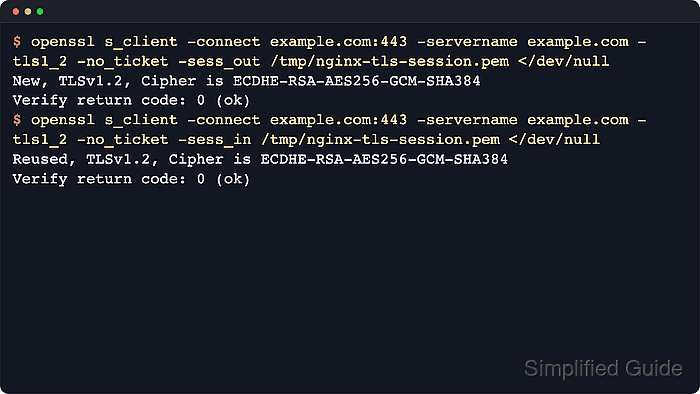
Nginx controls stateful session resumption with ssl_session_cache and ssl_session_timeout. A shared cache creates a memory zone available to all worker processes, so a session saved by one worker can be reused when a later connection lands on another worker instead of relying on the per-worker OpenSSL built-in cache.
Size the cache and timeout for the reconnect pattern you expect. Nginx documents about 4,000 sessions per megabyte, uses a 5-minute default timeout, and uses a shared cache to generate and rotate ticket keys unless explicit ssl_session_ticket_key files are configured. Because TLS session tickets remain enabled by default, the OpenSSL checks use -no_ticket so the second connection proves the shared session ID cache is working.
Related: How to improve Nginx performance
Related: How to enable OCSP stapling in Nginx
Tool: TLS Handshake Load Calculator
Steps to enable TLS session caching in Nginx:
- Create or update a TLS session cache snippet that is loaded from the http context.
$ sudo tee /etc/nginx/conf.d/tls-session-cache.conf >/dev/null <<'EOF'
ssl_session_cache shared:SSL:10m;
ssl_session_timeout 10m;
EOF
shared:SSL:10m creates a 10 MB memory zone shared across all Nginx workers, and the same directives can be placed inside a single TLS server { } block when only one site should use them. If the packaged layout does not load /etc/nginx/conf.d/ from http { }, add the same directives to the active file that does.
- Test the Nginx configuration for syntax errors.
$ sudo nginx -t
nginx: the configuration file /etc/nginx/nginx.conf syntax is ok
nginx: configuration file /etc/nginx/nginx.conf test is successful
A failing test prints the first file and line that stopped parsing, and that error must be fixed before a reload can succeed.
Related: How to test Nginx configuration
- Reload the nginx service to apply the new configuration.
$ sudo systemctl reload nginx
On systems without systemd, a graceful reload can be triggered with sudo nginx -s reload.
Related: How to manage the Nginx service
- Save a resumable TLS 1.2 session without session tickets to a temporary file.
$ openssl s_client -connect host.example.net:443 -servername host.example.net -tls1_2 -no_ticket -sess_out /tmp/nginx-tls-session.pem </dev/null
CONNECTED(00000003)
##### snipped #####
New, TLSv1.2, Cipher is ECDHE-RSA-AES256-GCM-SHA384
##### snipped #####
DONE
Replace host.example.net with the HTTPS hostname served by the updated Nginx listener. -no_ticket disables TLS session tickets for the client test so the result reflects the shared session ID cache instead of ticket-based resumption.
- Repeat the connection with the saved session to confirm resumption from the shared cache.
$ openssl s_client -connect host.example.net:443 -servername host.example.net -tls1_2 -no_ticket -sess_in /tmp/nginx-tls-session.pem </dev/null
CONNECTED(00000003)
##### snipped #####
Reused, TLSv1.2, Cipher is ECDHE-RSA-AES256-GCM-SHA384
##### snipped #####
DONE
If the second handshake stays at New, check directive inheritance, timeout expiry, cache size, and whether a load balancer sent the follow-up connection to a different Nginx node.
- Remove the temporary session file.
$ rm --force /tmp/nginx-tls-session.pem
The session file can contain resumption material and belongs in /tmp/ only for short-lived verification.

Mohd Shakir Zakaria is a cloud architect with deep roots in software development and open-source advocacy. Certified in AWS, Red Hat, VMware, ITIL, and Linux, he specializes in designing and managing robust cloud and on-premises infrastructures.


