Microcaching in Nginx keeps a very short proxy cache in front of a dynamic application so bursts of identical anonymous requests are served from Nginx instead of forcing the upstream to regenerate the same response for every hit. Even a 1 to 5 second cache window can flatten flash traffic, reduce application worker pressure, and improve response time during busy periods.
The cache is built from two parts: proxy_cache_path creates the disk-backed cache plus the shared-memory keys_zone that tracks cached metadata, and proxy_cache inside a server or location tells Nginx which upstream responses should use that cache. Cache lifetime is controlled with proxy_cache_valid, while proxy_cache_lock and proxy_cache_use_stale updating help prevent many simultaneous misses from stampeding the upstream.
Microcaching is only safe for responses that are genuinely shared across clients, usually anonymous GET and HEAD traffic. Requests carrying cookies or Authorization should bypass the cache, and upstream responses that send Set-Cookie are not cached by default. If you deliberately ignore upstream Cache-Control or Expires headers to force a short anonymous cache window, do it only for content you have confirmed is safe to share.
Related: How to enable caching in Nginx
Related: How to configure Nginx as a reverse proxy
Steps to enable microcaching in Nginx:
- Open the existing site or server block that already proxies requests to the upstream application.
$ sudoedit /etc/nginx/sites-available/example.com.conf
On packaged installs, the active proxy configuration is commonly under /etc/nginx/conf.d/, /etc/nginx/sites-available/, or /etc/nginx/sites-enabled/. If the site is not yet proxied through Nginx, configure that first.
- Create the on-disk microcache directory with ownership matching the Nginx worker user.
$ sudo install --directory --owner=www-data --group=www-data --mode=0750 /var/cache/nginx/microcache
Use the worker account for the local package, which is commonly www-data on Debian and Ubuntu and nginx on RHEL-family systems.
- Create an http-level cache definition file.
proxy_cache_path /var/cache/nginx/microcache levels=1:2 keys_zone=microcache:20m max_size=1g inactive=30m use_temp_path=off;

map $request_method $skip_cache_method {
    default 1;
    GET 0;
    HEAD 0;
}

map $http_authorization $skip_cache_auth {
    default 1;
    "" 0;
}

map $http_cookie $skip_cache_cookie {
    default 1;
    "" 0;
}

map "$skip_cache_method$skip_cache_auth$skip_cache_cookie" $skip_cache {
    default 1;
    "000" 0;
}
proxy_cache_path and map are valid only in the http context. The example above works when /etc/nginx/conf.d/*.conf is already included from the main /etc/nginx/nginx.conf http block, which is the default on many packaged installs.
One megabyte of keys_zone holds metadata for about eight thousand cache keys, so 20m is enough for a moderately sized anonymous page cache.
- Add the microcaching directives to the proxied location block.
location / {
    proxy_pass http://127.0.0.1:8080;

    proxy_set_header Host $host;
    proxy_set_header X-Real-IP $remote_addr;
    proxy_set_header X-Forwarded-For $proxy_add_x_forwarded_for;
    proxy_set_header X-Forwarded-Proto $scheme;

    proxy_cache microcache;
    proxy_cache_key "$scheme$host$request_uri";
    proxy_cache_methods GET HEAD;
    proxy_cache_valid 200 301 302 5s;
    proxy_cache_valid 404 1s;

    proxy_cache_lock on;
    proxy_cache_background_update on;
    proxy_cache_use_stale updating error timeout invalid_header http_500 http_502 http_503 http_504;

    proxy_ignore_headers Cache-Control Expires;
    proxy_cache_bypass $skip_cache;
    proxy_no_cache $skip_cache;

    add_header X-Cache-Status $upstream_cache_status always;
}
Keep proxy_ignore_headers Cache-Control Expires; only when Nginx should enforce a short anonymous cache window even though the upstream marks the response as non-cacheable. Remove that line when the upstream already sends correct cache headers.
proxy_cache_background_update on; works with proxy_cache_use_stale updating; so an expired object can be refreshed in the background while clients keep receiving the stale cached copy.
Do not ignore upstream Set-Cookie headers for shared microcaches. Caching responses that set per-client cookies can leak personalized content.
- Test the Nginx configuration for syntax errors before reloading the service.
$ sudo nginx -t
nginx: the configuration file /etc/nginx/nginx.conf syntax is ok
nginx: configuration file /etc/nginx/nginx.conf test is successful
Related: How to test Nginx configuration
- Reload Nginx to apply the new cache configuration.
$ sudo systemctl reload nginx
Use sudo nginx -s reload only when Nginx is not managed by systemd in the current environment.
Related: How to manage the Nginx service
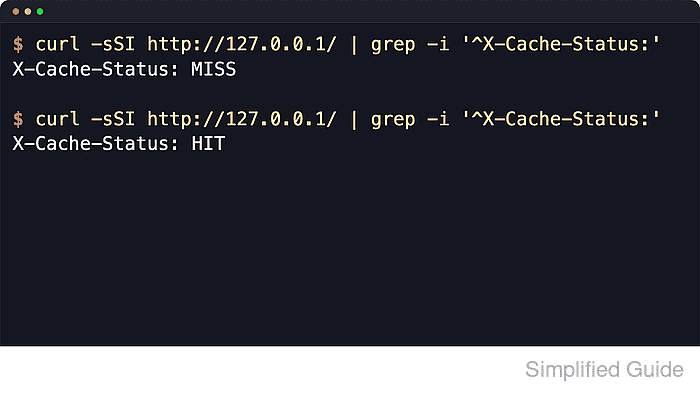
- Make the first anonymous request to a cacheable URL and confirm the response is a cache MISS.
$ curl -sS -D - http://127.0.0.1/ -o /dev/null
HTTP/1.1 200 OK
Server: nginx/1.28.3 (Ubuntu)
Date: Sat, 06 Jun 2026 11:49:33 GMT
Content-Type: text/plain
Content-Length: 18
Connection: keep-alive
X-Cache-Status: MISS
Use the real site hostname when /127.0.0.1/ is not served by the same server_name or virtual host.
- Repeat the same request within the 5-second TTL and confirm it becomes a cache HIT.
$ curl -sS -D - http://127.0.0.1/ -o /dev/null
HTTP/1.1 200 OK
Server: nginx/1.28.3 (Ubuntu)
Date: Sat, 06 Jun 2026 11:49:33 GMT
Content-Type: text/plain
Content-Length: 18
Connection: keep-alive
X-Cache-Status: HIT
When the second request is still MISS, check whether the upstream is returning Set-Cookie, whether the request carries cookies or Authorization, and whether the cache definition file really loads inside the http context.
Tool: HTTP Header Checker
- Send a request with a cookie to verify that personalized traffic bypasses the cache.
$ curl -sS -D - -H 'Cookie: session=1' http://127.0.0.1/ -o /dev/null
HTTP/1.1 200 OK
Server: nginx/1.28.3 (Ubuntu)
Date: Sat, 06 Jun 2026 11:49:33 GMT
Content-Type: text/plain
Content-Length: 18
Connection: keep-alive
X-Cache-Status: BYPASS
If this request returns HIT, the bypass rules are incomplete and the page should not be considered safe to microcache yet.
- Confirm that cached objects are being written to disk.
$ sudo find /var/cache/nginx/microcache -type f
/var/cache/nginx/microcache/1/67/c14e39809f55f159475c12f9b06ba671
The cache file names are hashed from the cache key, so the filenames themselves are not human-readable.

Mohd Shakir Zakaria is a cloud architect with deep roots in software development and open-source advocacy. Certified in AWS, Red Hat, VMware, ITIL, and Linux, he specializes in designing and managing robust cloud and on-premises infrastructures.


