Repeat anonymous requests should not force the upstream application to render the same safe-to-share response every time. Proxy caching in Nginx stores eligible upstream responses on local disk, then serves later matching requests from the cache instead of sending each one back to the application server.
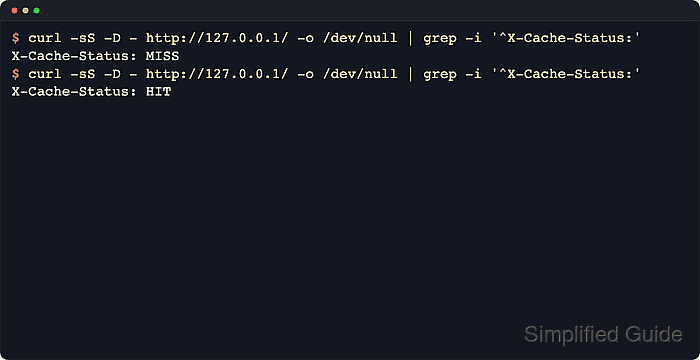
The cache is defined once with proxy_cache_path in the http context, where Nginx sets the disk location and allocates a shared memory zone for cache metadata. A proxied location then enables that zone with proxy_cache, while proxy_cache_valid supplies fallback TTL rules and $upstream_cache_status shows whether a request was a cache MISS, HIT, or intentional BYPASS.
Caching must stay aligned with how the upstream response varies. Responses with Set-Cookie are not cached by default, while pages that depend on Authorization, locale cookies, tenant headers, or similar per-request inputs need bypass rules or a more specific proxy_cache_key to avoid serving the wrong content. Examples below use a packaged Linux layout with /etc/nginx/conf.d/, /etc/nginx/nginx.conf/, and the nginx systemd unit; when systemd is not managing the daemon, reload with sudo nginx -s reload instead.
Related: How to improve Nginx performance
Related: How to configure Nginx as a reverse proxy
Tool: Cache TTL Hit Rate Calculator
Steps to enable caching in Nginx:
- Create a cache directory that the Nginx worker user can write to.
$ sudo install -d -m 0750 -o www-data -g www-data /var/cache/nginx/proxy_cache
Use the worker account for the local package, which is commonly www-data on Debian and Ubuntu and nginx on Red Hat-family systems.
- Create /etc/nginx/conf.d/proxy-cache.conf with the cache zone definition. On packaged installs, files in /etc/nginx/conf.d/ are usually included from the main http block automatically.
proxy_cache_path /var/cache/nginx/proxy_cache levels=1:2 keys_zone=page_cache:10m max_size=1g inactive=60m use_temp_path=off;
keys_zone=page_cache:10m names the shared cache and reserves metadata memory, while inactive=60m removes cache files that go unused for an hour even if they have not reached their TTL yet.
If the local package does not include /etc/nginx/conf.d/*.conf from the http block, place proxy_cache_path directly inside the http { … } section of /etc/nginx/nginx.conf.
- Enable the cache in the proxied location block and add explicit bypass rules for authenticated or session-bound traffic.
location / {
    proxy_pass http://127.0.0.1:8080;

    proxy_cache page_cache;
    proxy_cache_valid 200 301 302 10m;
    proxy_cache_valid 404 1m;

    proxy_cache_bypass $http_authorization $cookie_session;
    proxy_no_cache $http_authorization $cookie_session;

    add_header X-Cache-Status $upstream_cache_status always;
}
Upstream X-Accel-Expires, Cache-Control, and Expires headers can override or disable the fallback TTLs set by proxy_cache_valid.
Responses that vary by request headers, locale cookies, or tenant selection still need a matching proxy_cache_key or cache bypass rules, even when the URL stays the same.
- Test the updated Nginx configuration before reloading the daemon.
$ sudo nginx -t
nginx: the configuration file /etc/nginx/nginx.conf syntax is ok
nginx: configuration file /etc/nginx/nginx.conf test is successful
Related: How to test Nginx configuration
- Reload Nginx so the new cache zone and location settings take effect.
$ sudo systemctl reload nginx
Use sudo nginx -s reload when the daemon is running without systemd, such as in some containers or hand-started test environments.
Related: How to manage the Nginx service
- Send the first anonymous request to fill the cache.
$ curl -sS -D - http://127.0.0.1/ -o /dev/null
HTTP/1.1 200 OK
Server: nginx/1.28.3 (Ubuntu)
Date: Sat, 06 Jun 2026 03:39:04 GMT
Content-Type: text/plain
Content-Length: 11
Connection: keep-alive
X-Cache-Status: MISS
MISS means Nginx forwarded the request to the upstream and stored the cacheable response for later matching requests.
- Repeat the same anonymous request and confirm that Nginx serves it from cache.
$ curl -sS -D - http://127.0.0.1/ -o /dev/null
HTTP/1.1 200 OK
Server: nginx/1.28.3 (Ubuntu)
Date: Sat, 06 Jun 2026 03:39:04 GMT
Content-Type: text/plain
Content-Length: 11
Connection: keep-alive
X-Cache-Status: HIT
HIT confirms that the location is storing and reusing cacheable upstream responses.
- Send an authenticated request and confirm that it bypasses the shared cache.
$ curl -sS -D - -H 'Authorization: Bearer example-token' http://127.0.0.1/ -o /dev/null
HTTP/1.1 200 OK
Server: nginx/1.28.3 (Ubuntu)
Date: Sat, 06 Jun 2026 03:39:04 GMT
Content-Type: text/plain
Content-Length: 11
Connection: keep-alive
X-Cache-Status: BYPASS
If this request returns HIT, the bypass rules are incomplete and authenticated traffic may receive a shared cached response.

Mohd Shakir Zakaria is a cloud architect with deep roots in software development and open-source advocacy. Certified in AWS, Red Hat, VMware, ITIL, and Linux, he specializes in designing and managing robust cloud and on-premises infrastructures.


