When a Certbot-managed site serves an expired certificate, browsers and API clients reject HTTPS before the application can answer. The failure can come from an expired local lineage, a renewal path that stopped working, or a web server that still serves old certificate files after Certbot has already written a replacement.
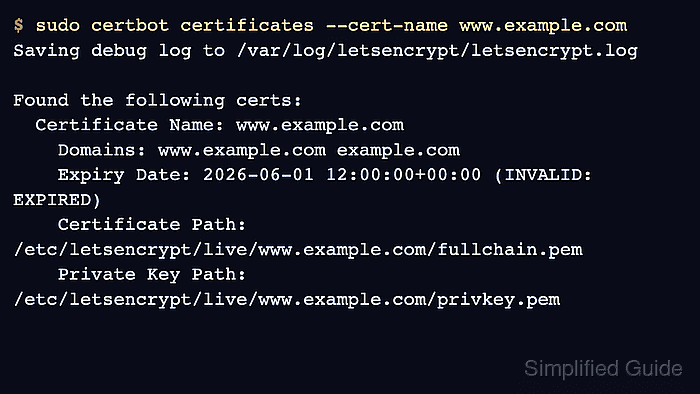
Certbot stores each managed certificate lineage under /etc/letsencrypt/live/ and records renewal settings under /etc/letsencrypt/renewal/. The local certbot certificates output shows what Certbot owns, while an external OpenSSL check shows the certificate that clients actually receive from Nginx, Apache, a load balancer, or a CDN.
Recover the site by comparing the public endpoint, the local lineage, the renewal dry run, and the TLS service reload boundary. Avoid repeated production retries while DNS, firewall, webroot, plugin, or hook failures remain unresolved because failed authorizations and duplicate orders can consume rate limits before the actual problem is fixed.
Related: List Certbot certificates
Related: Test Certbot certificate renewal
Related: Check the Certbot renewal timer
Steps to troubleshoot an expired Certbot certificate:
- Confirm that the public HTTPS endpoint is serving an expired certificate.
$ echo | openssl s_client -connect www.example.com:443 -servername www.example.com 2>/dev/null | openssl x509 -noout -subject -issuer -dates
subject=CN=www.example.com
issuer=C=US, O=Let's Encrypt, CN=E7
notBefore=Mar  3 12:00:00 2026 GMT
notAfter=Jun  1 12:00:00 2026 GMT
Run the check against the hostname users reach. If a CDN, load balancer, or reverse proxy terminates TLS, this result belongs to that layer and may not match the local Certbot host yet.
Tool: SSL Expiry Checker - List the Certbot lineage that should cover the hostname.
$ sudo certbot certificates --cert-name www.example.com
Saving debug log to /var/log/letsencrypt/letsencrypt.log

Found the following certs:
  Certificate Name: www.example.com
    Domains: www.example.com example.com
    Expiry Date: 2026-06-01 12:00:00+00:00 (INVALID: EXPIRED)
    Certificate Path: /etc/letsencrypt/live/www.example.com/fullchain.pem
    Private Key Path: /etc/letsencrypt/live/www.example.com/privkey.pem
Use the exact Certificate Name with --cert-name in later commands. If Certbot reports no matching certificate, run the check on the host or container that owns /etc/letsencrypt/ before creating a new lineage.
Related: List Certbot certificates - Check the local certificate file when the public endpoint and Certbot listing disagree.
$ sudo openssl x509 -in /etc/letsencrypt/live/www.example.com/fullchain.pem -noout -subject -issuer -dates
subject=CN=www.example.com
issuer=C=US, O=Let's Encrypt, CN=E7
notBefore=Jun 12 00:00:00 2026 GMT
notAfter=Sep 10 23:59:59 2026 GMT
If the local file is valid but the public endpoint is expired, do not request another production certificate yet. Reload the service or inspect the load balancer, CDN, virtual host, or certificate path that is still serving the old file.
Related: Check a Certbot certificate chain - Reload the TLS service when Certbot already has a newer certificate file.
$ sudo systemctl reload nginx
Use the service that terminates TLS for the hostname, such as nginx, apache2, haproxy, or an application-specific reload command.
Related: Manage the Nginx service
Related: Manage the Apache service - Run a renewal dry run for the expired lineage.
$ sudo certbot renew --cert-name www.example.com --dry-run
Saving debug log to /var/log/letsencrypt/letsencrypt.log
Processing /etc/letsencrypt/renewal/www.example.com.conf
Simulating renewal of an existing certificate for www.example.com and example.com

Certbot failed to authenticate some domains (authenticator: webroot). The Certificate Authority reported these problems:
  Domain: www.example.com
  Type:   unauthorized
  Detail: 203.0.113.10: Invalid response from http://www.example.com/.well-known/acme-challenge/token: 404
--dry-run tests the renewal flow against staging and does not replace the active production certificate. Web server plugins may still make temporary configuration changes and reload the server during the test.
Related: Test Certbot certificate renewalTreat the first dry-run failure as the blocker to fix. Repeating the same live renewal before the dry run succeeds can consume production validation attempts without restoring service.
- Fix the challenge path named by the dry run.
For HTTP-01, check public DNS, port 80 reachability, redirects, the active webroot, and hidden-directory rules for /.well-known/acme-challenge/. For DNS-01, fix the TXT record name, token value, delegated zone, API credentials, or propagation delay. For standalone, make sure another process is not already binding the required validation port.
Related: Use a webroot challenge with Certbot
Related: Use a DNS challenge with Certbot - Re-run the dry run after the failing signal is fixed.
$ sudo certbot renew --cert-name www.example.com --dry-run
Saving debug log to /var/log/letsencrypt/letsencrypt.log
Processing /etc/letsencrypt/renewal/www.example.com.conf
Simulating renewal of an existing certificate for www.example.com and example.com

Congratulations, all simulated renewals succeeded:
  /etc/letsencrypt/live/www.example.com/fullchain.pem (success)
A successful dry run proves that Certbot can load the lineage, reuse the saved authenticator, complete validation, and finish renewal hooks against staging.
- Renew the production certificate once after the dry run succeeds.
$ sudo certbot renew --cert-name www.example.com
Saving debug log to /var/log/letsencrypt/letsencrypt.log
Processing /etc/letsencrypt/renewal/www.example.com.conf
Renewing an existing certificate for www.example.com and example.com

Successfully renewed certificate for www.example.com.
Use --force-renewal only when Certbot says the certificate is not due but you intentionally need a new production certificate. An expired lineage is already due for renewal.
- Confirm that Certbot now has a valid certificate for the lineage.
$ sudo certbot certificates --cert-name www.example.com Saving debug log to /var/log/letsencrypt/letsencrypt.log Found the following certs: Certificate Name: www.example.com Domains: www.example.com example.com Expiry Date: 2026-09-10 23:59:59+00:00 (VALID: 89 days) Certificate Path: /etc/letsencrypt/live/www.example.com/fullchain.pem Private Key Path: /etc/letsencrypt/live/www.example.com/privkey.pem - Reload the TLS service after the production renewal.
$ sudo systemctl reload nginx
When renewals commonly succeed but clients keep seeing the old certificate, add a deploy hook that reloads the service after successful renewals.
Related: Reload Apache after Certbot renewal
Related: Reload Nginx after Certbot renewal - Retest the public endpoint and confirm that clients receive the renewed certificate.
$ openssl s_client -brief -connect www.example.com:443 -servername www.example.com -verify_hostname www.example.com </dev/null
Connecting to 203.0.113.10
CONNECTION ESTABLISHED
Protocol version: TLSv1.3
Peer certificate: CN=www.example.com
Verification: OK
Verified peername: www.example.com
DONE
If this still reports the old expiry, inspect the listener that terminates TLS before issuing another certificate. The stale layer may be a different server block, IPv6 listener, proxy, load balancer, CDN edge, or application-specific certificate store.
- Check the renewal scheduler after service is restored.
$ systemctl list-timers --all '*certbot*'
NEXT                        LEFT     LAST                        PASSED UNIT          ACTIVATES
Fri 2026-06-12 12:33:10 UTC 4h 12min Fri 2026-06-12 00:18:42 UTC 8h ago certbot.timer certbot.service
The incident is not fully closed until the scheduled renewal path is enabled, the next trigger is visible, and a dry-run renewal succeeds for the affected lineage.
Related: Check the Certbot renewal timer

Mohd Shakir Zakaria is a cloud architect with deep roots in software development and open-source advocacy. Certified in AWS, Red Hat, VMware, ITIL, and Linux, he specializes in designing and managing robust cloud and on-premises infrastructures.


