A Certbot DNS challenge proves domain control by publishing a temporary TXT record instead of serving a token from the web server. Use it when port 80 cannot be exposed, when the origin is private, or when the certificate order includes a name that cannot use HTTP-01 validation.
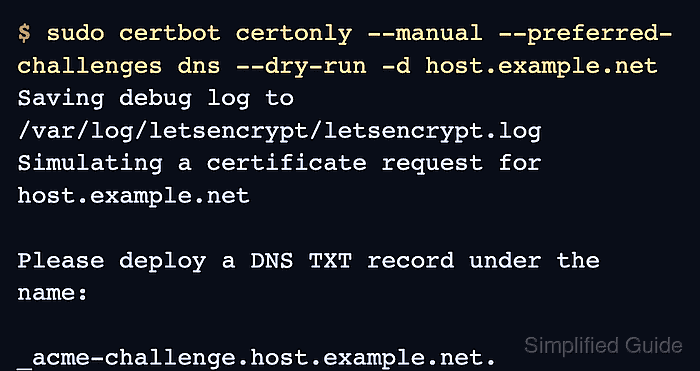
The manual DNS flow is deliberately interactive. Certbot prints the exact record name and value for the current ACME order, waits while you publish and verify the record, then continues only after you press Enter.
The manual challenge path fits one-time issuance and controlled break-glass work. For repeatable unattended renewal, use a provider DNS plugin or manual auth and cleanup hooks so the TXT record can be created and removed automatically.
Steps to use a Certbot DNS challenge:
- Open a terminal on the host where Certbot will store the certificate lineage.
- Install Certbot and DNS lookup tools.
$ sudo apt install --assume-yes certbot dnsutils
Reading package lists... Done
Building dependency tree... Done
The following NEW packages will be installed:
  certbot dnsutils
##### snipped #####
Setting up certbot ...
Use the package manager that matches the server. The example uses the Debian and Ubuntu APT package layout.
- Confirm that Certbot supports the manual authenticator and DNS challenge option.
$ certbot --help all ##### snipped ##### manual: Authenticate through manual configuration or custom shell scripts. ##### snipped ##### --preferred-challenges PREF_CHALLS A sorted, comma delimited list of the preferred challenge to use during authorization ##### snipped ##### - Decide which identifier the DNS challenge will validate.
Certificate identifier: host.example.net
Expected TXT owner: _acme-challenge.host.example.net
For a wildcard certificate such as *.example.net, the DNS-01 owner is based on the parent name, so the TXT record goes under _acme-challenge.example.net instead of a name containing the literal asterisk.
- Rehearse the request against the staging ACME service.
$ sudo certbot certonly \
  --manual \
  --preferred-challenges dns \
  --dry-run \
  --agree-tos \
  --email admin@example.net \
  --no-eff-email \
  -d host.example.net
Saving debug log to /var/log/letsencrypt/letsencrypt.log
Simulating a certificate request for host.example.net

Please deploy a DNS TXT record under the name:

_acme-challenge.host.example.net.

with the following value:

<validation-string-from-certbot>

Before continuing, verify the TXT record has been deployed.
Do not reuse an old TXT value. Each ACME order can produce a new value, and Certbot validates the value shown in the current prompt.
- Publish the TXT record in the authoritative DNS provider for the zone.
_acme-challenge.host.example.net. 300 IN TXT "<validation-string-from-certbot>"
Publish only the value from the active Certbot prompt. Remove stale validation strings from older attempts unless another active order still needs them.
- Check that public DNS resolvers can see the TXT value before continuing.
$ dig +short TXT _acme-challenge.host.example.net
"<validation-string-from-certbot>"
DNS providers, split-horizon views, and delegated validation zones can show different answers from different resolver locations. The ACME DNS Challenge Readiness Check can compare the expected value and DNS route before you let Certbot continue.
Tool: ACME DNS Challenge Readiness Check - Press Enter in the waiting Certbot session after the record is visible.
Press Enter to Continue
Waiting for verification...
The dry run was successful.
If Certbot reports NXDOMAIN, No TXT record found, or a mismatched value, leave the certificate request failed, fix the DNS owner or value, and start a fresh request so the prompt and TXT value match.
- Request the production certificate after the staging run succeeds.
$ sudo certbot certonly \
  --manual \
  --preferred-challenges dns \
  --agree-tos \
  --email admin@example.net \
  --no-eff-email \
  -d host.example.net
Saving debug log to /var/log/letsencrypt/letsencrypt.log
Requesting a certificate for host.example.net
Successfully received certificate.
Certificate is saved at: /etc/letsencrypt/live/host.example.net/fullchain.pem
Key is saved at:         /etc/letsencrypt/live/host.example.net/privkey.pem
The production request produces its own TXT value, so repeat the publish, verify, and continue sequence for the live order.
- Confirm that Certbot saved the certificate lineage.
$ sudo certbot certificates --cert-name host.example.net Saving debug log to /var/log/letsencrypt/letsencrypt.log Found the following certs: Certificate Name: host.example.net Domains: host.example.net Expiry Date: 2026-09-10 14:20:00+00:00 (VALID: 89 days) Certificate Path: /etc/letsencrypt/live/host.example.net/fullchain.pem Private Key Path: /etc/letsencrypt/live/host.example.net/privkey.pem - Record the renewal boundary for the manual certificate.
$ sudo certbot renew --cert-name host.example.net --dry-run
Saving debug log to /var/log/letsencrypt/letsencrypt.log
Processing /etc/letsencrypt/renewal/host.example.net.conf
PluginError: An authentication script must be provided with --manual-auth-hook when using the manual plugin non-interactively.
Manual DNS certificates are not safe to leave on unattended renewal unless an auth hook and cleanup hook, or a provider DNS plugin, can update the TXT record without an operator. For normal recurring certificates, use a DNS provider plugin instead.
- Remove the temporary TXT record after the certificate request finishes.
_acme-challenge.host.example.net. 300 IN TXT "<validation-string-from-certbot>" # remove after validation
Certbot cannot remove a manually created DNS record. Clean up stale values so future checks show only active validation records.

Mohd Shakir Zakaria is a cloud architect with deep roots in software development and open-source advocacy. Certified in AWS, Red Hat, VMware, ITIL, and Linux, he specializes in designing and managing robust cloud and on-premises infrastructures.


