A Certbot-managed site can hold a fresh certificate file but still fail TLS validation when the web server serves only the leaf certificate, the wrong certificate name, or an incomplete intermediate chain. Checking the chain from both the Certbot lineage and the public HTTPS endpoint catches that gap before browsers and API clients report trust errors.
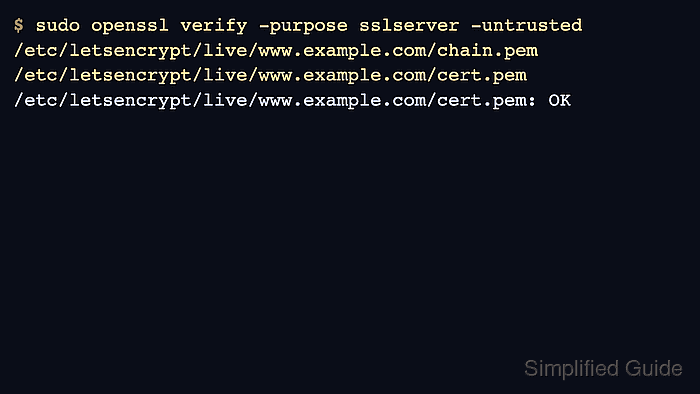
Certbot stores each lineage under a matching live directory such as /etc/letsencrypt/live/www.example.com/ with cert.pem, chain.pem, fullchain.pem, and privkey.pem. certbot certificates identifies the certificate name and live paths, while openssl verify checks whether the leaf certificate can build through the intermediate certificates in chain.pem to a trusted CA.
The final check should connect to the hostname users reach, not only inspect files on disk, because Apache, Nginx, load balancers, and CDNs can serve different certificate material than the current Certbot lineage. Use a shell that can read /etc/letsencrypt/live/, and replace www.example.com with the exact hostname shown on the certificate.
Related: How to list Certbot certificates
Related: How to test Certbot certificate renewal
Tool: SSL Certificate Chain Checker
Steps to check a Certbot certificate chain:
- List the Certbot certificate that should serve the hostname.
$ sudo certbot certificates
Saving debug log to /var/log/letsencrypt/letsencrypt.log

- - - - - - - - - - - - - - - - - - - - - - - - - - - - - - - - - - - - - - - -
Found the following certs:
  Certificate Name: www.example.com
    Serial Number: 1a18e1444bdfadca6c4c0dfd2986d94682cb770c
    Key Type: RSA
    Domains: www.example.com example.com
    Expiry Date: 2026-09-08 20:22:55+00:00 (VALID: 88 days)
    Certificate Path: /etc/letsencrypt/live/www.example.com/fullchain.pem
    Private Key Path: /etc/letsencrypt/live/www.example.com/privkey.pem
- - - - - - - - - - - - - - - - - - - - - - - - - - - - - - - - - - - - - - - -
The Certificate Path points at fullchain.pem. The matching cert.pem and chain.pem files normally sit in the same live directory for that lineage.
- Verify the local leaf certificate against Certbot's intermediate chain.
$ sudo openssl verify -purpose sslserver -untrusted /etc/letsencrypt/live/www.example.com/chain.pem /etc/letsencrypt/live/www.example.com/cert.pem
/etc/letsencrypt/live/www.example.com/cert.pem: OK
OK means OpenSSL built a server-certificate chain from cert.pem through chain.pem to a trusted CA in the host trust store. For a private CA, add the relevant trusted root with OpenSSL's CA options instead of treating a trust-store error as a Certbot renewal problem.
- Inspect the certificate order inside fullchain.pem.
$ sudo openssl crl2pkcs7 -nocrl -certfile /etc/letsencrypt/live/www.example.com/fullchain.pem | openssl pkcs7 -print_certs -noout
subject=CN=www.example.com
issuer=C=US, O=Example Trust, CN=Example Intermediate CA

subject=C=US, O=Example Trust, CN=Example Intermediate CA
issuer=C=US, O=Example Trust, CN=Example Root CA
The first subject should be the site certificate, followed by the intermediate certificate or certificates. The trusted root is usually not served in a public HTTPS chain.
- Check the chain served by the HTTPS endpoint.
$ openssl s_client -connect www.example.com:443 -servername www.example.com -verify_hostname www.example.com -verify_return_error </dev/null
Connecting to www.example.com
CONNECTED(00000003)
---
Certificate chain
 0 s:CN=www.example.com
   i:C=US, O=Example Trust, CN=Example Intermediate CA
 1 s:C=US, O=Example Trust, CN=Example Intermediate CA
   i:C=US, O=Example Trust, CN=Example Root CA
##### snipped #####
Verification: OK
Verified peername: www.example.com
Verify return code: 0 (ok)
If the local files verify but the served endpoint does not, inspect the web server, load balancer, or CDN certificate setting before replacing the certificate. A common cause is a server block pointing at cert.pem instead of fullchain.pem, or a service that was not reloaded after renewal.

Mohd Shakir Zakaria is a cloud architect with deep roots in software development and open-source advocacy. Certified in AWS, Red Hat, VMware, ITIL, and Linux, he specializes in designing and managing robust cloud and on-premises infrastructures.


