A Certbot host can hold several certificate lineages, and guessing from the web server hostname can send renewal tests, deletes, or reconfiguration commands to the wrong certificate. Listing the local lineages first shows the Certbot certificate name, covered domains, expiry status, key type, and live file paths before another command changes anything.
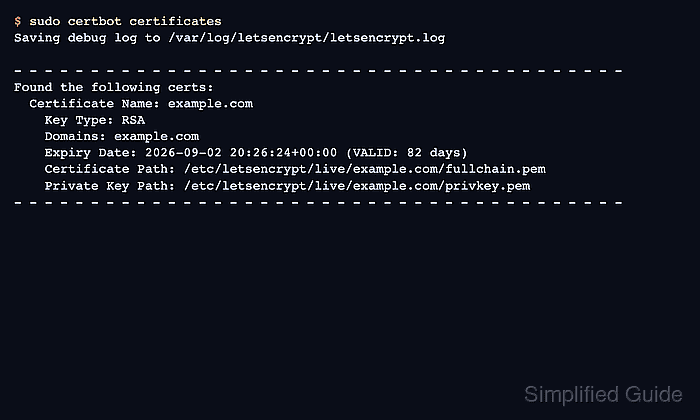
The certbot certificates command reads the local Certbot configuration and renewal files. It does not contact the ACME server, issue a new certificate, renew an existing one, reload a web server, or prove that every listed certificate is currently installed in Nginx, Apache, or another TLS service.
Run the check on the server and configuration tree that owns the certificates. Default package installs usually use the system Certbot directory, but containerized or non-default deployments can keep a separate tree; an empty result only means that Certbot found no managed lineages in the selected configuration.
Related: Test Certbot certificate renewal
Related: Check a Certbot certificate chain
Related: Check the Certbot renewal timer
Steps to list Certbot certificates:
- List the certificate lineages known to the default Certbot configuration.
$ sudo certbot certificates
Saving debug log to /var/log/letsencrypt/letsencrypt.log

- - - - - - - - - - - - - - - - - - - - - - - - - - - - - - - - - - - - - - - -
Found the following certs:
  Certificate Name: www.example.com
    Serial Number: 17699cf16e54efde12974db19194243112617902
    Key Type: RSA
    Domains: www.example.com example.com
    Expiry Date: 2026-09-02 00:14:39+00:00 (VALID: 75 days)
    Certificate Path: /etc/letsencrypt/live/www.example.com/fullchain.pem
    Private Key Path: /etc/letsencrypt/live/www.example.com/privkey.pem
- - - - - - - - - - - - - - - - - - - - - - - - - - - - - - - - - - - - - - - -
Certificate Name is the lineage name to pass to commands such as --cert-name www.example.com. Domains lists the names inside that certificate, and Expiry Date shows whether the local certificate is still valid.
- Check the intended lineage by name before using that name in a renewal, reconfigure, revoke, or delete command.
$ sudo certbot certificates --cert-name www.example.com
Saving debug log to /var/log/letsencrypt/letsencrypt.log

- - - - - - - - - - - - - - - - - - - - - - - - - - - - - - - - - - - - - - - -
Found the following matching certs:
  Certificate Name: www.example.com
    Serial Number: 17699cf16e54efde12974db19194243112617902
    Key Type: RSA
    Domains: www.example.com example.com
    Expiry Date: 2026-09-02 00:14:39+00:00 (VALID: 75 days)
    Certificate Path: /etc/letsencrypt/live/www.example.com/fullchain.pem
    Private Key Path: /etc/letsencrypt/live/www.example.com/privkey.pem
- - - - - - - - - - - - - - - - - - - - - - - - - - - - - - - - - - - - - - - -
Use the exact value after Certificate Name, not a domain alias that happens to appear in the Domains line.
- List certificates from a non-default Certbot configuration tree when renewals are containerized or stored outside /etc/letsencrypt.
$ sudo certbot certificates --config-dir /srv/certbot/config --work-dir /srv/certbot/work --logs-dir /srv/certbot/logs
Saving debug log to /srv/certbot/logs/letsencrypt.log

- - - - - - - - - - - - - - - - - - - - - - - - - - - - - - - - - - - - - - - -
Found the following certs:
  Certificate Name: app.example.net
    Key Type: ECDSA
    Domains: app.example.net
    Expiry Date: 2026-09-14 08:19:07+00:00 (VALID: 94 days)
    Certificate Path: /srv/certbot/config/live/app.example.net/fullchain.pem
    Private Key Path: /srv/certbot/config/live/app.example.net/privkey.pem
- - - - - - - - - - - - - - - - - - - - - - - - - - - - - - - - - - - - - - - -
Match the same custom directories used by the renewal job. Listing the default path on the host can miss certificates managed by a container, deployment user, or separate ACME server configuration.
- Treat an empty list as a configuration-scope result, not proof that the server has no TLS certificate.
$ sudo certbot certificates
Saving debug log to /var/log/letsencrypt/letsencrypt.log

- - - - - - - - - - - - - - - - - - - - - - - - - - - - - - - - - - - - - - - -
No certificates found.
- - - - - - - - - - - - - - - - - - - - - - - - - - - - - - - - - - - - - - - -
If the site still serves HTTPS, check whether another Certbot config tree, another ACME client, a hosting control panel, or manually installed certificate files own the active certificate.
- Use the listed file path when a separate certificate inspection is needed.
$ sudo openssl x509 -in /etc/letsencrypt/live/www.example.com/fullchain.pem -noout -subject -issuer -dates
subject=CN = www.example.com
issuer=C = US, O = Let's Encrypt, CN = E7
notBefore=Jun 11 19:26:24 2026 GMT
notAfter=Sep  2 20:26:24 2026 GMT
Related: Check a Certbot certificate chain
Tool: SSL Certificate Chain Checker

Mohd Shakir Zakaria is a cloud architect with deep roots in software development and open-source advocacy. Certified in AWS, Red Hat, VMware, ITIL, and Linux, he specializes in designing and managing robust cloud and on-premises infrastructures.


