Renewed Certbot certificate files do not change the certificate already opened by a long-running Nginx worker. Add a deploy hook so Nginx validates its configuration and reloads only after Certbot has successfully renewed a certificate lineage.
A deploy hook is the right Certbot phase for a web server reload because it runs after a successful obtain or renewal event. A post hook can run after any renewal attempt, and a plain certbot renew exit status can be zero even when no certificate changed, so attach reload behavior to the deploy phase instead of a wrapper that guesses from the exit code.
The commands below use packaged Linux hosts where Nginx already serves certificate files from /etc/letsencrypt/live/. The hook tests Nginx before sending a reload signal; a broken config should stop the hook before the running service is asked to re-read files.
Related: Test Certbot certificate renewal
Related: Configure a Certbot renewal hook
Related: Manage the Nginx service
Steps to reload Nginx after Certbot renewal:
- Confirm that the Nginx service is running before wiring the renewal hook.
$ systemctl is-active nginx
active
If Nginx is not active, fix the service state first. A renewal hook should reload an already-running server after certificate files change, not hide a stopped or failed service.
Related: Manage the Nginx service
- Test the current Nginx configuration.
$ sudo nginx -t
nginx: the configuration file /etc/nginx/nginx.conf syntax is ok
nginx: configuration file /etc/nginx/nginx.conf test is successful
The hook should use the same config test before reloading. A clean parse confirms syntax and referenced files, but it does not prove that every backend, DNS name, or public listener is reachable.
Related: Test Nginx configuration
- Create the Certbot deploy-hook directory if it does not already exist.
$ sudo install -d -m 755 /etc/letsencrypt/renewal-hooks/deploy
Executable files in /etc/letsencrypt/renewal-hooks/deploy/ run after successful renewals. Use /etc/letsencrypt/renewal-hooks/post/ only for work that should run after a renewal attempt finishes, including failed attempts.
- Create the Nginx reload hook file.
$ sudoedit /etc/letsencrypt/renewal-hooks/deploy/reload-nginx.sh
- reload-nginx.sh
#!/bin/sh
set -eu

/usr/sbin/nginx -t
/usr/sbin/nginx -s reload
nginx -s reload sends the reload signal to the running Nginx master process. If local policy requires all service actions through systemd, replace the last line with /bin/systemctl reload nginx after confirming it works from unattended renewal runs.
- Make the hook executable.
$ sudo chmod 755 /etc/letsencrypt/renewal-hooks/deploy/reload-nginx.sh
- Run the hook manually before waiting for a real renewal.
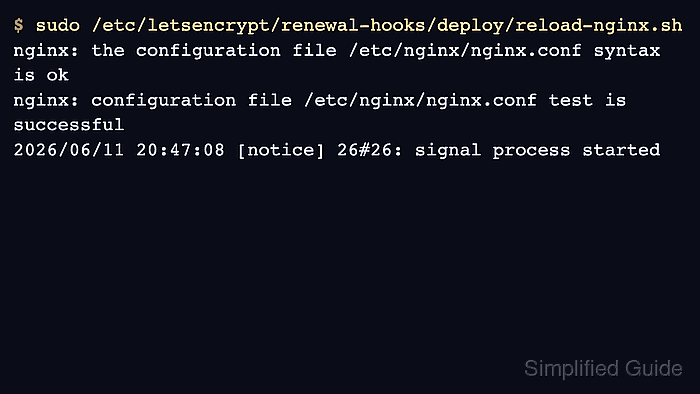
$ sudo /etc/letsencrypt/renewal-hooks/deploy/reload-nginx.sh
nginx: the configuration file /etc/nginx/nginx.conf syntax is ok
nginx: configuration file /etc/nginx/nginx.conf test is successful
2026/06/17 23:50:56 [notice] 2880#2880: signal process started
The signal process started line confirms that Nginx accepted the reload signal. If the command exits before that line, fix the config test or service state before testing Certbot renewal.
- Confirm that Nginx stayed active after the manual hook test.
$ systemctl is-active nginx
active
If the service is not active after the hook runs, inspect the Nginx journal before relying on scheduled renewals.
- Test the renewal path with deploy hooks enabled for the dry run.
$ sudo certbot renew --cert-name www.example.com --dry-run --run-deploy-hooks
Saving debug log to /var/log/letsencrypt/letsencrypt.log

Processing /etc/letsencrypt/renewal/www.example.com.conf

Simulating renewal of an existing certificate for www.example.com and example.com

Congratulations, all simulated renewals succeeded:
  /etc/letsencrypt/live/www.example.com/fullchain.pem (success)
Certbot dry runs do not run deploy hooks by default. The --run-deploy-hooks option makes a successful dry run execute applicable deploy hooks using the current active certificate files, not the temporary staging certificate.
Related: Test Certbot certificate renewal
- Confirm that the public site presents the renewed certificate after a real renewal.
$ openssl s_client -servername www.example.com \
  -connect www.example.com:443 </dev/null 2>/dev/null | \
  openssl x509 -noout -subject -dates
subject=CN=www.example.com
notBefore=Jun 12 00:00:00 2026 GMT
notAfter=Sep 10 23:59:59 2026 GMT
Check the hostname and listener that users actually reach. CDNs, load balancers, IPv6 records, shared listeners, and stale edge nodes can serve a different certificate than the local Nginx process.
Tool: SSL Expiry Checker

Mohd Shakir Zakaria is a cloud architect with deep roots in software development and open-source advocacy. Certified in AWS, Red Hat, VMware, ITIL, and Linux, he specializes in designing and managing robust cloud and on-premises infrastructures.


