How to secure a PostgreSQL server
A PostgreSQL server can look private from the application side while still accepting weak authentication, broad network listeners, or overpowered roles. Securing the server means checking the listener, host-based authentication, password storage, transport encryption, role attributes, object grants, extension surface, audit logging, storage protection, and restore coverage as one chain.
The running server can report its active configuration files and loaded settings through SQL, so start with runtime state instead of assuming a package layout or copied path. pg_hba.conf rules are evaluated in order, password hashes follow the current password_encryption setting only when passwords are set or reset, and object access combines direct grants, role memberships, and privileges granted to PUBLIC.
Apply fixes one layer at a time and keep a working administrative session open while changing access rules. A narrow listener, strong authentication, TLS, and least-privilege roles reduce exposure, but backup restore tests and protected storage still matter because security work is incomplete if the cluster cannot be recovered after a mistake or compromise.
Steps to secure a PostgreSQL server:
- Check the running PostgreSQL server version before applying hardening changes.
$ sudo -u postgres psql -Atc "SHOW server_version;"
18.4 (Ubuntu 18.4-0ubuntu0.26.04.1)
Plan major-version upgrades with a rollback path and a maintenance window.
Related: How to upgrade PostgreSQL safely
- Identify the active postgresql.conf file used by the cluster.
$ sudo -u postgres psql -Atc "SHOW config_file;"
/etc/postgresql/18/main/postgresql.conf
Runtime settings shown by SHOW reflect the loaded configuration, not just file contents.
- Identify the active pg_hba.conf file used by the cluster.
$ sudo -u postgres psql -Atc "SHOW hba_file;"
/etc/postgresql/18/main/pg_hba.conf
A wrong rule in pg_hba.conf can block remote administration and force console-only recovery.
- Check the core connection, password, TLS, and logging settings.
$ sudo -u postgres psql -P pager=off -c "SELECT name, setting FROM pg_settings WHERE name IN ('listen_addresses', 'password_encryption', 'ssl', 'log_connections') ORDER BY name;"
        name         |    setting
---------------------+---------------
 listen_addresses    | localhost
 log_connections     | on
 password_encryption | scram-sha-256
 ssl                 | on
(4 rows)
Keep listen_addresses as narrow as possible, use scram-sha-256 for new password hashes, enable TLS for network clients, and enable connection logging when audit records are required.
- Review parsed host-based authentication rules.
$ sudo -u postgres psql -P pager=off -c "SELECT type, address, auth_method FROM pg_hba_file_rules WHERE error IS NULL ORDER BY line_number;"
 type  |  address  |  auth_method
-------+-----------+---------------
 local |           | peer
 local |           | peer
 host  | 127.0.0.1 | scram-sha-256
 host  | ::1       | scram-sha-256
 local |           | peer
 host  | 127.0.0.1 | scram-sha-256
 host  | ::1       | scram-sha-256
(7 rows)
Rules using trust, wide network ranges, or md5 for remote clients need review. The first matching rule is used.
- Confirm a remote application connection negotiates TLS.
$ psql "sslmode=require host=db.example.net user=app_runtime dbname=appdb" -c "\conninfo"
            Connection Information
      Parameter       |         Value
----------------------+------------------------
 Database             | appdb
 Client User          | app_runtime
 Host                 | db.example.net
 Server Port          | 5432
 Options              |
 Protocol Version     | 3.0
 Password Used        | true
 GSSAPI Authenticated | false
 SSL Connection       | true
 SSL Library          | OpenSSL
 SSL Protocol         | TLSv1.3
 SSL Key Bits         | 256
 SSL Cipher           | TLS_AES_256_GCM_SHA384
 SSL Compression      | false
 ALPN                 | postgresql
 Superuser            | off
 Hot Standby          | off
(18 rows)
Use the application host, database name, and role that should use TLS in production.
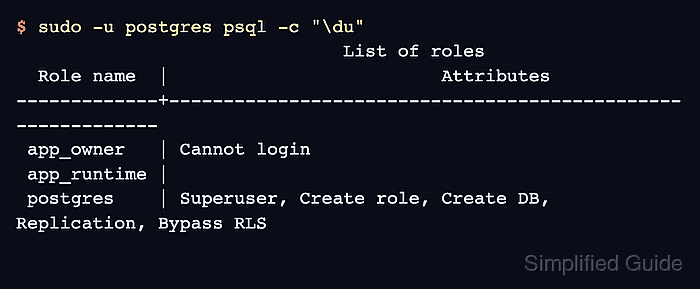
- List roles with elevated attributes.
$ sudo -u postgres psql -c "\du"
                              List of roles
  Role name  |                         Attributes
-------------+------------------------------------------------------------
 app_owner   | Cannot login
 app_runtime |
 postgres    | Superuser, Create role, Create DB, Replication, Bypass RLS
Only operational administrator roles should show Superuser, Create role, Replication, or Bypass RLS.
Related: How to create roles in PostgreSQL
- Inspect privileges on application objects.
$ sudo -u postgres psql appdb -c "\dp app.accounts"
                                    Access privileges
 Schema |   Name   | Type  |      Access privileges       | Column privileges | Policies
--------+----------+-------+------------------------------+-------------------+----------
 app    | accounts | table | app_owner=arwdDxtm/app_owner+|                   |
        |          |       | app_runtime=arwd/app_owner   |                   |
(1 row)
An access line that starts with = represents privileges granted to PUBLIC.
Related: How to grant privileges in PostgreSQL
Related: How to revoke privileges in PostgreSQL - Review default privileges for new application objects.
$ sudo -u postgres psql appdb -c "\ddp"
                Default access privileges
   Owner   | Schema | Type  |     Access privileges
-----------+--------+-------+----------------------------
 app_owner | app    | table | app_runtime=arwd/app_owner
(1 row)
Default privileges prevent new tables or sequences from drifting away from the intended access model.
- Review installed extensions in each application database.
$ sudo -u postgres psql appdb -c "\dx"
                           List of installed extensions
   Name   | Version | Default version |   Schema   |         Description
----------+---------+-----------------+------------+------------------------------
 pgcrypto | 1.4     | 1.4             | public     | cryptographic functions
 plpgsql  | 1.0     | 1.0             | pg_catalog | PL/pgSQL procedural language
(2 rows)
Remove unused extensions and restrict who can install trusted extensions in application databases.
- Identify the data directory that needs host-level storage protection.
$ sudo -u postgres psql -Atc "SHOW data_directory;"
/var/lib/postgresql/18/main
Loss of encryption keys permanently blocks access to the data directory and any backups stored on the encrypted volume.
- List databases that need backup coverage.
$ sudo -u postgres psql -Atc "SELECT datname FROM pg_database WHERE datistemplate = false ORDER BY 1;"
appdb
postgres
Backups belong on storage with restricted access and defined retention, not on the same disk as the database.
- Test restoring a recent backup in a disposable target.
A restore test proves the backup contains the roles, permissions, extensions, and data needed for recovery.