A PostgreSQL role can authenticate successfully and still fail when one access layer is missing. Granting privileges for an application role means covering database connection, schema lookup, object actions, and future objects created by the owner or migration role.
PostgreSQL stores access as role-based privileges on separate object types. The examples below use the database appdb, schema public, object owner appowner, and runtime role appuser, with commands run from a local Linux host as the operating-system postgres account. Managed services use the same SQL through an administrator psql connection instead of sudo -u postgres.
GRANT changes access on existing objects, but it does not transfer ownership, grant the right to drop or alter objects, or prepare future tables and sequences by itself. Use ALTER DEFAULT PRIVILEGES for the role that creates objects in the schema; if migrations run as appowner, target appowner rather than the runtime role.
Related: How to create roles in PostgreSQL \\
Related: How to harden default privileges in PostgreSQL \\
Related: How to revoke privileges in PostgreSQL
Steps to grant privileges in PostgreSQL:
- Confirm the target database, schema, owner role, and runtime role before granting access.
The commands below use appdb, public, appowner, and appuser. Replace them with the database, schema, object-creating role, and application role from the target system.
- Grant database connection permission to the runtime role.
$ sudo -u postgres psql --dbname=postgres --command="GRANT CONNECT ON DATABASE appdb TO appuser;"
GRANT
- Grant schema lookup permission to the runtime role.
$ sudo -u postgres psql --dbname=appdb --command="GRANT USAGE ON SCHEMA public TO appuser;"
GRANT
Granting CREATE on a schema allows the role to create objects inside that schema, which is broader than a normal runtime role needs.
- Grant table privileges on existing tables in the schema.
$ sudo -u postgres psql --dbname=appdb --command="GRANT SELECT, INSERT, UPDATE, DELETE ON ALL TABLES IN SCHEMA public TO appuser;"
GRANT
ALL TABLES also covers existing views and foreign tables in the schema.
- Grant sequence privileges on existing sequences in the schema.
$ sudo -u postgres psql --dbname=appdb --command="GRANT USAGE, SELECT, UPDATE ON ALL SEQUENCES IN SCHEMA public TO appuser;"
GRANT
USAGE allows nextval(), SELECT allows currval(), and UPDATE allows setval() on sequences.
- Grant routine execution on existing routines when the application calls stored functions or procedures.
$ sudo -u postgres psql --dbname=appdb --command="GRANT EXECUTE ON ALL ROUTINES IN SCHEMA public TO appuser;"
GRANT
Use ALL FUNCTIONS on older PostgreSQL releases that do not recognize ALL ROUTINES.
- Set default table privileges for future objects created by the owner role.
$ sudo -u postgres psql --dbname=appdb --command="ALTER DEFAULT PRIVILEGES FOR ROLE appowner IN SCHEMA public GRANT SELECT, INSERT, UPDATE, DELETE ON TABLES TO appuser;"
ALTER DEFAULT PRIVILEGES
The role in FOR ROLE must match the role that creates the objects. In many application databases, that is a migration or owner role rather than the runtime role.
- Set default sequence privileges for future sequences created by the owner role.
$ sudo -u postgres psql --dbname=appdb --command="ALTER DEFAULT PRIVILEGES FOR ROLE appowner IN SCHEMA public GRANT USAGE, SELECT, UPDATE ON SEQUENCES TO appuser;"
ALTER DEFAULT PRIVILEGES
- Set default routine privileges for future routines created by the owner role.
$ sudo -u postgres psql --dbname=appdb --command="ALTER DEFAULT PRIVILEGES FOR ROLE appowner IN SCHEMA public GRANT EXECUTE ON ROUTINES TO appuser;"
ALTER DEFAULT PRIVILEGES
Use ON FUNCTIONS on older PostgreSQL releases that do not recognize ON ROUTINES.
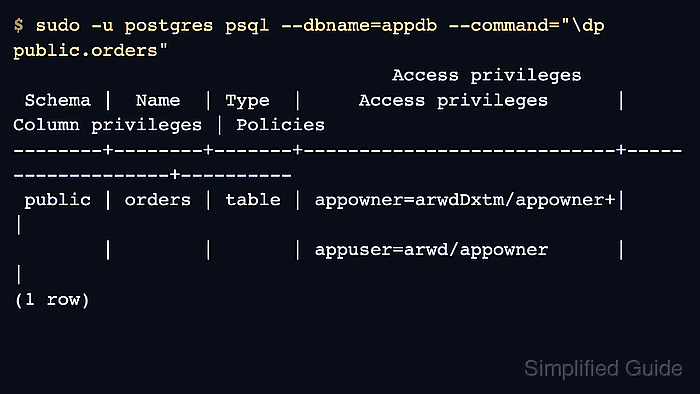
- List table privileges to confirm the runtime role appears in the table ACL.
$ sudo -u postgres psql --dbname=appdb --command="\dp public.orders"
                                  Access privileges
 Schema |  Name  | Type  |     Access privileges      | Column privileges | Policies
--------+--------+-------+----------------------------+-------------------+----------
 public | orders | table | appowner=arwdDxtm/appowner+|                   |
        |        |       | appuser=arwd/appowner      |                   |
(1 row)
For tables, appuser=arwd means INSERT, SELECT, UPDATE, and DELETE were granted to appuser.
- List sequence privileges to confirm identity or serial columns can allocate values.
$ sudo -u postgres psql --dbname=appdb --command="\dp public.orders_order_id_seq" Access privileges Schema | Name | Type | Access privileges | Column privileges | Policies --------+---------------------+----------+-----------------------+-------------------+---------- public | orders_order_id_seq | sequence | appowner=rwU/appowner+| | | | | appuser=rwU/appowner | | (1 row) - List default privileges to confirm future objects inherit the intended grants.
$ sudo -u postgres psql --dbname=appdb --command="\ddp" Default access privileges Owner | Schema | Type | Access privileges ----------+--------+----------+----------------------- appowner | public | function | appuser=X/appowner appowner | public | sequence | appuser=rwU/appowner appowner | public | table | appuser=arwd/appowner (3 rows) - Check the effective privileges for the runtime role.
$ sudo -u postgres psql --dbname=appdb --command="SELECT has_database_privilege('appuser','appdb','CONNECT') AS can_connect, has_schema_privilege('appuser','public','USAGE') AS can_use_schema, has_table_privilege('appuser','public.orders','INSERT') AS can_insert_orders, has_sequence_privilege('appuser','public.orders_order_id_seq','USAGE') AS can_use_order_id;" can_connect | can_use_schema | can_insert_orders | can_use_order_id -------------+----------------+-------------------+------------------ t | t | t | t (1 row) - Run a write smoke test with the runtime role against an object the application should use.
$ psql --host=db.example.net --username=appuser --dbname=appdb --command="INSERT INTO public.orders (customer_name) VALUES ('sample order') RETURNING order_id;"
 order_id
----------
        1
(1 row)

INSERT 0 1
Use a transaction, a staging database, or a disposable test row when a production table must not keep sample data.
- Run a routine smoke test with the runtime role when stored routines are part of the application path.
$ psql --host=db.example.net --username=appuser --dbname=appdb --command="SELECT public.order_count() AS order_count;"
 order_count
-------------
           1
(1 row)

Mohd Shakir Zakaria is a cloud architect with deep roots in software development and open-source advocacy. Certified in AWS, Red Hat, VMware, ITIL, and Linux, he specializes in designing and managing robust cloud and on-premises infrastructures.


