Encrypting client traffic with SSL (TLS) protects database credentials and query results from interception when connections traverse shared networks or untrusted infrastructure.
PostgreSQL negotiates TLS during the connection handshake when ssl is enabled and the server is configured with a certificate (server.crt) plus a private key (server.key). Clients opt in with parameters such as sslmode=require, while access rules in pg_hba.conf can explicitly permit only encrypted sessions by using hostssl entries.
Incorrect certificate paths, permissions, or pg_hba.conf rule ordering can prevent PostgreSQL from starting or can lock out remote clients. The private key must be readable by the PostgreSQL service account only, and production deployments should prefer a CA-trusted certificate plus strict client verification (sslmode=verify-full) instead of encryption-only modes.
Related: How to configure pg_hba.conf in PostgreSQL \\
Related: How to secure a PostgreSQL server
Steps to enable SSL for PostgreSQL connections:
- Open a terminal session on the database server with sudo privileges.
- Identify the active postgresql.conf, pg_hba.conf, and cluster data directory paths.
$ sudo -u postgres psql -Atc "SHOW config_file; SHOW hba_file; SHOW data_directory;"
/etc/postgresql/18/main/postgresql.conf
/etc/postgresql/18/main/pg_hba.conf
/var/lib/postgresql/18/main
- Create backup copies of the configuration files before editing them.
$ sudo cp -a /etc/postgresql/18/main/postgresql.conf /etc/postgresql/18/main/postgresql.conf.bak
$ sudo cp -a /etc/postgresql/18/main/pg_hba.conf /etc/postgresql/18/main/pg_hba.conf.bak
Use the paths returned by the running server instead of assuming the example version or cluster name.
- Install the server certificate as server.crt in the cluster data directory.
$ sudo install --owner=postgres --group=postgres --mode=0644 server.crt /var/lib/postgresql/18/main/server.crt
Replace /var/lib/postgresql/18/main with the data directory path from the earlier query.
- Install the matching server private key as server.key in the cluster data directory.
$ sudo install --owner=postgres --group=postgres --mode=0600 server.key /var/lib/postgresql/18/main/server.key
PostgreSQL refuses to start if server.key is group/world readable, commonly logging private key file "server.key" has group or world access.
- Enable SSL in the postgresql.conf file reported earlier.
ssl = on
ssl_cert_file = 'server.crt'
ssl_key_file = 'server.key'
Relative paths are resolved from the cluster data directory when ssl_cert_file and ssl_key_file are not absolute.
- Restart PostgreSQL to apply the SSL settings.
$ sudo systemctl restart postgresql
Enabling ssl and changing certificate/key paths require a restart.
- Confirm the server offers TLS by performing a STARTTLS handshake with OpenSSL.
$ openssl s_client -starttls postgres -connect 127.0.0.1:5432 -servername app.internal.example -brief
Connecting to 127.0.0.1
depth=0 CN=app.internal.example
verify error:num=18:self-signed certificate
CONNECTION ESTABLISHED
Protocol version: TLSv1.3
Ciphersuite: TLS_AES_256_GCM_SHA384
Peer certificate: CN=app.internal.example
Verification error: self-signed certificate
DONE
A trusted production certificate should verify without the self-signed certificate warning.
- Add a hostssl rule in pg_hba.conf to require TLS for remote clients.
hostssl appdb appuser 192.0.2.0/24 scram-sha-256
hostnossl appdb appuser 192.0.2.0/24 reject
Place the rules above any broader host entries that match the same clients, and validate scope carefully to avoid locking out legitimate access.
- Check the parsed pg_hba.conf rules for errors before reloading.
$ sudo -u postgres psql -c "SELECT line_number, error FROM pg_hba_file_rules WHERE error IS NOT NULL;"
 line_number | error
-------------+-------
(0 rows)
- Reload PostgreSQL to apply pg_hba.conf changes.
$ sudo -u postgres psql -c "SELECT pg_reload_conf();"
 pg_reload_conf
----------------
 t
(1 row)
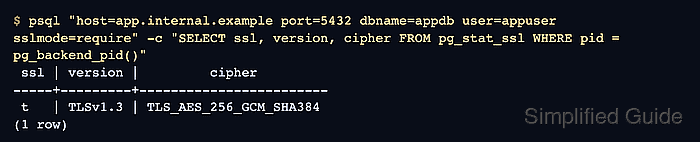
- Verify an SSL-required connection from a client using psql.
$ psql "host=app.internal.example port=5432 dbname=appdb user=appuser sslmode=require" -c "SELECT ssl, version, cipher FROM pg_stat_ssl WHERE pid = pg_backend_pid()"
 ssl | version |         cipher
-----+---------+------------------------
 t   | TLSv1.3 | TLS_AES_256_GCM_SHA384
(1 row)
sslmode=require encrypts traffic but does not validate server identity, so use sslmode=verify-full with a trusted root certificate for protection against man-in-the-middle attacks.
- Confirm that the nonencrypted client path is rejected when the hostnossl rule is part of the policy.
$ psql "host=app.internal.example port=5432 dbname=appdb user=appuser sslmode=disable" -c "\conninfo"
psql: error: connection to server at "app.internal.example", port 5432 failed: FATAL:  pg_hba.conf rejects connection for host "app.internal.example", user "appuser", database "appdb", no encryption

Mohd Shakir Zakaria is a cloud architect with deep roots in software development and open-source advocacy. Certified in AWS, Red Hat, VMware, ITIL, and Linux, he specializes in designing and managing robust cloud and on-premises infrastructures.


