A PostgreSQL logical backup is most useful when one database needs a portable restore point before a deployment, schema change, migration, or restore test. Success means the dump file is a custom-format archive that pg_restore can read and list before anyone depends on it.
The pg_dump command exports a consistent snapshot of one database while normal readers and writers continue. Custom format keeps the archive compressed by default, stores a table of contents, and lets pg_restore inspect or restore selected objects later.
Local shell access on a Linux server with the postgres system account is assumed. A pg_dump archive does not include cluster-wide roles, role memberships, or tablespace definitions, so keep those in a separate pg_dumpall globals file when the backup must restore onto another cluster. Do not rely on one logical dump as the whole backup plan for busy production systems; pair it with tested restores and the site's physical or WAL-based recovery policy when point-in-time recovery is required.
Related: How to restore a PostgreSQL database backup
Related: How to secure a PostgreSQL server
Steps to create a PostgreSQL database backup:
- Choose one database name and one dated archive filename.
Database: appdb
Backup file: /var/backups/postgresql/appdb-2026-06-07_091500.dump
Use one filename consistently through the backup, permission, validation, and off-host copy steps.
- Create the backup directory with access limited to the postgres account.
$ sudo install --directory --mode=0750 --owner=postgres --group=postgres /var/backups/postgresql
- Check free space on the backup filesystem.
$ df -h /var/backups/postgresql
Filesystem      Size  Used Avail Use% Mounted on
overlay         118G   36G   76G  33% /
- Create a custom-format archive with pg_dump.
$ sudo -u postgres pg_dump --format=custom --compress=9 --file=/var/backups/postgresql/appdb-2026-06-07_091500.dump appdb
Replace appdb with the database name. Add --host, --port, and --username for remote connections. Use a pg_dump binary from the server's major version or a newer supported major version, because older pg_dump clients refuse to dump newer servers.
- Restrict the archive so only administrative users can read it.
$ sudo chmod 600 /var/backups/postgresql/appdb-2026-06-07_091500.dump
Database dumps contain application data and can include secrets stored in tables.
- Confirm that the archive exists and has nonzero size.
$ sudo -u postgres ls -lh /var/backups/postgresql/appdb-2026-06-07_091500.dump
-rw------- 1 postgres postgres 4.6K Jun  7 05:11 /var/backups/postgresql/appdb-2026-06-07_091500.dump
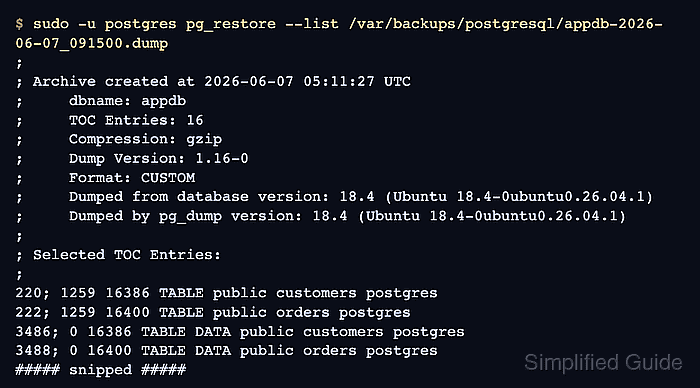
- List the archive table of contents with pg_restore.
$ sudo -u postgres pg_restore --list /var/backups/postgresql/appdb-2026-06-07_091500.dump
;
; Archive created at 2026-06-07 05:11:27 UTC
;     dbname: appdb
;     TOC Entries: 16
;     Compression: gzip
;     Dump Version: 1.16-0
;     Format: CUSTOM
;     Integer: 4 bytes
;     Offset: 8 bytes
;     Dumped from database version: 18.4 (Ubuntu 18.4-0ubuntu0.26.04.1)
;     Dumped by pg_dump version: 18.4 (Ubuntu 18.4-0ubuntu0.26.04.1)
;
;
; Selected TOC Entries:
;
220; 1259 16386 TABLE public customers postgres
219; 1259 16385 SEQUENCE public customers_id_seq postgres
222; 1259 16400 TABLE public orders postgres
221; 1259 16399 SEQUENCE public orders_id_seq postgres
3486; 0 16386 TABLE DATA public customers postgres
3488; 0 16400 TABLE DATA public orders postgres
##### snipped #####
A readable table of contents confirms that the file is a pg_restore archive, not a truncated or plain SQL dump.
- Capture cluster-wide globals when the database may be restored onto another PostgreSQL cluster.
$ sudo -u postgres pg_dumpall --globals-only --file=/var/backups/postgresql/postgresql-globals-2026-06-07.sql
pg_dump covers one database. The globals file carries roles, role memberships, and tablespace definitions for the cluster.
- Restrict the globals file so only administrative users can read it.
$ sudo chmod 600 /var/backups/postgresql/postgresql-globals-2026-06-07.sql
Globals dumps can expose role names and password hashes.
- Confirm that the globals file exists and has nonzero size.
$ sudo -u postgres ls -lh /var/backups/postgresql/postgresql-globals-2026-06-07.sql
-rw------- 1 postgres postgres 526 Jun  7 05:11 /var/backups/postgresql/postgresql-globals-2026-06-07.sql
- Copy the database archive and globals file to off-host storage.
$ sudo rsync --archive --compress /var/backups/postgresql/appdb-2026-06-07_091500.dump /var/backups/postgresql/postgresql-globals-2026-06-07.sql backup@backup1.example.net:/srv/backups/postgresql/
Off-host storage prevents one database host or disk failure from taking both the live database and its backup copy.
- Record the database name, archive filename, globals filename, storage location, and restore test target.
Custom-format database archives restore with pg_restore. Related: How to restore a PostgreSQL database backup

Mohd Shakir Zakaria is a cloud architect with deep roots in software development and open-source advocacy. Certified in AWS, Red Hat, VMware, ITIL, and Linux, he specializes in designing and managing robust cloud and on-premises infrastructures.


