Restoring a PostgreSQL backup proves that a dump can rebuild a usable database after a bad migration, accidental delete, or storage incident. The safest first restore target is a separate database name so the backup can be checked before any application points at it.
Custom, tar, and directory-format dumps created by pg_dump are restored with pg_restore. The archive contains table definitions, data, sequence values, constraints, ownership, and privileges that pg_restore replays into the destination database. Plain SQL dumps use psql instead, so confirming the archive format before restore prevents using the wrong client.
A restore can overwrite objects, apply ownership changes, and execute SQL contained in the dump. Restore only archives from trusted sources, create the destination from template0 when testing a full database restore, and use a maintenance window when an application will switch to the recovered database.
Related: How to create a PostgreSQL database backup \\
Related: How to upgrade PostgreSQL safely \\
Tool: Backup Restore Time Calculator
Steps to restore a PostgreSQL database backup using //pg_restore//:
- Confirm the backup file is readable by the local postgres account.
$ sudo -u postgres ls -lh /var/backups/postgresql/appdb-2026-06-07_091500.dump
-rw------- 1 postgres postgres 4.0K Jun  7 05:06 /var/backups/postgresql/appdb-2026-06-07_091500.dump
Keep dump files in a restricted backup directory because they usually contain application data, role grants, and schema details.
- Inspect the backup table of contents before restoring it.
$ sudo -u postgres pg_restore --list /var/backups/postgresql/appdb-2026-06-07_091500.dump
;
; Archive created at 2026-06-07 05:06:08 UTC
;     dbname: appdb
;     TOC Entries: 15
;     Compression: gzip
;     Dump Version: 1.16-0
;     Format: CUSTOM
;     Integer: 4 bytes
;     Offset: 8 bytes
;     Dumped from database version: 18.4 (Ubuntu 18.4-0ubuntu0.26.04.1)
;     Dumped by pg_dump version: 18.4 (Ubuntu 18.4-0ubuntu0.26.04.1)
;
;
; Selected TOC Entries:
;
222; 1259 16398 TABLE public orders appowner
221; 1259 16397 SEQUENCE public orders_id_seq appowner
220; 1259 16387 TABLE public users appowner
219; 1259 16386 SEQUENCE public users_id_seq appowner
##### snipped #####
Plain SQL backups (.sql) are restored with psql. pg_restore normally reports that a text-format dump should use psql when given a plain SQL file.
- Create an empty destination database from template0.
$ sudo -u postgres createdb --template=template0 appdb_restore
Use a new database name for restore testing. Restore into an existing database only when old objects are intentionally being replaced.
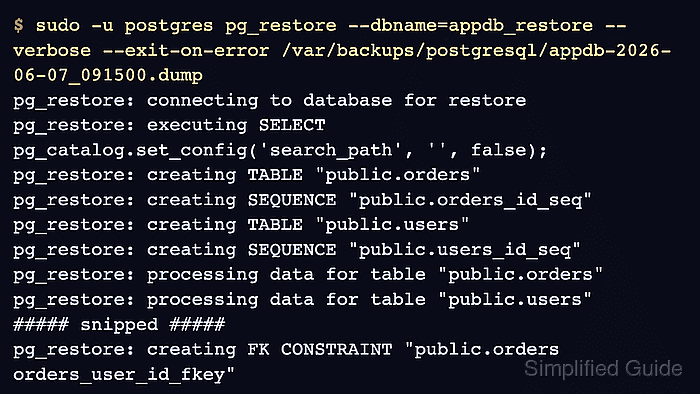
- Restore the archive into the destination database.
$ sudo -u postgres pg_restore --dbname=appdb_restore --verbose --exit-on-error /var/backups/postgresql/appdb-2026-06-07_091500.dump
pg_restore: connecting to database for restore
pg_restore: executing SELECT pg_catalog.set_config('search_path', '', false);
pg_restore: creating TABLE "public.orders"
pg_restore: creating SEQUENCE "public.orders_id_seq"
pg_restore: creating TABLE "public.users"
pg_restore: creating SEQUENCE "public.users_id_seq"
pg_restore: processing data for table "public.orders"
pg_restore: processing data for table "public.users"
pg_restore: executing SEQUENCE SET orders_id_seq
pg_restore: executing SEQUENCE SET users_id_seq
pg_restore: creating CONSTRAINT "public.orders orders_pkey"
pg_restore: creating CONSTRAINT "public.users users_pkey"
pg_restore: creating FK CONSTRAINT "public.orders orders_user_id_fkey"
Adding --clean drops restored objects before recreating them. Check the --dbname target before using destructive restore options.
- List restored tables to confirm the schema is present.
$ sudo -u postgres psql -d appdb_restore -c "\dt" List of tables Schema | Name | Type | Owner --------+--------+-------+---------- public | orders | table | appowner public | users | table | appowner (2 rows) - Run a read-only data check against an expected application table.
$ sudo -u postgres psql -d appdb_restore -c "SELECT count(*) AS users FROM public.users;"
 users
-------
     3
(1 row)
Use a table, row count, checksum, migration marker, or business query that proves the restored data is the expected recovery point.
- Refresh planner statistics after the restore.
$ sudo -u postgres vacuumdb --dbname=appdb_restore --analyze
vacuumdb: vacuuming database "appdb_restore"
pg_restore can restore optimizer statistics when the archive contains them, but running ANALYZE after recovery gives the planner current table statistics for the restored database.
- Check the restored database size as a final database-level sanity check.
$ sudo -u postgres psql -d appdb_restore -c "SELECT pg_size_pretty(pg_database_size(current_database())) AS size;"
  size
---------
 8046 kB
(1 row)
- Switch the application to the restored database only after database checks pass.
Application configuration may reference a fixed database name, so a restore into appdb_restore can require a connection string change, a rename during downtime, or a separate cutover step.
- Validate application reads and writes against the restored database.
Include a write-path check before returning service to users because restores can expose sequence, ownership, permission, or trigger problems that a read-only table listing will not catch.

Mohd Shakir Zakaria is a cloud architect with deep roots in software development and open-source advocacy. Certified in AWS, Red Hat, VMware, ITIL, and Linux, he specializes in designing and managing robust cloud and on-premises infrastructures.


