Audit logging in PostgreSQL gives administrators a server-side trail for connection activity, DDL changes, and the session identity behind each recorded event. It is most useful when an investigation needs to tie a change back to a database role, client address, application name, and timestamp instead of relying only on application logs.
PostgreSQL writes audit-relevant events through its normal server log. A practical baseline records successful connection authorization, disconnections, DDL statements, a correlation-friendly log_line_prefix, and a consistent log time zone, then verifies the result with one test session.
Statement logging can record sensitive SQL text, so keep the baseline narrow and avoid mod or all unless the volume and privacy tradeoff is accepted. On Debian/Ubuntu packaged PostgreSQL, pg_lsclusters names the log file under /var/log/postgresql; instances that use the PostgreSQL logging collector or syslog should verify the equivalent destination before running the final log check.
Related: How to manage extensions in PostgreSQL \\
Related: How to secure a PostgreSQL server
Steps to configure PostgreSQL audit logging:
- Open a terminal on the PostgreSQL host with sudo privileges.
- Print the active postgresql.conf path from the running server.
$ sudo -u postgres psql --no-psqlrc --tuples-only --no-align --command "SHOW config_file;"
/etc/postgresql/18/main/postgresql.conf
- Find the packaged cluster log file.
$ pg_lsclusters
Ver Cluster Port Status Owner    Data directory              Log file
18  main    5432 online postgres /var/lib/postgresql/18/main /var/log/postgresql/postgresql-18-main.log
Use the log file shown for the target cluster in the final verification step. Non-Debian installs may use current_logfiles, a configured log_directory, syslog, or another service log destination.
- Record successful connection authorization, disconnections, and session identifiers.
$ sudo -u postgres psql --no-psqlrc --command "ALTER SYSTEM SET log_connections = 'authorization';"
ALTER SYSTEM
$ sudo -u postgres psql --no-psqlrc --command "ALTER SYSTEM SET log_disconnections = 'on';"
ALTER SYSTEM
$ sudo -u postgres psql --no-psqlrc --command "ALTER SYSTEM SET log_line_prefix = '%m [%p] %c %l %u@%d %r app=%a ';"
ALTER SYSTEM
authorization records completed connection authorization on current PostgreSQL releases. Older releases that only accept a boolean log_connections value should use on.
"%c" adds a session identifier, "%l" adds the per-session log line number, and app=%a records the client application_name.
- Limit statement logging to DDL and suppress bind parameter values in non-error statement logs.
$ sudo -u postgres psql --no-psqlrc --command "ALTER SYSTEM SET log_statement = 'ddl';"
ALTER SYSTEM
$ sudo -u postgres psql --no-psqlrc --command "ALTER SYSTEM SET log_parameter_max_length = 0;"
ALTER SYSTEM
log_statement = 'ddl' still records literal SQL text for DDL commands. Do not run broad statement logging on production traffic until retention, access controls, and sensitive-data exposure are reviewed.
- Use a consistent time zone for log timestamps.
$ sudo -u postgres psql --no-psqlrc --command "ALTER SYSTEM SET log_timezone = 'UTC';"
ALTER SYSTEM
- Reload PostgreSQL to apply the reloadable logging changes.
$ sudo -u postgres psql --no-psqlrc --command "SELECT pg_reload_conf();"
 pg_reload_conf
----------------
 t
(1 row)
- Confirm the active logging parameters and check for settings that still need a restart.
$ sudo -u postgres psql --no-psqlrc --command "SELECT name, setting, pending_restart FROM pg_settings WHERE name IN ('log_connections','log_disconnections','log_line_prefix','log_statement','log_parameter_max_length','log_timezone') ORDER BY name;" name | setting | pending_restart --------------------------+--------------------------------+----------------- log_connections | authorization | f log_disconnections | on | f log_line_prefix | %m [%p] %c %l %u@%d %r app=%a | f log_parameter_max_length | 0 | f log_statement | ddl | f log_timezone | UTC | f (6 rows) - Generate one test DDL event with a recognizable application_name.
$ sudo -u postgres psql --no-psqlrc "dbname=postgres application_name=audit-check" --command "CREATE TEMP TABLE audit_demo(id integer);"
CREATE TABLE
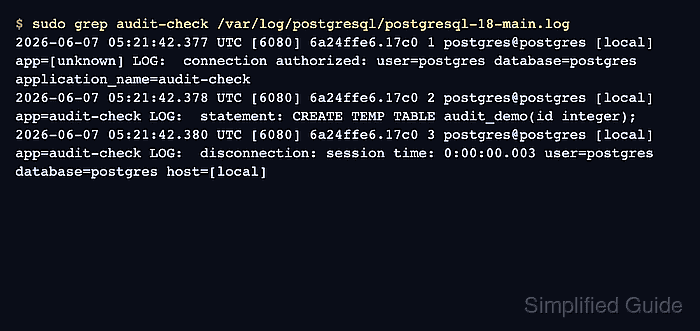
- Confirm that the server log contains connection, statement, and disconnection audit entries for the test session.
$ sudo grep audit-check /var/log/postgresql/postgresql-18-main.log
2026-06-07 05:21:42.377 UTC [6080] 6a24ffe6.17c0 1 postgres@postgres [local] app=[unknown] LOG:  connection authorized: user=postgres database=postgres application_name=audit-check
2026-06-07 05:21:42.378 UTC [6080] 6a24ffe6.17c0 2 postgres@postgres [local] app=audit-check LOG:  statement: CREATE TEMP TABLE audit_demo(id integer);
2026-06-07 05:21:42.380 UTC [6080] 6a24ffe6.17c0 3 postgres@postgres [local] app=audit-check LOG:  disconnection: session time: 0:00:00.003 user=postgres database=postgres host=[local]

Mohd Shakir Zakaria is a cloud architect with deep roots in software development and open-source advocacy. Certified in AWS, Red Hat, VMware, ITIL, and Linux, he specializes in designing and managing robust cloud and on-premises infrastructures.


