Masking a systemd service is the hard block that prevents a unit from starting by hand, through dependencies, or through boot-time activation. Removing that block is the recovery step when maintenance is finished or when a vendor service needs to be allowed to run again.
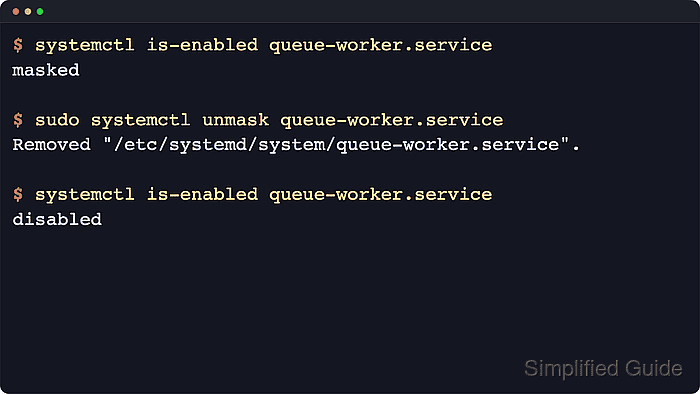
The systemctl unmask command removes the /dev/null symlink that systemd uses to mark a unit as masked. After that symlink is removed, the unit returns to its underlying unit-file state such as disabled, enabled, static, or indirect, and systemd can read the real unit file again.
Examples below use a generic queue-worker.service unit name to keep the flow readable. Replace it with the real unit name on the host, add sudo for system services, and use systemctl --user for per-user units. Unmasking only removes the block itself: it does not start the service, re-enable it for boot, or restore a missing unit file, so a unit that still shows not-found afterward must be reinstalled or restored separately.
Related: How to mask a service in systemd
Related: How to disable a service using systemctl
Steps to unmask a service with systemctl:
- Confirm that the unit is actually masked before removing the block.
$ systemctl is-enabled queue-worker.service
masked
masked is the persistent /etc/systemd/system form. masked-runtime is the temporary /run/systemd/system form that disappears after reboot unless it is removed earlier.
- Remove the mask from the unit.
$ sudo systemctl unmask queue-worker.service
Removed "/etc/systemd/system/queue-worker.service".
Use sudo systemctl --runtime unmask queue-worker.service when the state is masked-runtime. Current upstream systemctl behavior expects a unit name here, not a path such as /etc/systemd/system/queue-worker.service.
- Confirm that the unit returned to its underlying unit-file state.
$ systemctl is-enabled queue-worker.service
disabled
disabled is common after unmasking, while enabled, static, or indirect can also be correct depending on how the service was installed before it was masked. Use the separate start or enable flow when the service should run again immediately or come back automatically at boot. Related: How to start a service using systemctl
Related: How to enable a service using systemctl
Related: How to check whether a service is enabled using systemctl - Inspect the unit status if the service still seems unusable after the mask is removed.
$ systemctl status --no-pager --full queue-worker.service
* queue-worker.service - Queue Worker Service
     Loaded: loaded (/usr/lib/systemd/system/queue-worker.service; disabled; preset: enabled)
     Active: inactive (dead)
##### snipped #####
If the status header shows Loaded: not-found after unmasking, the blocking symlink is gone but the real unit file is still missing. systemctl status is the fastest human-readable follow-up, and journalctl -u unit.service is the cleaner next step when the start job fails or times out. Related: How to check service status using systemctl
Related: How to view service logs using journalctl

Mohd Shakir Zakaria is a cloud architect with deep roots in software development and open-source advocacy. Certified in AWS, Red Hat, VMware, ITIL, and Linux, he specializes in designing and managing robust cloud and on-premises infrastructures.


