Service logs in the systemd journal show why a daemon failed to start, restarted repeatedly, or ignored a configuration change after a short status summary stopped being specific enough. Reading the unit journal around the failure window is often the fastest way to separate an application error from a dependency, permission, or boot-order problem.
On a systemd host, service processes write standard output and standard error to systemd-journald by default, and journalctl can filter those records by unit name with -u or --unit. That unit view also includes manager messages about starts, stops, reloads, and failures, which keeps the output centered on one service instead of mixing in the full system journal.
Most system service logs require sudo, while per-user services use journalctl --user -u unit.service instead. Older service failures from earlier reboots appear only when the host keeps journal files after boot, typically under /var/log/journal, so hosts that use only volatile storage may show only the current boot.
Steps to view service logs using journalctl:
- Show the newest entries for the target service first.
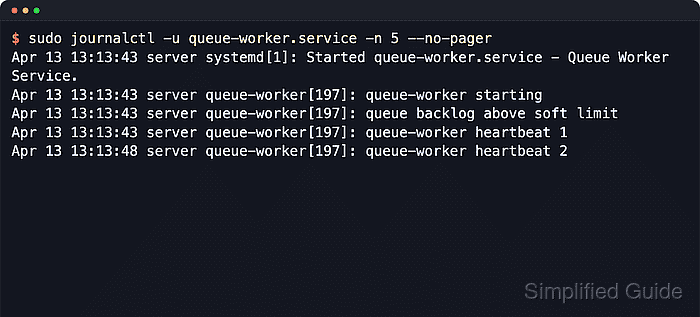
$ sudo journalctl -u queue-worker.service -n 6 --no-pager
Apr 22 02:45:09 server systemd[1]: Started queue-worker.service - Queue Worker Service.
Apr 22 02:45:09 server queue-worker[247]: queue-worker starting
Apr 22 02:45:09 server queue-worker[247]: queue backlog above soft limit
Apr 22 02:45:09 server queue-worker[247]: queue-worker heartbeat 1
Apr 22 02:45:14 server queue-worker[247]: queue-worker heartbeat 2
Apr 22 02:45:19 server queue-worker[247]: queue-worker heartbeat 3
Replace queue-worker.service with the real unit name, such as nginx.service or ssh.service. If the exact name is unclear, use systemctl list-units --type=service --all to confirm it first.
- Limit the results to a recent incident window when older service activity adds noise.
$ sudo journalctl -u queue-worker.service --since "1 minute ago" --no-pager
Apr 22 02:45:09 server systemd[1]: Started queue-worker.service - Queue Worker Service.
Apr 22 02:45:09 server queue-worker[247]: queue-worker starting
Apr 22 02:45:09 server queue-worker[247]: queue backlog above soft limit
Apr 22 02:45:09 server queue-worker[247]: queue-worker heartbeat 1
Apr 22 02:45:14 server queue-worker[247]: queue-worker heartbeat 2
Apr 22 02:45:19 server queue-worker[247]: queue-worker heartbeat 3
Apr 22 02:45:24 server queue-worker[247]: queue-worker heartbeat 4
--since accepts exact timestamps plus keywords such as today, yesterday, and now. Add --boot when the host keeps logs from several boots and only the current boot matters.
- Follow new service log entries live while reproducing the issue.
$ sudo journalctl -u queue-worker.service --follow --lines=4 --no-pager
Apr 22 02:43:50 server queue-worker[126]: queue-worker heartbeat 5
Apr 22 02:43:55 server queue-worker[126]: queue-worker heartbeat 6
Apr 22 02:44:00 server queue-worker[126]: queue-worker heartbeat 7
Apr 22 02:44:05 server queue-worker[126]: queue-worker heartbeat 8
##### waits for new entries until Ctrl-C #####
--follow keeps printing new lines until interrupted, and --lines controls how much recent context appears before the live stream starts. Add --no-tail when all stored lines should remain visible in follow mode.
- Reduce the output to warning-level events and above when triaging failures faster matters more than seeing every line.
$ sudo journalctl -u queue-worker.service --priority=warning..alert --no-pager
Apr 22 02:44:50 server queue-worker[223]: queue backlog above soft limit
The range warning..alert includes priorities 4 through 1 and leaves out notice, info, and debug messages. This is a quick way to surface configuration errors, restart warnings, or dependency failures before reading the full log history.
- List recorded boots before opening logs from an earlier service failure.
$ sudo journalctl --list-boots --no-pager
IDX BOOT ID                          FIRST ENTRY                 LAST ENTRY
  0 1ab70a2af88c4655967c692361244c8d Wed 2026-04-22 02:42:59 UTC Wed 2026-04-22 02:45:41 UTC
When the table includes a -1 entry, open the previous boot for the same service with sudo journalctl -u queue-worker.service -b -1 --no-pager.

Mohd Shakir Zakaria is a cloud architect with deep roots in software development and open-source advocacy. Certified in AWS, Red Hat, VMware, ITIL, and Linux, he specializes in designing and managing robust cloud and on-premises infrastructures.


