A local llama.cpp server often starts as a terminal process, but a host that should keep answering API clients after logout or reboot needs service management. systemd gives llama-server a named unit, boot enablement, restart policy, journal logs, and a standard service state for operators to inspect.
This service pattern uses the default llama-server router mode without a model path in ExecStart=. The HTTP process starts first, and /v1/models shows which models the router has loaded or can expose to clients.
Keep the listener on the default loopback address unless a reverse proxy, container, or LAN client must connect directly. Binding beyond loopback does not add authentication, so combine a firewall, reverse proxy controls, or LLAMA_API_KEY with any non-local listener before exposing the service.
Related: Start the llama.cpp server
Related: Set llama.cpp server host and port
Related: Check llama.cpp server health
Related: Deploy a custom application as a systemd service
Steps to run llama.cpp server as a systemd service:
- Find the absolute path to llama-server.
$ command -v llama-server
/usr/bin/llama-server
Use the returned path in ExecStart= if your package or build installs llama-server somewhere else.
- Create a dedicated service account.
# useradd --system \
  --home-dir /srv/llama \
  --shell \
  /usr/sbin/nologin \
  --user-group llama
A service account keeps the server process separate from a human login account and gives file ownership a clear boundary.
- Create the working directory for the service.
# install -d -o llama \
  -g llama \
  -m 0755 \
  /srv/llama
- Create the systemd unit file.
[Unit]
Description=llama.cpp server
After=network.target

[Service]
Type=exec
User=llama
Group=llama
WorkingDirectory=/srv/llama
ExecStart=/usr/bin/llama-server
Restart=on-failure
RestartSec=5
TimeoutStopSec=30
SyslogIdentifier=llama-server

[Install]
WantedBy=multi-user.target
Type=exec makes missing binaries and invocation failures surface during service startup. Add --model, --models-dir, --host, or --port to ExecStart= only when the service should differ from the default router listener.
Related: Create a systemd service unit
Tool: systemd Unit Generator - Verify that systemd accepts the unit file.
# systemd-analyze verify \
/etc/systemd/system/llama-\
server.service
No output means systemd-analyze accepted the unit syntax and referenced directives.
- Reload the systemd manager so it reads the new unit.
# systemctl daemon-reload
Related: Reload systemd manager configuration
- Enable the service for boot and start it immediately.
# systemctl enable \
  --now \
  llama-server.service
enable creates the boot-time install link, and --now starts the service in the same command.
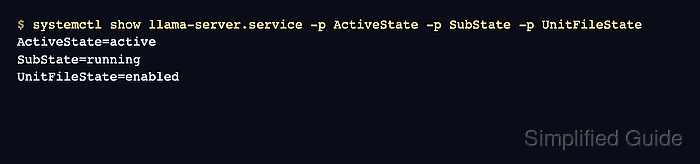
Related: Enable a systemd service - Confirm that systemd started and enabled the service.
$ systemctl show \
  llama-server.service \
  -p ActiveState \
  -p SubState \
  -p UnitFileState
ActiveState=active
SubState=running
UnitFileState=enabled
Related: Check systemd service status
- Check the service health endpoint.
$ curl localhost:8080/health
{"status":"ok"}
A service that loads a GGUF at startup can return HTTP 503 with Loading model while the model is still loading. Wait for /health to return ok before pointing clients at the service.
Related: Check llama.cpp server health - List the models visible through the service API.
$ curl localhost:8080/v1/models
{"data":[],"object":"list"}
An empty list is expected for a fresh router service with no loaded models. After loading or configuring a model, the response should include the model ID that clients will send.
Related: Load a model with the llama.cpp server router

Mohd Shakir Zakaria is a cloud architect with deep roots in software development and open-source advocacy. Certified in AWS, Red Hat, VMware, ITIL, and Linux, he specializes in designing and managing robust cloud and on-premises infrastructures.


