Deploying a production LGTM stack means running Grafana with durable Loki, Tempo, and Mimir backends instead of the disposable all-in-one Docker image. The production path needs storage, tenancy, TLS, backups, upgrades, and monitoring checks before teams depend on it for incidents.
Use Helm and Kubernetes as the deployment surface when the stack is shared. The backends should write to object storage, Grafana should connect through stable service names or gateways, and every signal path should have a smoke test that proves data can be written and queried.
Treat the first production rollout as a staged promotion from a tested values repository. Run the same values through a staging namespace, record the exact chart versions, and keep rollback and restore inputs beside the release files before changing the production namespace.
Steps to deploy a production LGTM stack:
- Create a production namespace for the stack.
$ kubectl create namespace monitoring
namespace/monitoring created
- Add the Grafana Helm repository.
$ helm repo add grafana https://grafana.github.io/helm-charts
"grafana" has been added to your repositories
- Update the local chart index.
$ helm repo update
Hang tight while we grab the latest from your chart repositories...
##### snipped #####
Update Complete.
- Freeze the release plan in a task or change record.
$ cat lgtm-releases.txt
grafana            grafana/grafana
loki               grafana/loki
tempo              grafana/tempo-distributed
mimir              grafana/mimir-distributed
Pin chart versions in the real release files. Avoid relying on whatever version the Helm repository returns on deployment day.
- Confirm the object storage buckets or prefixes exist.
$ aws s3 ls
2026-06-21 08:10:00 lgtm-loki-prod
2026-06-21 08:10:02 lgtm-tempo-prod
2026-06-21 08:10:04 lgtm-mimir-prod
Use neutral bucket names in saved transcripts and screenshots. Real account names, endpoints, and prefixes should not be published.
- Deploy or upgrade Loki with production storage values.
$ helm upgrade --install loki grafana/loki \
  --namespace monitoring \
  --values values/loki-prod.yaml \
  --wait --timeout 15m
Release "loki" has been upgraded. Happy Helming!
- Deploy or upgrade Tempo with production storage values.
$ helm upgrade --install tempo grafana/tempo-distributed \
  --namespace monitoring \
  --values values/tempo-prod.yaml \
  --wait --timeout 15m
Release "tempo" has been upgraded. Happy Helming!
- Deploy or upgrade Mimir with production storage values.
$ helm upgrade --install mimir grafana/mimir-distributed \
  --namespace monitoring \
  --values values/mimir-prod.yaml \
  --wait --timeout 20m
Release "mimir" has been upgraded. Happy Helming!
- Deploy or upgrade Grafana after the backend services exist.
$ helm upgrade --install grafana grafana/grafana \
  --namespace monitoring \
  --values values/grafana-prod.yaml \
  --wait --timeout 10m
Release "grafana" has been upgraded. Happy Helming!
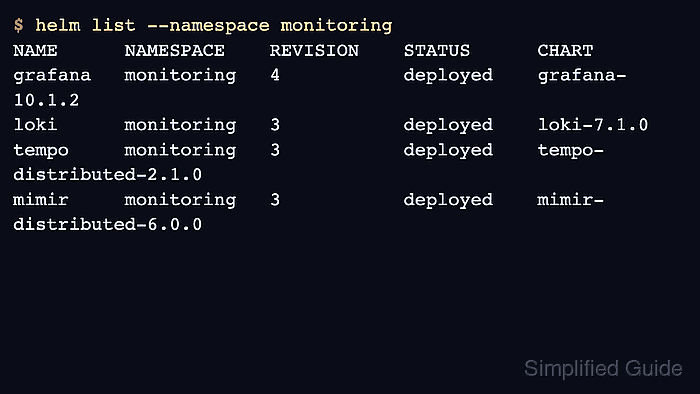
- Check all production releases.
$ helm list --namespace monitoring
NAME      NAMESPACE    REVISION    STATUS      CHART
grafana   monitoring   4           deployed    grafana-10.1.2
loki      monitoring   3           deployed    loki-7.1.0
tempo     monitoring   3           deployed    tempo-distributed-2.1.0
mimir     monitoring   3           deployed    mimir-distributed-6.0.0
- Check pod readiness in the namespace.
$ kubectl get pods --namespace monitoring
NAME                                      READY   STATUS
grafana-7f9df8f8c7-n2c6x                 1/1     Running
loki-backend-0                           2/2     Running
tempo-distributor-6db8bbd4c9-f6m9v       1/1     Running
mimir-distributor-64ffbff8d7-8m5s9       1/1     Running
##### snipped #####
- Run a smoke query for each signal path.
$ curl --silent https://grafana.example.com/api/health
{"database":"ok","version":"13.0.1"}
After the Grafana health check, query one known Loki stream, one Tempo trace, and one Mimir metric through the Grafana data sources.
Related: How to check LGTM stack health in Grafana - Record backup, upgrade, and monitoring readiness before handoff.
$ cat lgtm-production-readiness.txt
storage=verified
tenancy=verified
tls=verified
backup_restore=verified
upgrade_rollback=verified
self_monitoring=verified

Mohd Shakir Zakaria is a cloud architect with deep roots in software development and open-source advocacy. Certified in AWS, Red Hat, VMware, ITIL, and Linux, he specializes in designing and managing robust cloud and on-premises infrastructures.


