Shared application storage becomes a failure domain when every client depends on one server or one block device. A replicated GlusterFS volume stores the same file data on multiple storage nodes, so a single brick outage does not immediately remove the filesystem from clients.
In a GlusterFS cluster, storage nodes first join a trusted storage pool. Each node contributes a brick, which is an empty directory backed by local storage, and the volume definition groups those bricks into a mounted namespace that clients access through the glusterfs mount helper.
A three-node replica 3 layout avoids the two-way replication pattern that can enter split-brain during a network partition. Keep bricks on dedicated filesystems, keep hostnames resolvable from every node, and treat replication as availability protection rather than backup protection.
Steps to create highly available storage with GlusterFS:
- Install GlusterFS on every storage node.
Keep the same GlusterFS major version on all nodes in the trusted pool.
- Confirm that each storage-node hostname resolves from every node.
$ getent hosts node1 node2 node3
10.0.10.11  node1
10.0.10.12  node2
10.0.10.13  node3
Open the glusterd management port and the brick port range between storage nodes before probing peers.
- Identify the dedicated brick device on each storage node.
$ lsblk -o NAME,SIZE,FSTYPE,MOUNTPOINT
NAME      SIZE FSTYPE MOUNTPOINT
sda        80G ext4   /
sdb       200G
└─sdb1    200G
- Format the brick partition with XFS on each storage node.
$ sudo mkfs.xfs -f /dev/sdb1
meta-data=/dev/sdb1              isize=512    agcount=4, agsize=13107200 blks
##### snipped #####
realtime =none                   extsz=4096   blocks=0, rtextents=0
Formatting destroys all data on the target partition.
- Create the brick filesystem mount point on each storage node.
$ sudo mkdir -p /srv/gluster/brick1
- Mount the brick filesystem on each storage node.
$ sudo mount -t xfs /dev/sdb1 /srv/gluster/brick1
Use a dedicated brick mount to avoid force volume creation and to keep storage I/O isolated from the operating system.
- Read the brick filesystem UUID on each storage node.
$ sudo blkid /dev/sdb1
/dev/sdb1: UUID="0c3e4c7a-2a6e-4e4a-a5d4-8b6b4a9a9c2f" TYPE="xfs"
/etc/fstab
UUID=0c3e4c7a-2a6e-4e4a-a5d4-8b6b4a9a9c2f  /srv/gluster/brick1  xfs  defaults,noatime  0  0
A wrong entry in /etc/fstab can prevent boot; validate the entry before restarting the node.
- Validate the /etc/fstab entry on each storage node.
$ sudo mount -a
No output indicates the existing and newly added mount entries were accepted.
- Confirm the brick filesystem is mounted on each storage node.
$ findmnt /srv/gluster/brick1
TARGET              SOURCE    FSTYPE OPTIONS
/srv/gluster/brick1 /dev/sdb1 xfs    rw,noatime
- Create an empty brick directory for the volume on each storage node.
$ sudo mkdir -p /srv/gluster/brick1/gv0
The brick directory belongs under the mounted filesystem, not on the mount point itself.
- Probe the second storage node from node1.
$ sudo gluster peer probe node2
peer probe: success
- Probe the third storage node from node1.
$ sudo gluster peer probe node3
peer probe: success
- Confirm both peers are connected to the trusted pool.
$ sudo gluster peer status
Number of Peers: 2

Hostname: node2
Uuid: b3c5f9e1-8b1e-4a6a-8b5d-7d1d9c0e1f22
State: Peer in Cluster (Connected)

Hostname: node3
Uuid: 0a1b2c3d-4e5f-6789-0abc-def123456789
State: Peer in Cluster (Connected)
- Create the replicated GlusterFS volume from node1.
$ sudo gluster volume create gv0 replica 3 transport tcp \
  node1:/srv/gluster/brick1/gv0 \
  node2:/srv/gluster/brick1/gv0 \
  node3:/srv/gluster/brick1/gv0
volume create: gv0: success: please start the volume to access data
Replica 3 keeps a full copy on each storage node and avoids a two-node split-brain design.
Related: How to create a GlusterFS volume
- Start the new volume from node1.
$ sudo gluster volume start gv0
volume start: gv0: success
- Verify the volume layout from node1.
$ sudo gluster volume info gv0
Volume Name: gv0
Type: Replicate
Status: Started
Number of Bricks: 1 x 3 = 3
Transport-type: tcp
Bricks:
Brick1: node1:/srv/gluster/brick1/gv0
Brick2: node2:/srv/gluster/brick1/gv0
Brick3: node3:/srv/gluster/brick1/gv0
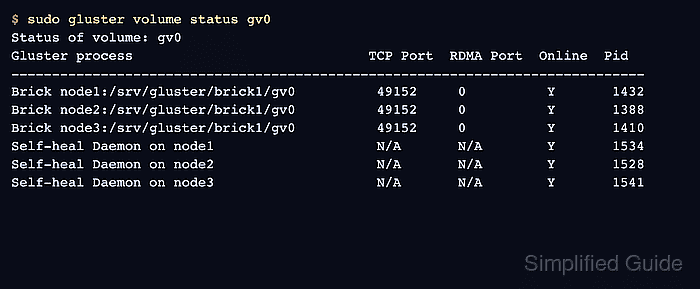
- Verify all bricks and self-heal daemons are online.
$ sudo gluster volume status gv0
Status of volume: gv0
Gluster process                             TCP Port  RDMA Port  Online  Pid
------------------------------------------------------------------------------
Brick node1:/srv/gluster/brick1/gv0          49152     0          Y       1432
Brick node2:/srv/gluster/brick1/gv0          49152     0          Y       1388
Brick node3:/srv/gluster/brick1/gv0          49152     0          Y       1410
Self-heal Daemon on node1                    N/A       N/A        Y       1534
Self-heal Daemon on node2                    N/A       N/A        Y       1528
Self-heal Daemon on node3                    N/A       N/A        Y       1541
- Create a mount point for the volume on a client.
$ sudo mkdir -p /mnt/gv0
- Mount the GlusterFS volume on the client.
$ sudo mount -t glusterfs node1:/gv0 /mnt/gv0
The mount source can be any reachable server in the trusted pool.
- Write a health-check file through the client mount.
$ echo ok | sudo tee /mnt/gv0/healthcheck.txt
ok
- Read the health-check file through the mounted volume.
$ cat /mnt/gv0/healthcheck.txt
ok
Mount the same volume from a second client when possible and confirm healthcheck.txt appears there too.
- Check for pending replica heal entries after the smoke test.
$ sudo gluster volume heal gv0 info
Brick node1:/srv/gluster/brick1/gv0
Status: Connected
Number of entries: 0

Brick node2:/srv/gluster/brick1/gv0
Status: Connected
Number of entries: 0

Brick node3:/srv/gluster/brick1/gv0
Status: Connected
Number of entries: 0
Related: How to heal a GlusterFS volume

Mohd Shakir Zakaria is a cloud architect with deep roots in software development and open-source advocacy. Certified in AWS, Red Hat, VMware, ITIL, and Linux, he specializes in designing and managing robust cloud and on-premises infrastructures.


