Testing WebViews with Detox lets an end-to-end test interact with HTML controls inside an embedded mobile screen. Teams commonly need it for checkout, login, help, or document flows where the native app opens a React Native WebView and the result must be asserted from the same Detox run.
Detox treats the native WebView host and the inner web document as different layers. A screen with one WebView can target inner DOM elements with web.element(); screens with multiple WebViews should first match the native host with web(by.id(…)) and then call element() for the HTML element inside it.
Keep the web test focused on selectors and behavior that belong to the embedded page. Use HTML IDs or CSS selectors for web controls, keep native testID values on WebView hosts that need disambiguation, and keep iOS-only security workarounds in the test setup instead of the app's production WebView configuration.
Related: How to write a first Detox test
Related: How to stabilize selectors in Detox tests
Related: How to run Detox tests locally
Steps to test WebViews with Detox:
- Add a native testID to the WebView host when the screen can show more than one WebView.
- CheckoutScreen.jsx
import { WebView } from 'react-native-webview';

const checkoutSource = { uri: 'https://checkout.example.net/session/demo' };

export function CheckoutScreen() {
  return (
    <WebView
      testID="CHECKOUT.WEBVIEW"
      source={checkoutSource}
    />
  );
}
Prefer a unique testID over WebView atIndex(). The WebView host atIndex() helper is iOS-only, so it does not make a cross-platform test clearer.
- Add stable HTML selectors to the controls that the Detox test must operate.
- checkout.html
<form id="checkout-form">
  <label for="cardholder-name">Name on card</label>
  <input id="cardholder-name" name="cardholderName" />
  <button id="pay-button" type="button">Pay</button>
  <p id="payment-status" aria-live="polite"></p>
</form>
by.web.id() is the easiest match to maintain. Use by.web.cssSelector() or by.web.name() when the embedded page cannot expose IDs.
- Create a focused spec that opens the native screen before using WebView matchers.
- e2e/webview.e2e.js
describe('checkout webview', () => {
  beforeEach(async () => {
    await device.launchApp({ newInstance: true });
    await element(by.id('CHECKOUT.OPEN_BUTTON')).tap();
  });

  it('submits the embedded payment form', async () => {
    const checkoutWebView = web(by.id('CHECKOUT.WEBVIEW'));
    const nameField = checkoutWebView.element(by.web.id('cardholder-name'));
    const payButton = checkoutWebView.element(by.web.id('pay-button'));
    const status = checkoutWebView.element(by.web.id('payment-status'));

    await expect(nameField).toExist();
    await nameField.typeText('Test Buyer');
    await payButton.tap();
    await expect(status).toHaveText('Payment ready');
  });
});
On a screen with only one WebView, web.element(by.web.id('cardholder-name')) can target the inner element without binding a native WebView first.
- Keep the iOS WebKit-security bypass in the launch call only when cross-origin WebView content blocks normal inner-element interaction.
await device.launchApp({
  newInstance: true,
  launchArgs: { detoxDisableWebKitSecurity: true },
});
detoxDisableWebKitSecurity is iOS-only and belongs in test launch arguments, not in production WebView configuration.
Related: How to use launch arguments in Detox tests - Run the focused WebView spec against the selected Detox configuration.
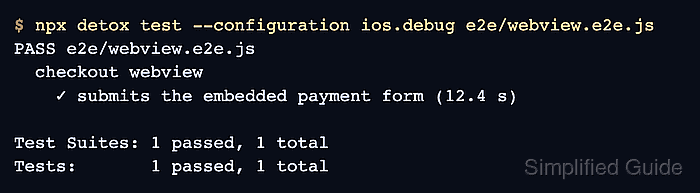
$ npx detox test --configuration ios.debug e2e/webview.e2e.js
PASS e2e/webview.e2e.js
  checkout webview
    ✓ submits the embedded payment form (12.4 s)

Test Suites: 1 passed, 1 total
Tests:       1 passed, 1 total
Replace ios.debug with the configuration name from .detoxrc.js. The app must already be built and installable for that configuration.
Related: How to configure Detox build settings - Check the native host and the inner selector separately when the WebView element is not found.
await expect(element(by.id('CHECKOUT.WEBVIEW'))).toBeVisible();
await expect(
  web(by.id('CHECKOUT.WEBVIEW')).element(by.web.id('payment-status'))
).toExist();
If the native host is visible but the web element is missing, inspect the embedded page selector, loading state, or cross-origin boundary before adding waits.
Related: How to wait for UI elements in Detox

Mohd Shakir Zakaria is a cloud architect with deep roots in software development and open-source advocacy. Certified in AWS, Red Hat, VMware, ITIL, and Linux, he specializes in designing and managing robust cloud and on-premises infrastructures.


