Detox build settings tell the CLI which native app binary belongs to each simulator or emulator target. They matter in React Native projects that keep separate debug and release outputs for iOS and Android, because the selected Detox configuration decides both the build command and the file Detox installs before a test run.
Current Detox configuration usually lives in .detoxrc.js, with apps, devices, and configurations kept as separate dictionaries. The app entry owns the binaryPath and optional build command, the device entry owns the simulator or emulator description, and the named configuration pairs an app with a device.
Set the values to match the project that already builds from xcodebuild or Gradle. When the settings are correct, detox build for one named configuration runs the configured native build command and leaves the expected .app or .apk at the configured path.
Steps to configure Detox build settings:
- Open the Detox config file from the project root.
$ vi .detoxrc.js
- Add app, device, and configuration entries for the builds Detox should run.
- .detoxrc.js
/** @type {Detox.DetoxConfig} */
module.exports = {
  testRunner: {
    args: {
      '$0': 'jest',
      config: 'e2e/jest.config.js',
    },
    jest: {
      setupTimeout: 120000,
    }
  },
  apps: {
    'ios.debug': {
      type: 'ios.app',
      binaryPath: 'ios/build/Build/Products/Debug-iphonesimulator/Example.app',
      build: 'xcodebuild -workspace ios/Example.xcworkspace -scheme Example -configuration Debug -sdk iphonesimulator -derivedDataPath ios/build',
    },
    'android.debug': {
      type: 'android.apk',
      binaryPath: 'android/app/build/outputs/apk/debug/app-debug.apk',
      build: 'cd android && ./gradlew assembleDebug assembleAndroidTest -DtestBuildType=debug',
    },
  },
  devices: {
    simulator: {
      type: 'ios.simulator',
      device: {
        type: 'iPhone 15',
      },
    },
    emulator: {
      type: 'android.emulator',
      device: {
        avdName: 'Pixel_7_API_36_Detox',
      },
    },
  },
  configurations: {
    'ios.sim.debug': {
      device: 'simulator',
      app: 'ios.debug',
    },
    'android.emu.debug': {
      device: 'emulator',
      app: 'android.debug',
    },
  },
};
Replace Example with the actual Xcode workspace, scheme, and app product name. If the iOS project does not use CocoaPods, replace -workspace with -project and point it at the matching .xcodeproj.
- List the installed iOS simulator device types before keeping the simulator entry.
$ xcrun simctl list devicetypes
== Device Types ==
iPhone 14 (com.apple.CoreSimulator.SimDeviceType.iPhone-14)
iPhone 15 (com.apple.CoreSimulator.SimDeviceType.iPhone-15)
iPhone 15 Pro (com.apple.CoreSimulator.SimDeviceType.iPhone-15-Pro)
##### snipped #####
Use one of the printed names for devices.simulator.device.type.
- List the Android virtual device names before keeping the emulator entry.
$ emulator -list-avds
Pixel_7_API_36_Detox
The printed AVD name must match devices.emulator.device.avdName.
Related: How to set up an Android emulator environment for Detox - Update the build commands and binary paths for any custom product flavor or release build.
Android product flavors normally change both the Gradle task names and output path, such as assembleDriverDebug with android/app/build/outputs/apk/driver/debug/app-driver-debug.apk. Add testBinaryPath only when the Android test APK is generated outside Detox's default Gradle output path.
- Build the iOS simulator configuration.
$ npx detox build --configuration ios.sim.debug
xcodebuild -workspace ios/Example.xcworkspace -scheme Example -configuration Debug -sdk iphonesimulator -derivedDataPath ios/build
##### snipped #####
** BUILD SUCCEEDED **
Run pod install in ios/ first when the workspace or Pods project is missing.
- Build the Android emulator configuration.
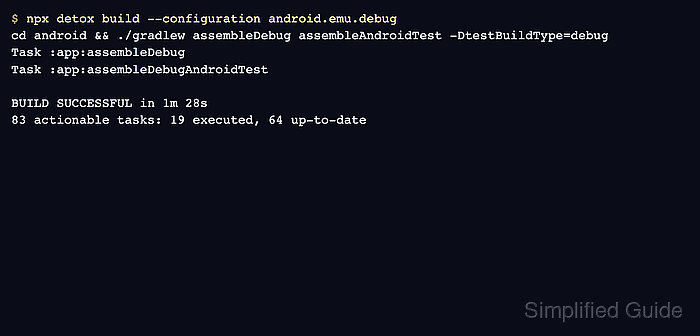
$ npx detox build --configuration android.emu.debug
cd android && ./gradlew assembleDebug assembleAndroidTest -DtestBuildType=debug
> Task :app:assembleDebug
> Task :app:assembleDebugAndroidTest

BUILD SUCCESSFUL in 1m 28s
83 actionable tasks: 19 executed, 64 up-to-date
- Confirm the configured Android binary path exists after the build.
$ ls -lh android/app/build/outputs/apk/debug/app-debug.apk
-rw-r--r--  1 developer  staff   72M Jun 18 14:20 android/app/build/outputs/apk/debug/app-debug.apk
- Run one smoke test with the same configuration after the build succeeds.
$ npx detox test --configuration android.emu.debug e2e/smoke.test.js
PASS e2e/smoke.test.js
A passing smoke test proves the selected Detox configuration can find the build output and hand the app to the test runner.
Related: How to run Detox tests

Mohd Shakir Zakaria is a cloud architect with deep roots in software development and open-source advocacy. Certified in AWS, Red Hat, VMware, ITIL, and Linux, he specializes in designing and managing robust cloud and on-premises infrastructures.


