GitHub Actions can run Detox end-to-end tests as a pull request gate when the job prepares Node dependencies, simulator utilities, the mobile app build, and the test command on the same runner. This fits a React Native project that already passes locally and needs the same release configuration to fail CI before a mobile regression is merged.
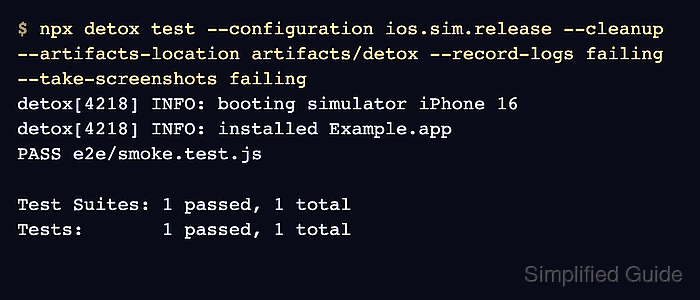
A GitHub-hosted macOS runner can start an iOS simulator and install applesimutils with Homebrew, which keeps the CI path smaller than an Android emulator job on shared runners. Detox recommends CI runs use a release build and shut down the simulator after the test run, so the job builds an ios.sim.release configuration and runs detox test with --cleanup.
The repository still owns the Xcode workspace, scheme, simulator model, and Detox config names. A passing run should show the build step completing, the Detox test step reporting PASS, and the artifact step retaining failure logs or screenshots for review.
Steps to run Detox tests in GitHub Actions:
- Confirm the project has a release Detox configuration for CI.
- .detoxrc.js
/** @type {Detox.DetoxConfig} */
module.exports = {
  apps: {
    'ios.release': {
      type: 'ios.app',
      build: 'xcodebuild -workspace ios/Example.xcworkspace -scheme Example -configuration Release -sdk iphonesimulator -derivedDataPath ios/build',
      binaryPath: 'ios/build/Build/Products/Release-iphonesimulator/Example.app',
    },
  },
  devices: {
    simulator: {
      type: 'ios.simulator',
      device: {
        type: 'iPhone 16',
      },
    },
  },
  configurations: {
    'ios.sim.release': {
      device: 'simulator',
      app: 'ios.release',
    },
  },
};
Replace the workspace, scheme, app path, simulator model, and configuration name with values from the project. Keep the same configuration name in the workflow's DETOX_CONFIGURATION value.
Related: How to configure Detox build settings - Add the GitHub Actions workflow file.
- .github/workflows/detox-ios.yml
name: Detox iOS

on:
  pull_request:
    branches:
      - main
  workflow_dispatch:

permissions:
  contents: read

jobs:
  detox-ios:
    runs-on: macos-15
    timeout-minutes: 45
    env:
      DETOX_CONFIGURATION: ios.sim.release

    steps:
      - uses: actions/checkout@v6

      - uses: actions/setup-node@v4
        with:
          node-version: 20
          cache: npm

      - name: Install dependencies
        run: npm ci

      - name: Install iOS simulator utility
        run: |
          brew tap wix/brew
          brew install applesimutils

      - name: Build Detox app
        run: npx detox build --configuration "$DETOX_CONFIGURATION"

      - name: Run Detox tests
        run: npx detox test --configuration "$DETOX_CONFIGURATION" --cleanup --artifacts-location artifacts/detox --record-logs failing --take-screenshots failing

      - name: Upload Detox artifacts
        if: always()
        uses: actions/upload-artifact@v7
        with:
          name: detox-ios-artifacts
          path: artifacts/detox
          if-no-files-found: warn
The job uses macos-15 so the runner image is less likely to drift than macos-latest. Change the runner label only after confirming the Xcode and simulator versions required by the app.
- Push the workflow to a branch that can trigger pull_request or run it manually from Actions → Detox iOS → Run workflow.
Use the manual trigger for the first CI validation so a broken simulator or Xcode setting does not block every pull request while the workflow is being tuned.
- Check the build step log for a successful app binary.
Run npx detox build --configuration "$DETOX_CONFIGURATION"
detox[build] INFO: Executing build command: xcodebuild -workspace ios/Example.xcworkspace -scheme Example -configuration Release -sdk iphonesimulator -derivedDataPath ios/build
##### snipped #####
** BUILD SUCCEEDED **
A build failure at this point usually belongs to the Xcode scheme, signing mode, dependency install, or binary path in .detoxrc.js rather than to the detox test command.
- Check the Detox test step log for a passing test runner result.
Run npx detox test --configuration "$DETOX_CONFIGURATION" --cleanup --artifacts-location artifacts/detox --record-logs failing --take-screenshots failing
detox[4218] INFO: booting simulator iPhone 16
detox[4218] INFO: installed Example.app
PASS e2e/smoke.test.js

Test Suites: 1 passed, 1 total
Tests:       1 passed, 1 total
--cleanup shuts down the simulator at the end of the run, which prevents leftover simulator state from affecting later jobs on the same runner.
- Confirm the workflow summary keeps the Detox artifact upload available after failed runs.
Run actions/upload-artifact@v7
Artifact detox-ios-artifacts has been successfully uploaded
Keep if: always() on the upload step so failed Detox runs still preserve logs and screenshots.
Related: How to save Detox test artifacts

Mohd Shakir Zakaria is a cloud architect with deep roots in software development and open-source advocacy. Certified in AWS, Red Hat, VMware, ITIL, and Linux, he specializes in designing and managing robust cloud and on-premises infrastructures.


