Saving Detox test artifacts keeps device logs, screenshots, and videos from an end-to-end run in a directory that can be reviewed after the simulator or emulator closes. The files are useful when a mobile test fails in CI or after a specific app state, because they show the device output and screen state from that run.
detox test can enable artifact capture for one run while leaving shared project configuration unchanged. CLI artifact flags override matching settings in .detoxrc.js or the detox section of package.json, which makes them a good fit for temporary debug captures and CI evidence runs.
An existing Detox project with a working configuration and installed app binary is required before artifact capture can succeed. A single Jest spec and an ios.sim.debug configuration keep the capture small; replace those values with the test file and configuration used by the project.
Related: How to run Detox tests
Related: How to capture screenshots in Detox tests
Steps to save Detox test artifacts:
- Run the target Detox spec with artifact capture enabled.
$ detox test --configuration ios.sim.debug --record-logs all --take-screenshots all --video-records all --artifacts-location ./artifacts/detox e2e/login.e2e.js
PASS e2e/login.e2e.js
  Login flow
    ✓ signs in a registered user (8.4 s)

Test Suites: 1 passed, 1 total
Tests:       1 passed, 1 total
A location without a trailing slash lets Detox create a configuration and timestamp child directory. Add a trailing slash only when the path already belongs to one clean CI run.
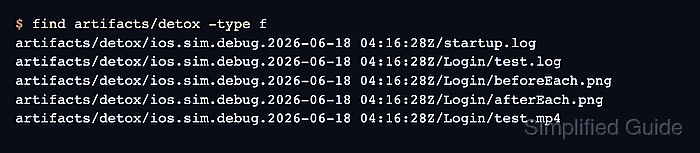
- List the files saved under the artifact root.
$ find artifacts/detox -type f
artifacts/detox/ios.sim.debug.2026-06-18 04:16:28Z/startup.log
artifacts/detox/ios.sim.debug.2026-06-18 04:16:28Z/Login/test.log
artifacts/detox/ios.sim.debug.2026-06-18 04:16:28Z/Login/beforeEach.png
artifacts/detox/ios.sim.debug.2026-06-18 04:16:28Z/Login/afterEach.png
artifacts/detox/ios.sim.debug.2026-06-18 04:16:28Z/Login/test.mp4
Detox creates a run directory, then a test directory, then artifact files such as startup.log, test.log, .png screenshots, and .mp4 video recordings.
- Use failure-only screenshots and videos when the run is part of a routine CI job.
$ detox test --configuration ios.sim.debug --record-logs all --take-screenshots failing --video-records failing --artifacts-location ./artifacts/detox e2e/login.e2e.js
Keeping logs for all tests and media only for failed tests usually gives enough failure evidence without storing a video for every passing spec.
- Confirm the failure directory contains the files needed for review.
$ find artifacts/detox -type f
artifacts/detox/ios.sim.debug.2026-06-18 04:22:10Z/startup.log
artifacts/detox/ios.sim.debug.2026-06-18 04:22:10Z/Login failure/test.log
artifacts/detox/ios.sim.debug.2026-06-18 04:22:10Z/Login failure/afterEach.png
artifacts/detox/ios.sim.debug.2026-06-18 04:22:10Z/Login failure/test.mp4
Do not use --video-records all on large CI suites unless the artifact retention policy can handle the extra storage.

Mohd Shakir Zakaria is a cloud architect with deep roots in software development and open-source advocacy. Certified in AWS, Red Hat, VMware, ITIL, and Linux, he specializes in designing and managing robust cloud and on-premises infrastructures.


