Setting up Detox in a React Native project connects the app build, simulator or emulator target, and Jest runner so end-to-end tests can install the app and drive real UI screens. It is useful after the native project already builds from the command line and before a larger Detox test suite is written.
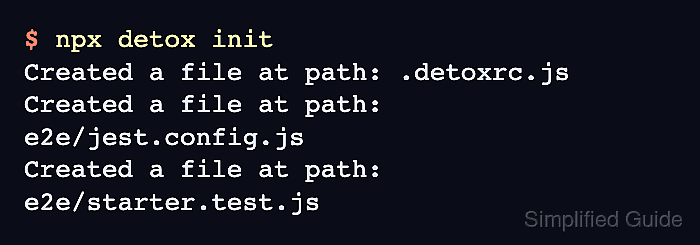
Detox keeps this wiring in .detoxrc.js and an e2e/ test folder. The initializer creates starter files for Jest, apps, devices, and named configurations, but the generated app names, binary paths, build commands, and device names still need to match the project.
Using npm and the local Detox binary through npx avoids a global Detox CLI install. An iOS simulator debug build proves one local configuration without turning project setup into a full Android native patching workflow.
Related: How to set up an Android emulator environment for Detox
Related: How to write a first Detox test
Related: How to run Detox tests locally
Steps to set up Detox in a React Native project:
- Open a terminal in the React Native project root.
- Install Jest and Detox as development dependencies.
$ npm install "jest@^29" detox --save-dev
added 387 packages, and audited 388 packages in 13s

##### snipped #####

Run `npm audit` for details.
The Jest 29 range follows the current Detox project setup recommendation and avoids older lockfile-pinned Jest releases.
- Create the Detox starter configuration and test files.
$ npx detox init
Created a file at path: .detoxrc.js
Created a file at path: e2e/jest.config.js
Created a file at path: e2e/starter.test.js
- Confirm that the initializer wrote the expected project files.
$ ls -la .detoxrc.js e2e/jest.config.js e2e/starter.test.js
-rw-r--r--  1 user  staff  2153 Jun 18 12:50 .detoxrc.js
-rw-r--r--  1 user  staff   407 Jun 18 12:50 e2e/jest.config.js
-rw-r--r--  1 user  staff   629 Jun 18 12:50 e2e/starter.test.js
- Replace the generated iOS app placeholders in .detoxrc.js.
- .detoxrc.js
/** @type {Detox.DetoxConfig} */
module.exports = {
  testRunner: {
    args: {
      '$0': 'jest',
      config: 'e2e/jest.config.js'
    },
    jest: {
      setupTimeout: 120000
    }
  },
  apps: {
    'ios.debug': {
      type: 'ios.app',
      binaryPath: 'ios/build/Build/Products/Debug-iphonesimulator/Example.app',
      build: 'xcodebuild -workspace ios/Example.xcworkspace -scheme Example -configuration Debug -sdk iphonesimulator -derivedDataPath ios/build'
    }
  },
  devices: {
    simulator: {
      type: 'ios.simulator',
      device: {
        type: 'iPhone 15'
      }
    }
  },
  configurations: {
    'ios.sim.debug': {
      device: 'simulator',
      app: 'ios.debug'
    }
  }
};
Replace Example with the actual app scheme and product name. If the project does not use CocoaPods, change -workspace to the matching Xcode project path.
- List installed iOS simulator device types before keeping the generated device name.
$ xcrun simctl list devicetypes
== Device Types ==
iPhone 14 (com.apple.CoreSimulator.SimDeviceType.iPhone-14)
iPhone 15 (com.apple.CoreSimulator.SimDeviceType.iPhone-15)
iPhone 15 Pro (com.apple.CoreSimulator.SimDeviceType.iPhone-15-Pro)
##### snipped #####
- Update the simulator device type if the generated type is not installed.
- .detoxrc.js
devices: {
  simulator: {
    type: 'ios.simulator',
    device: {
      type: 'iPhone 15'
    }
  }
}
Use one of the device type names printed by xcrun simctl list devicetypes.
- Build the selected Detox configuration.
$ npx detox build --configuration ios.sim.debug
detox[build] running command: xcodebuild -workspace ios/Example.xcworkspace -scheme Example -configuration Debug -sdk iphonesimulator -derivedDataPath ios/build
##### snipped #####
** BUILD SUCCEEDED **
Run pod install in ios/ first when the app uses CocoaPods and the workspace or Pods project is missing.
- Keep the generated starter test as a scaffold or replace its selectors before the first test run.
$ npx detox --help
detox <command>

Commands:
  detox build  Runs the user-provided build command, as defined in the 'build' property of the specified configuration.
  detox init   Creates template files to get you started with Detox
  detox test   Run your test suites with the test runner specified in the project's Detox config
##### snipped #####
The generated e2e/starter.test.js expects sample element IDs such as welcome and hello_button. Replace them with selectors from the app before treating detox test as a real project result.
Related: How to write a first Detox test

Mohd Shakir Zakaria is a cloud architect with deep roots in software development and open-source advocacy. Certified in AWS, Red Hat, VMware, ITIL, and Linux, he specializes in designing and managing robust cloud and on-premises infrastructures.


