How to revert a systemd unit override
Reverting a systemd unit override removes local changes from systemctl edit, systemctl set-property, or a copied unit file so the packaged definition takes effect again. Use it when a temporary workaround is no longer needed, a drop-in introduced a bad setting, or a service should return to its vendor baseline before further troubleshooting.
systemd loads the vendor unit file first from directories such as /usr/lib/systemd/system and then applies higher-priority files from /etc/systemd/system or /run/systemd/system. The official systemctl(1) documentation says that systemctl revert unit.service removes matching persistent and runtime drop-ins, removes a full local replacement when a vendor unit exists, and clears a mask on that unit.
Reverting the unit definition does not replace an already running service process by itself. Restart the unit after the revert when the override changed launch-time settings such as ExecStart=, environment variables, limits, sandboxing, or restart timing; use systemctl --user revert for per-user units; and treat a remaining /etc or /run fragment path as a sign that the unit may be local-only rather than vendor supplied.
Steps to revert a systemd unit override:
- Inspect the loaded unit before reverting it.
$ systemctl cat override-demo.service
# /usr/lib/systemd/system/override-demo.service
[Unit]
Description=Override demo service

[Service]
Type=simple
ExecStart=/usr/bin/sleep infinity
Restart=always
RestartSec=5

[Install]
WantedBy=multi-user.target

# /etc/systemd/system/override-demo.service.d/override.conf
[Service]
RestartSec=15
Environment=SOURCE=persistent

# /run/systemd/system/override-demo.service.d/runtime.conf
[Service]
Environment=SOURCE_RUNTIME=runtime
Replace override-demo.service with the real unit name. Any extra file block printed after the vendor unit shows that one or more local overrides are still loaded for that unit.
Use systemctl --user cat unit.service for a per-user unit.
- Revert the unit to the vendor definition.
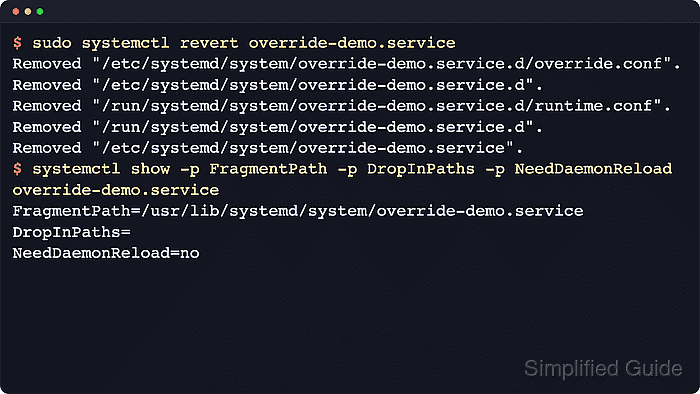
$ sudo systemctl revert override-demo.service
Removed "/etc/systemd/system/override-demo.service.d/override.conf".
Removed "/etc/systemd/system/override-demo.service.d".
Removed "/run/systemd/system/override-demo.service.d/runtime.conf".
Removed "/run/systemd/system/override-demo.service.d".
Reverting a remote-access, network, storage, or boot-critical unit can remove locally required parameters immediately. Keep console or other out-of-band access available before reverting units such as sshd.service, network daemons, or mount-related units.
If a full replacement file exists under /etc/systemd/system/override-demo.service, the same command removes that file too and falls back to the vendor copy. A masked unit is unmasked in the same pass.
- Check that the manager is back on the vendor file and no drop-ins remain loaded.
$ systemctl show -p FragmentPath -p DropInPaths -p UnitFileState -p NeedDaemonReload override-demo.service
FragmentPath=/usr/lib/systemd/system/override-demo.service
DropInPaths=
UnitFileState=disabled
NeedDaemonReload=no
FragmentPath should point back under /usr and DropInPaths= should be empty. A successful revert normally leaves NeedDaemonReload=no immediately, so a separate daemon-reload is not needed just to apply the revert.
- Print the loaded unit again to confirm that only the vendor definition remains.
$ systemctl cat override-demo.service
# /usr/lib/systemd/system/override-demo.service
[Unit]
Description=Override demo service

[Service]
Type=simple
ExecStart=/usr/bin/sleep infinity
Restart=always
RestartSec=5

[Install]
WantedBy=multi-user.target
systemctl cat prints the final merged definition that systemd sees. After a clean revert, the extra /etc and /run blocks should be gone.
- Restart the unit when the reverted settings affect how the service starts or runs.
$ sudo systemctl restart override-demo.service
The revert changes the loaded unit file right away, but a running service keeps its current process until it is restarted or started again later.
- Check the runtime state after the restart.
$ systemctl status --no-pager --full override-demo.service
● override-demo.service - Override demo service
     Loaded: loaded (/usr/lib/systemd/system/override-demo.service; disabled; preset: enabled)
     Active: active (running) since Wed 2026-04-22 03:30:06 UTC; 194ms ago
   Main PID: 124 (sleep)
      Tasks: 1 (limit: 28491)
     Memory: 152.0K (peak: 320.0K)
        CPU: 1ms
     CGroup: /system.slice/override-demo.service
             └─124 /usr/bin/sleep infinity

Apr 22 03:30:06 host systemd[1]: Started override-demo.service - Override demo service.
The restored Loaded: path is the quickest human-readable proof that the vendor unit is active again. If the unit had been masked earlier, systemctl is-enabled unit.service commonly changes from masked back to disabled, enabled, or static after the revert.
- Check whether the unit is local-only if the fragment path still stays under /etc or /run.
$ systemctl show -p FragmentPath local-only.service
FragmentPath=/etc/systemd/system/local-only.service
If the fragment still points to /etc/systemd/system or /run/systemd/system after revert, the unit may not have a vendor-supplied copy under /usr. In that case, revert leaves the local-only unit file in place and you need to remove or replace it manually only after confirming that the unit was meant to stay local.
When the goal is only to remove one or two directives instead of restoring the whole vendor unit, edit the drop-in again rather than reverting it entirely.
Related: How to edit a systemd unit override