Restarting a service with systemctl replaces the running daemon process when a live reload is not enough. That is the usual path after a package update, an environment change, a stuck worker, or an application setting that only takes effect on a fresh start.
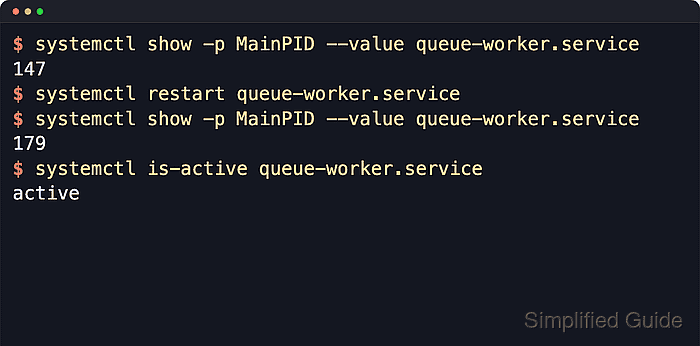
On a systemd host, systemctl restart unit.service asks the manager to stop the unit and start it again, and current upstream behavior also starts the unit if it is inactive already. A successful restart usually shows a fresh since timestamp in systemctl status, a different Main PID on long-running services, or both.
Restarting a service is different from reloading the systemd manager. Add sudo for system services, use systemctl --user restart unit.service for per-user units, run systemctl daemon-reload first when the unit file or a drop-in changed on disk, use reload when the daemon supports rereading its own configuration in place, use try-restart when the service should stay stopped if it is inactive already, and use an explicit stop followed by start when a full stop boundary matters before the service returns.
Steps to restart a service using systemctl:
- Check the current service status before restarting it.
$ systemctl status --no-pager --full queue-worker.service
● queue-worker.service - Queue Worker Service
     Loaded: loaded (/etc/systemd/system/queue-worker.service; disabled; preset: enabled)
     Active: active (running) since Wed 2026-04-22 02:29:20 UTC; 7s ago
   Main PID: 126 (queue-worker.sh)
      Tasks: 2 (limit: 28491)
     Memory: 516.0K (peak: 1.2M)
        CPU: 4ms
##### snipped #####
Replace queue-worker.service with the actual unit name, such as nginx.service, ssh.service, or postgresql.service. The status view confirms both the current runtime state and the unit file path before the restart.
- Record the current main PID when a clear before-and-after proof is needed.
$ systemctl show -p MainPID --value queue-worker.service
126
On most long-running services, a different MainPID after the restart confirms that systemd replaced the running process. Services such as Type=oneshot units can finish without a persistent main process, so a refreshed Active: timestamp is the clearer proof there.
- Restart the service.
$ sudo systemctl restart queue-worker.service
Restarting a remote-access, proxy, database, or queue service can interrupt active clients immediately, so keep console or other out-of-band access available before restarting anything that might lock out the current session.
restart starts inactive units too. Use sudo systemctl try-restart queue-worker.service instead when the service should restart only if it is already running.
- Confirm that the unit is active again.
$ systemctl is-active queue-worker.service
active
is-active is the shortest success check after the restart command returns. If it prints inactive or failed, go straight to the unit journal.
- Check the status again to confirm a fresh runtime.
$ systemctl status --no-pager --full queue-worker.service
● queue-worker.service - Queue Worker Service
     Loaded: loaded (/etc/systemd/system/queue-worker.service; disabled; preset: enabled)
     Active: active (running) since Wed 2026-04-22 02:29:27 UTC; 8s ago
   Main PID: 131 (queue-worker.sh)
      Tasks: 2 (limit: 28491)
     Memory: 516.0K (peak: 1.2M)
     CPU: 5ms
##### snipped #####
A fresh since timestamp shows that systemd stopped the old service instance and started a new one. When you recorded MainPID earlier, compare it here or rerun systemctl show -p MainPID --value unit.service to confirm the process change directly.
- Read the recent unit journal when the service exits right after the restart or drops back to failed.
$ sudo journalctl -u queue-worker.service -n 8 --no-pager
Apr 22 02:29:27 server systemd[1]: Stopping queue-worker.service - Queue Worker Service...
Apr 22 02:29:27 server queue-worker.sh[126]: Terminated
Apr 22 02:29:27 server queue-worker.sh[126]: queue-worker stopping
Apr 22 02:29:27 server systemd[1]: queue-worker.service: Deactivated successfully.
Apr 22 02:29:27 server systemd[1]: Stopped queue-worker.service - Queue Worker Service.
Apr 22 02:29:27 server systemd[1]: Started queue-worker.service - Queue Worker Service.
Apr 22 02:29:27 server queue-worker.sh[131]: queue-worker started
systemctl status already shows a short journal excerpt, but journalctl -u is the cleaner view when the stop hook hangs, the new process exits immediately, or a dependency prevents the unit from staying active.

Mohd Shakir Zakaria is a cloud architect with deep roots in software development and open-source advocacy. Certified in AWS, Red Hat, VMware, ITIL, and Linux, he specializes in designing and managing robust cloud and on-premises infrastructures.


