Editing a systemd override changes how one unit starts, stops, or inherits limits without copying the vendor unit into /etc/ and taking ownership of the whole file. That is the safer path when a packaged service only needs a local tweak such as a different restart delay, resource limit, environment value, or ordering rule.
systemd loads the main unit file first and then merges any /etc/systemd/system/unit-name.service.d/*.conf drop-ins on top of it. systemctl edit unit.service creates or reopens the default drop-in named override.conf unless --drop-in= selects another file, and a successful save reloads the manager automatically.
An override changes the unit definition that systemd will use the next time it starts or restarts the unit, but it does not replace a running service process by itself. Most service-unit overrides still need a follow-up restart, per-user services should use systemctl --user edit, list-style settings such as ExecStart= must be cleared before replacement, and dependencies such as After= or Requires= can only be added in a drop-in, not removed.
Steps to edit a systemd unit override:
- Inspect the loaded unit before changing it.
$ systemctl cat override-demo.service
# /usr/lib/systemd/system/override-demo.service
[Unit]
Description=Override demo service

[Service]
Type=simple
ExecStart=/bin/sh -c "exec sleep infinity"
Restart=on-failure
RestartSec=5
LimitNOFILE=1024
Replace override-demo.service with the real unit name. If the output already includes a second file block under /etc/systemd/system, an override is already loaded for that unit.
Use systemctl --user cat unit.service for a per-user unit instead of the system manager.
- Open the unit's default drop-in override with the editor configured for systemctl.
$ sudo systemctl edit override-demo.service
Without --full, systemctl edits a drop-in instead of replacing the main unit file. The default target for a system service is /etc/systemd/system/override-demo.service.d/override.conf.
Use sudo systemctl edit --drop-in=local.conf override-demo.service for a separately named drop-in, sudo systemctl edit --runtime override-demo.service for a change that should disappear at the next boot, or systemctl --user edit unit.service for a per-user service.
- Add only the directives that should change, under the same section name used by the original unit.
[Service]
RestartSec=15
LimitNOFILE=65535
Each drop-in still needs normal section headers such as [Service] or [Unit]. The rest of the vendor unit stays in effect.
- Clear list-style settings before replacing them, instead of stacking a second copy on top.
[Service]
ExecStart=
ExecStart=/usr/local/bin/override-demo --foreground --port 9443
Assigning an empty value to ExecStart= resets the inherited command list before the new command is added. The same pattern applies to other resettable list settings when entries must be removed or replaced.
Dependency settings such as After= and Requires= cannot be reset to an empty list in a drop-in. When dependencies must be removed, use sudo systemctl edit --full unit.service and review the whole copied unit carefully.
- Confirm that systemd loaded the new drop-in after saving the editor changes.
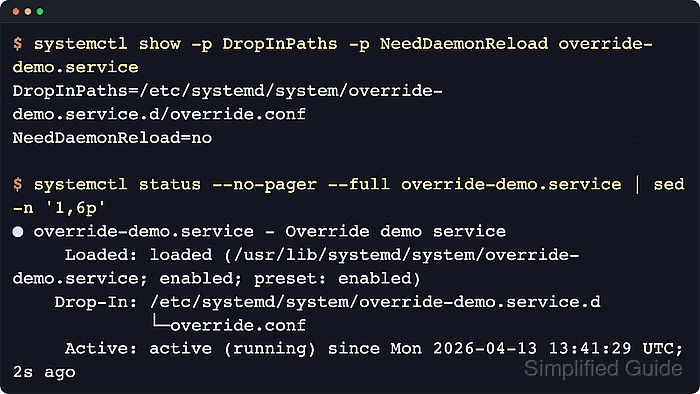
$ systemctl show -p DropInPaths -p NeedDaemonReload override-demo.service
DropInPaths=/etc/systemd/system/override-demo.service.d/override.conf
NeedDaemonReload=no
NeedDaemonReload=no is the expected post-save result after a successful systemctl edit because the command reloads the manager automatically.
If the file was written with a regular editor instead of systemctl edit, run sudo systemctl daemon-reload before expecting the manager to see the new drop-in.
- Print the loaded unit again to confirm that the drop-in is part of the definition now in use.
$ systemctl cat override-demo.service
# /usr/lib/systemd/system/override-demo.service
[Unit]
Description=Override demo service

[Service]
Type=simple
ExecStart=/bin/sh -c "exec sleep infinity"
Restart=on-failure
RestartSec=5
LimitNOFILE=1024

# /etc/systemd/system/override-demo.service.d/override.conf
[Service]
RestartSec=15
LimitNOFILE=65535
systemctl cat prints the main unit file and each loaded drop-in in order, which makes it the quickest way to confirm the final merged definition on disk.
- Restart the service so the running process picks up the changed unit settings.
$ sudo systemctl restart override-demo.service
Most service-unit override changes affect how systemd launches or constrains the service, so restart is the normal follow-up action. A service-specific reload usually rereads only the application's own configuration file.
- Check the service status after the restart.
$ systemctl status --no-pager --full override-demo.service
● override-demo.service - Override demo service
     Loaded: loaded (/usr/lib/systemd/system/override-demo.service; static)
    Drop-In: /etc/systemd/system/override-demo.service.d
             └─override.conf
     Active: active (running) since Wed 2026-04-22 03:12:52 UTC; 8s ago
   Main PID: 406 (sleep)
      Tasks: 1 (limit: 28491)
     Memory: 172.0K (peak: 1.4M)
        CPU: 9ms
##### snipped #####
The Drop-In: directory proves that the override file is loaded for the running unit, and the fresh since timestamp shows that the service has been started again under the updated definition.
- Check the exact property values when the override changes timeouts, limits, or other fields that are not obvious from status.
$ systemctl show -p RestartUSec -p LimitNOFILE override-demo.service
RestartUSec=15s
LimitNOFILE=65535
systemctl show prints normalized property names and values, so it is the clearest proof for settings such as RestartSec=, memory limits, file descriptor limits, or restart policies after the restart completes.

Mohd Shakir Zakaria is a cloud architect with deep roots in software development and open-source advocacy. Certified in AWS, Red Hat, VMware, ITIL, and Linux, he specializes in designing and managing robust cloud and on-premises infrastructures.


