How to enable a web application firewall for Nginx
Public Nginx sites that accept untrusted requests need inspection before traffic reaches the application. A web application firewall at the reverse proxy can log or reject obvious cross-site scripting, protocol abuse, and other hostile payloads before upstream code handles them.
On current Ubuntu and Debian packaging, the libnginx-mod-http-modsecurity package ships the ModSecurity v3 dynamic module together with /etc/nginx/modsecurity.conf and /etc/nginx/modsecurity_includes.conf. The modsecurity-crs package provides the OWASP Core Rule Set under /etc/modsecurity/crs and /usr/share/modsecurity-crs/rules, so the supported package path does not require compiling Nginx or the rule set from source.
A safe rollout starts in DetectionOnly mode so rule hits are written to the audit log before live traffic is blocked. The packaged CRS loader is written for Apache, so Nginx should use explicit Include lines in its ModSecurity include file. The packaged CRS setup also keeps blocking decisions in pass mode until its default actions are changed for enforcement.
Steps to enable a web application firewall for Nginx:
- Open a terminal session with an account that can use sudo.
- Install the Nginx ModSecurity module and the packaged CRS rules.
$ sudo apt update
Hit:1 http://archive.ubuntu.com/ubuntu resolute InRelease
Hit:2 http://archive.ubuntu.com/ubuntu resolute-updates InRelease
Hit:3 http://archive.ubuntu.com/ubuntu resolute-backports InRelease
Hit:4 http://security.ubuntu.com/ubuntu resolute-security InRelease
Reading package lists...

$ sudo apt install --assume-yes \
  libnginx-mod-http-modsecurity modsecurity-crs
Reading package lists...
Building dependency tree...
Reading state information...
The following NEW packages will be installed:
  libmodsecurity3t64 libnginx-mod-http-modsecurity libnginx-mod-http-ndk
  modsecurity-crs nginx
##### snipped
Setting up modsecurity-crs (3.3.8-1) ...
Setting up nginx (1.28.3-2ubuntu1.2) ...
Setting up libnginx-mod-http-modsecurity (1.0.3-2build6) ...
- Confirm the installed package versions.
$ dpkg-query -W -f '${binary:Package}\t${Version}\n' \ nginx libnginx-mod-http-modsecurity modsecurity-crs libmodsecurity3t64 libmodsecurity3t64:arm64 3.0.14-1build2 libnginx-mod-http-modsecurity 1.0.3-2build6 modsecurity-crs 3.3.8-1 nginx 1.28.3-2ubuntu1.2 - Verify the packaged rule engine still starts in DetectionOnly mode.
$ sudo grep -n '^SecRuleEngine' /etc/nginx/modsecurity.conf
7:SecRuleEngine DetectionOnly
The packaged /etc/nginx/modsecurity.conf already points the audit log to /var/log/nginx/modsec_audit.log, so the main setup work is loading the rule set and enabling the module in the Nginx configuration.
- Replace /etc/nginx/modsecurity_includes.conf with explicit CRS include lines that Nginx can parse.
$ sudoedit /etc/nginx/modsecurity_includes.conf
Include /etc/nginx/modsecurity.conf
Include /etc/modsecurity/crs/crs-setup.conf
Include /etc/modsecurity/crs/REQUEST-900-EXCLUSION-RULES-BEFORE-CRS.conf
Include /usr/share/modsecurity-crs/rules/*.conf
Include /etc/modsecurity/crs/RESPONSE-999-EXCLUSION-RULES-AFTER-CRS.conf
Do not point modsecurity_rules_file straight at /usr/share/modsecurity-crs/owasp-crs.load on current Ubuntu or Debian packages. That file contains IncludeOptional directives for Apache loading and causes nginx -t to fail when ModSecurity-nginx parses it.
- Enable ModSecurity in the http context so every server block inherits the WAF.
$ sudoedit /etc/nginx/conf.d/modsecurity.conf
# /etc/nginx/conf.d/modsecurity.conf
modsecurity on;
modsecurity_rules_file /etc/nginx/modsecurity_includes.conf;
For a narrower rollout, place the same two directives inside one specific server block instead of /etc/nginx/conf.d/modsecurity.conf.
- Create the audit log path with permissions Nginx can use.
$ sudo touch /var/log/nginx/modsec_audit.log
$ sudo chown www-data:adm /var/log/nginx/modsec_audit.log
$ sudo chmod 640 /var/log/nginx/modsec_audit.log
- Test the Nginx configuration before reloading it.
$ sudo nginx -t
2026/06/06 11:28:12 [notice] 3078#3078: ModSecurity-nginx v1.0.3 (rules loaded inline/local/remote: 0/924/0)
nginx: the configuration file /etc/nginx/nginx.conf syntax is ok
nginx: configuration file /etc/nginx/nginx.conf test is successful
Related: How to test Nginx configuration
- Reload nginx to apply the WAF configuration.
$ sudo systemctl reload nginx
Related: How to manage the Nginx service
- Send a request that should trigger the CRS while the rule engine is still in DetectionOnly mode.
$ curl --silent --show-error -D - -o /dev/null \
  'http://127.0.0.1/?q=%3Cscript%3Ealert(4)%3C%2Fscript%3E'
HTTP/1.1 200 OK
Server: nginx/1.28.3 (Ubuntu)
Date: Sat, 06 Jun 2026 11:28:12 GMT
Content-Type: text/html
Content-Length: 615
Last-Modified: Sat, 06 Jun 2026 11:28:10 GMT
Connection: keep-alive
ETag: "6a24044a-267"
Accept-Ranges: bytes
Use the real site hostname, or add --resolve example.com:80:127.0.0.1, when 127.0.0.1 does not map to the site that should be protected. A 200 response here is expected because DetectionOnly logs the match without blocking it.
- Confirm the request hit the audit log.
$ sudo grep -n 'XSS Attack Detected via libinjection' /var/log/nginx/modsec_audit.log
26:ModSecurity: Warning. detected XSS using libinjection.
##### snipped
[id "941100"] [msg "XSS Attack Detected via libinjection"]
##### snipped
[uri "/"] [unique_id "178074529270.355962"]
That confirms the module is active, the CRS rules are loaded, and the request is reaching the audit log before enforcement is enabled.
- Edit the ModSecurity policy so the rule engine is on.
$ sudoedit /etc/nginx/modsecurity.conf
Change the active rule engine line.
SecRuleEngine On
Blocking mode can return 403 for legitimate traffic until exclusions are tuned. Keep a rollback path ready and watch the audit log during the first live rollout.
- Edit the CRS setup file so matched blocking decisions return HTTP 403 instead of passing the transaction.
$ sudoedit /etc/modsecurity/crs/crs-setup.conf
Replace the two active default-action lines near the top of the file.
SecDefaultAction "phase:1,log,auditlog,deny,status:403"
SecDefaultAction "phase:2,log,auditlog,deny,status:403"
Changing only SecRuleEngine to On is not enough when the CRS setup file still leaves SecDefaultAction in pass mode.
- Verify the rule engine now shows On.
$ sudo grep -n '^SecRuleEngine' /etc/nginx/modsecurity.conf
7:SecRuleEngine On
- Verify the CRS default actions now use deny with status 403.
$ sudo grep -n '^SecDefaultAction' /etc/modsecurity/crs/crs-setup.conf
97:SecDefaultAction "phase:1,log,auditlog,deny,status:403"
98:SecDefaultAction "phase:2,log,auditlog,deny,status:403"
- Test the configuration after turning blocking on.
$ sudo nginx -t
2026/06/06 11:28:12 [notice] 3095#3095: ModSecurity-nginx v1.0.3 (rules loaded inline/local/remote: 0/924/0)
nginx: the configuration file /etc/nginx/nginx.conf syntax is ok
nginx: configuration file /etc/nginx/nginx.conf test is successful
Related: How to test Nginx configuration
- Reload nginx to apply enforcement.
$ sudo systemctl reload nginx
Related: How to manage the Nginx service
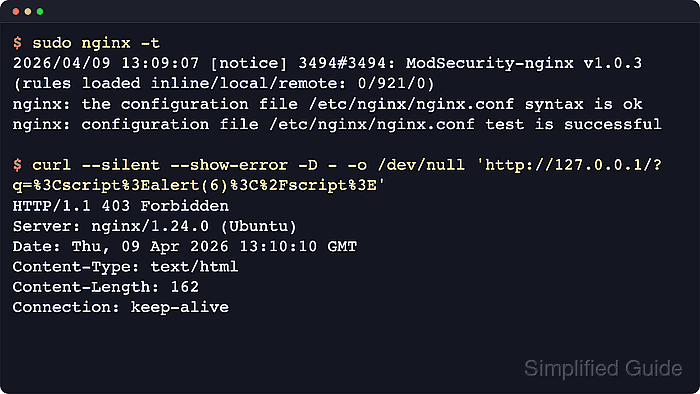
- Verify the same test payload is now blocked with HTTP 403.
$ curl --silent --show-error -D - -o /dev/null \
  'http://127.0.0.1/?q=%3Cscript%3Ealert(6)%3C%2Fscript%3E'
HTTP/1.1 403 Forbidden
Server: nginx/1.28.3 (Ubuntu)
Date: Sat, 06 Jun 2026 11:28:13 GMT
Content-Type: text/html
Content-Length: 162
Connection: keep-alive
At this point the WAF is enforcing the packaged CRS. The next production step is tuning exclusions in /etc/modsecurity/crs/crs-setup.conf or separate local rule files so legitimate application traffic is not blocked.