How to configure DRBD dual-primary mode
DRBD dual-primary mode lets two nodes hold the Primary role for the same resource at the same time. Use it only when the layer above DRBD can coordinate concurrent writes, such as a cluster filesystem, a managed virtualization live-migration stack, or a cluster manager with fencing.
Dual-primary is a resource policy, not just a promotion command. The resource must replicate with protocol C, allow two primaries in the active net configuration, and have fencing that can stop unsafe peer access when nodes lose contact.
Start from a synchronized two-node resource and keep ordinary filesystems such as ext4, XFS, or btrfs mounted on only one node. If both nodes can write without a distributed lock manager or equivalent application-level locking, a network interruption can create split-brain and data corruption.
Related: How to create a DRBD resource
Related: How to validate DRBD configuration
Related: How to configure DRBD fencing
Related: How to promote a DRBD resource to primary
Steps to configure DRBD dual-primary mode:
- Confirm the resource is connected and synchronized before changing its role policy.
$ sudo drbdadm status webdata
webdata role:Secondary
  disk:UpToDate
  node-b role:Secondary
    peer-disk:UpToDate
Do not enable dual-primary mode to work around an out-of-sync, disconnected, or split-brain resource. Repair the data state first, then change the role policy.
Related: How to check DRBD resource status
Related: How to verify DRBD synchronization state - Stop or pause upper-layer writers that are using the DRBD device.
If Pacemaker owns the resource, put the cluster or affected resources in maintenance mode before hand-editing the DRBD resource file. For manually managed resources, unmount conventional filesystems and stop services that open the device for writing.
- Open the active resource file on the first node.
$ sudoedit /etc/drbd.d/webdata.res
Replace webdata with the resource name used by the existing .res file.
- Add protocol C, allow-two-primaries, and fencing to the resource's active net configuration.
resource "webdata" {
  device minor 1;
  disk "/dev/vg_drbd/webdata";
  meta-disk internal;

  on "node-a" {
    node-id 0;
  }
  on "node-b" {
    node-id 1;
  }

  connection {
    host "node-a" address 192.0.2.10:7789;
    host "node-b" address 192.0.2.11:7789;
    net {
      protocol C;
      allow-two-primaries yes;
      fencing resource-and-stonith;
    }
  }

  handlers {
    fence-peer "/usr/lib/drbd/crm-fence-peer.9.sh";
    unfence-peer "/usr/lib/drbd/crm-unfence-peer.9.sh";
  }
}
protocol C makes a write complete after it reaches the local and peer disks. allow-two-primaries yes permits both nodes to be Primary, and fencing resource-and-stonith gives DRBD a way to block unsafe I/O while the cluster fencing layer resolves a lost peer.
Using allow-two-primaries without working fencing is unsafe. A disconnected pair can keep accepting writes on both sides, and later recovery must discard one side's changes.
Related: How to configure DRBD fencing
- Copy the same resource file to the peer node.
$ scp /etc/drbd.d/webdata.res admin@node-b:/tmp/webdata.res
Configuration management can replace scp when it installs the same resource definition on every participating node.
- Install the resource file on the peer node.
$ ssh admin@node-b 'sudo install --mode=0644 /tmp/webdata.res /etc/drbd.d/webdata.res'
- Validate that drbdadm parses the updated resource on the first node.
$ sudo drbdadm dump webdata
# resource webdata on node-a: not ignored, not stacked
# defined at /etc/drbd.d/webdata.res:1
resource webdata {
    device               minor 1;
    disk                 /dev/vg_drbd/webdata;
    meta-disk            internal;
##### snipped #####
        net {
            _name        node-b;
            protocol       C;
            allow-two-primaries yes;
            fencing      resource-and-stonith;
        }
##### snipped #####
}
Run the same parser check on node-b. A resource file can parse on one node and fail on another when hostnames, local addresses, or backing device paths do not match.
Related: How to validate DRBD configuration
- Preview the runtime change before applying it.
$ sudo drbdadm --dry-run adjust webdata
drbdsetup new-peer webdata 1 --_name=node-b --protocol=C --allow-two-primaries=yes --fencing=resource-and-stonith
drbdsetup new-path webdata 1 ipv4:192.0.2.10:7789 ipv4:192.0.2.11:7789
##### snipped #####
The dry run should show --allow-two-primaries=yes and --fencing=resource-and-stonith in the lower-level drbdsetup call.
- Apply the updated DRBD configuration on the first node.
$ sudo drbdadm adjust webdata
drbdadm adjust normally returns no output when the running resource already matches the file or the change applies successfully.
- Apply the same updated DRBD configuration on the peer node.
$ ssh node-b sudo drbdadm adjust webdata
- Promote the first node if it is not already Primary.
$ sudo drbdadm primary webdata
drbdadm primary normally returns no output after a successful role change.
- Promote the peer node.
$ ssh node-b sudo drbdadm primary webdata
This must succeed only on a resource intended for dual-primary access. If the command fails, do not force promotion until the configuration, fencing, synchronization state, and upper-layer locking are confirmed.
- Verify that both nodes are Primary and the data is UpToDate.
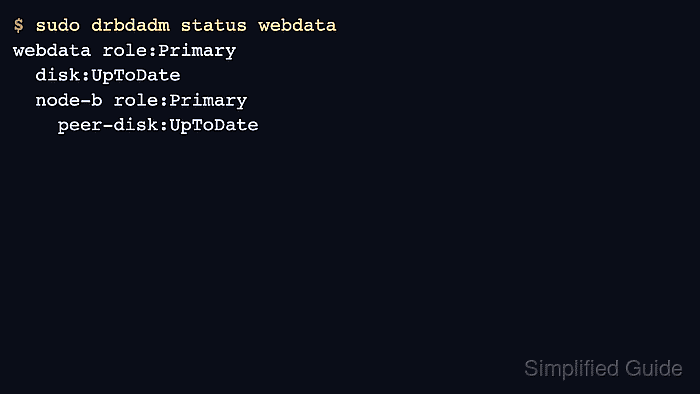
$ sudo drbdadm status webdata webdata role:Primary disk:UpToDate node-b role:Primary peer-disk:UpToDate - Return the upper layer to service only after the status check shows both roles and disks as expected.
Mount a cluster filesystem or start a cluster-managed workload through the component that owns locking and fencing. Do not mount a conventional filesystem read/write on both nodes.