Verifying DRBD synchronization state confirms that a replicated resource has finished copying changed blocks and that every expected peer volume has an up-to-date view of the data. Operators check this state after initial setup, forced resync, storage repair, online verification, or before allowing a failover target to host an application.
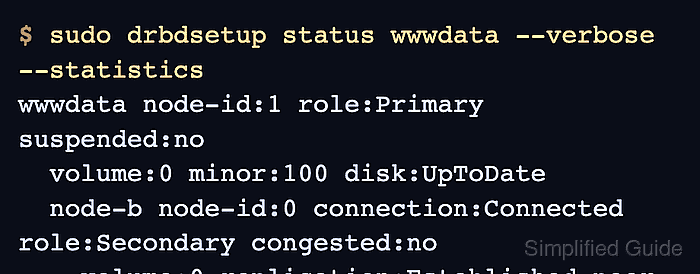
DRBD 9 reports the quick view through drbdadm status and exposes per-peer counters through drbdsetup status --verbose --statistics. A synchronized peer shows connection:Connected, replication:Established, peer-disk:UpToDate, and out-of-sync:0 for the selected volume.
Check the node that will make the operational decision, then compare any peer that might receive reads, writes, failover promotion, or repair traffic. SyncSource and SyncTarget mean synchronization is still running, while PausedSyncS, PausedSyncT, VerifyS, VerifyT, or a nonzero out-of-sync counter needs a follow-up before the resource is treated as ready.
Related: How to check DRBD resource status
Related: How to force a DRBD resync
Related: How to run DRBD online verification
Steps to verify DRBD synchronization state:
- Check the selected DRBD resource.
$ sudo drbdadm status wwwdata
wwwdata role:Primary
  volume:0 disk:UpToDate
  node-b role:Secondary
    volume:0 peer-disk:UpToDate
Replace wwwdata with the resource name and check every peer that must be ready for failover, maintenance, or application startup.
Related: How to check DRBD resource status
- Confirm that the peer connection is established.
$ sudo drbdadm cstate wwwdata:node-b
Connected
Connected means the peer link is active. Connecting, StandAlone, or WFConnection means the peer is not ready for a final synchronization decision.
- Inspect detailed replication counters for the resource.
$ sudo drbdsetup status wwwdata --verbose --statistics
wwwdata node-id:1 role:Primary suspended:no
  volume:0 minor:100 disk:UpToDate
  node-b node-id:0 connection:Connected role:Secondary congested:no
    volume:0 replication:Established peer-disk:UpToDate resync-suspended:no
        received:0 sent:131844 out-of-sync:0 pending:0 unacked:0
out-of-sync is reported in KiB. A ready peer volume shows replication:Established, peer-disk:UpToDate, resync-suspended:no, and out-of-sync:0.
- Read the progress fields when synchronization is still running.
$ sudo drbdsetup status wwwdata --verbose --statistics
wwwdata node-id:0 role:Secondary suspended:no
  volume:0 minor:100 disk:Inconsistent
  node-a node-id:1 connection:Connected role:Primary congested:no
    volume:0 replication:SyncTarget peer-disk:UpToDate resync-suspended:no
        done:64.18 out-of-sync:1835008 eta:92
SyncTarget means the local node is receiving blocks. SyncSource means the local node is sending blocks. done shows the synchronized percentage, and eta is the estimated remaining time in seconds.
Related: How to configure DRBD resync rate - Check the one-shot event view when automation needs parseable state.
$ sudo drbdsetup events2 --now wwwdata
exists resource name:wwwdata role:Primary suspended:no
exists connection name:wwwdata peer-node-id:0 conn-name:node-b connection:Connected role:Secondary
exists device name:wwwdata volume:0 minor:100 disk:UpToDate
exists peer-device name:wwwdata peer-node-id:0 conn-name:node-b volume:0
    replication:Established peer-disk:UpToDate resync-suspended:no
exists -
--now exits after the current state dump. Without it, events2 keeps streaming changes for monitoring tools. Add --statistics when the monitoring check also needs counters.
- Wait for synchronization only when a maintenance task needs a blocking check.
$ sudo drbdadm wait-sync wwwdata
The command returns after the resource is connected and any resynchronization has finished. Use it in maintenance windows, not as a replacement for reading the final state.
- Verify the same synchronized state from the peer node.
$ sudo drbdsetup status wwwdata --verbose --statistics
wwwdata node-id:0 role:Secondary suspended:no
  volume:0 minor:100 disk:UpToDate
  node-a node-id:1 connection:Connected role:Primary congested:no
    volume:0 replication:Established peer-disk:UpToDate resync-suspended:no
        received:131844 sent:0 out-of-sync:0 pending:0 unacked:0
Do not promote, fail over, detach storage, or start a dependent application when a peer still shows Inconsistent, Outdated, DUnknown, SyncTarget, PausedSyncT, VerifyT, or a nonzero out-of-sync counter. Resolve the cause first.
Related: How to force a DRBD resync
Related: How to view DRBD logs

Mohd Shakir Zakaria is a cloud architect with deep roots in software development and open-source advocacy. Certified in AWS, Red Hat, VMware, ITIL, and Linux, he specializes in designing and managing robust cloud and on-premises infrastructures.


