How to configure AWS CLI on Linux and macOS
Configuring AWS CLI on Linux or macOS saves the profile values that terminal commands use when a request does not pass --profile, --region, or --output. A saved profile gives local shells and automation jobs a predictable account, region, and output format before they make AWS service calls.
The aws configure wizard prompts for an access key ID, secret access key, default region, and default output format. It writes key material to ~/.aws/credentials and writes non-secret defaults such as region and output to ~/.aws/config. When --profile work is used, the wizard writes [work] in the credentials file and [profile work] in the config file.
Saving long-term access keys is appropriate only when that credential method is approved for the account. Do not use root account keys, and check the resolved profile before account-sensitive work because command-line flags and environment variables can override saved file values. If the account is accessed through the AWS Management Console or IAM Identity Center, use aws login or aws configure sso instead of storing long-term keys locally.
Steps to configure AWS CLI on Linux and macOS:
- Confirm that the current shell can run AWS CLI.
$ aws --version
aws-cli/2.35.2 Python/3.14.5 Linux/6.8.0 exe/x86_64.ubuntu.26
The platform suffix differs between Linux and macOS. The important result is that the command returns an aws-cli/2 version line instead of command not found.
Related: How to install AWS CLI on Ubuntu
Related: How to install AWS CLI on CentOS Stream or Red Hat Enterprise Linux
Related: How to install AWS CLI version 1 using pip - Gather the access key ID, secret access key, default region, and preferred output format for the profile you want this machine to use.
Use an approved non-root identity for this workflow. If the organization issues temporary console or IAM Identity Center credentials instead, configure that method rather than saving long-term keys here.
- Start the interactive configuration wizard for the default profile.
$ aws configure

Tip: You can deliver temporary credentials to the AWS CLI using your AWS Console session by running the command 'aws login'.

AWS Access Key ID [None]:
AWS Secret Access Key [None]:
Default region name [None]:
Default output format [None]:
Run aws configure --profile work when you want a named profile instead of overwriting [default]. If a value already exists in the profile files, it appears in brackets and pressing Enter keeps it; environment variables and instance-role credentials do not populate these prompts.
Related: How to configure multiple AWS CLI profiles - Enter the access key ID at the first prompt.
AWS Access Key ID [None]: AKIAIOSFODNN7EXAMPLE
- Enter the secret access key at the second prompt.
AWS Secret Access Key [None]: wJalrXUtnFEMI/K7MDENG/bPxRfiCYEXAMPLEKEY
- Enter the default region for commands that do not pass --region explicitly.
Default region name [None]: us-west-2
The region you save here becomes the profile default only. --region, AWS_REGION, and AWS_DEFAULT_REGION can still override it for a command or shell session.
Related: How to set the default Region in AWS CLI
Related: How to use AWS CLI environment variables - Enter the preferred default output format, or press Enter to leave it unset.
Default output format [None]: json
json preserves structured fields for scripts, while table and text are easier to scan during interactive checks.
Related: How to set AWS CLI default output format - List the shared configuration directory and confirm that the wizard created both files.
$ ls -l ~/.aws
-rw------- 1 user user  43 Jun 12 14:05 config
-rw------- 1 user user 116 Jun 12 14:05 credentials
The default paths on Linux and macOS are ~/.aws/config and ~/.aws/credentials.
Related: How to find the AWS CLI config file location
Related: How to find the AWS CLI shared credentials file location - Read the shared config file and confirm that the non-secret defaults were stored under the expected profile section.
$ cat ~/.aws/config
[default]
region = us-west-2
output = json
A named profile appears here as [profile work] even though the matching credentials section is [work]. The secret key stays in ~/.aws/credentials rather than this file.
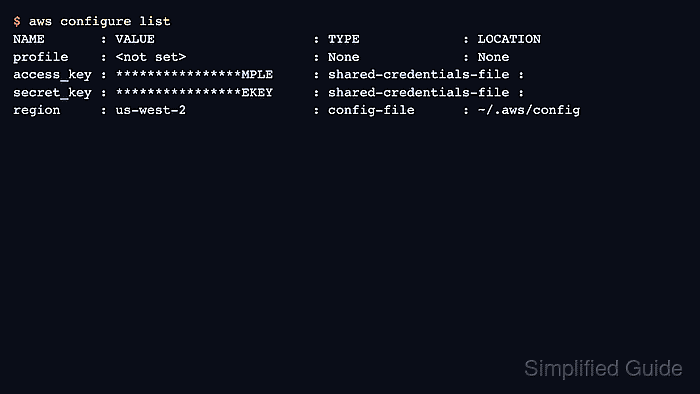
- Show the resolved configuration for the active profile.
$ aws configure list
NAME       : VALUE                    : TYPE             : LOCATION
profile    : <not set>                : None             : None
access_key : ****************MPLE     : shared-credentials-file :
secret_key : ****************EKEY     : shared-credentials-file :
region     : us-west-2                : config-file      : ~/.aws/config
If TYPE changes to env or manual, the current shell or command line is overriding what the wizard saved. Add --profile work when you need to inspect a named profile explicitly.
Related: How to use AWS CLI environment variables - Make one signed request to confirm that the configured profile can authenticate to AWS.
$ aws sts get-caller-identity --output json
{
    "UserId": "AIDASAMPLEUSERID",
    "Account": "123456789012",
    "Arn": "arn:aws:iam::123456789012:user/PlatformOperator"
}
If you configured a named profile, add --profile work to the command. A successful response confirms that the saved credentials can sign requests and shows the exact account and user or role that the CLI resolved.
Related: How to check the current caller identity in AWS CLI