Changing an AWS CLI profile is risky when the shell is not reading the file you think it is. Resolve the active shared config path before editing Region defaults, output format, assumed-role profiles, or IAM Identity Center session settings.
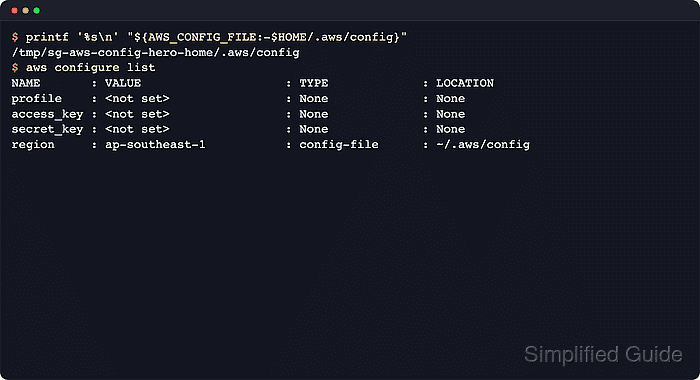
The shared config file stores non-secret profile settings such as region, output, role configuration, and sso-session blocks. The default location is ~/.aws/config on Linux and macOS and %USERPROFILE%\.aws\config on Windows.
The AWS_CONFIG_FILE environment variable moves the shared config lookup to another local path for the current shell or process. The location check should stay separate from the shared credentials file, because access keys normally live in ~/.aws/credentials or the path selected by AWS_SHARED_CREDENTIALS_FILE.
Steps to find the AWS CLI config file location:
- Print the default shared config path for comparison.
$ printf '%s\n' "$HOME/.aws/config"
/home/user/.aws/config
On Windows, the default path is %USERPROFILE%\.aws\config when AWS_CONFIG_FILE is not set.
- Check whether AWS_CONFIG_FILE is replacing the default path.
$ printenv AWS_CONFIG_FILE
/home/user/aws-configs/team-config
No output means the AWS CLI is still using the home-directory default from the previous step.
- Confirm that the resolved config file exists before opening or editing it.
$ ls -l "${AWS_CONFIG_FILE:-$HOME/.aws/config}"
-rw------- 1 user user 97 Jun 12 13:56 /home/user/aws-configs/team-config
No such file or directory means the file has not been created at that path yet or the override points to the wrong file.
- Run aws configure list to see whether active profile settings came from the shared config file.
$ aws configure list
NAME       : VALUE                    : TYPE             : LOCATION
profile    : <not set>                : None             : None
access_key : ****************MPLE     : shared-credentials-file :
secret_key : ****************EKEY     : shared-credentials-file :
region     : ap-southeast-1           : config-file      : /home/user/aws-configs/team-config
The LOCATION column shows the config file for values that came from that file. If TYPE shows env or None, the current shell is overriding that value or no value is set.
- Repeat the check with --profile when the settings live in a named profile section.
$ aws configure list --profile audit
NAME       : VALUE                    : TYPE             : LOCATION
profile    : audit                    : manual           : --profile
access_key : ****************MPLE     : shared-credentials-file :
secret_key : ****************EKEY     : shared-credentials-file :
region     : us-east-1                : config-file      : /home/user/aws-configs/team-config
--profile changes which profile section the AWS CLI reads, but it does not change the shared config file path unless AWS_CONFIG_FILE is also set.

Mohd Shakir Zakaria is a cloud architect with deep roots in software development and open-source advocacy. Certified in AWS, Red Hat, VMware, ITIL, and Linux, he specializes in designing and managing robust cloud and on-premises infrastructures.


