A website redesign changes more than visual styling. New templates can affect navigation, public URLs, forms, analytics, accessibility, search signals, and page performance, so the release needs measurable boundaries before design approval becomes a launch decision.
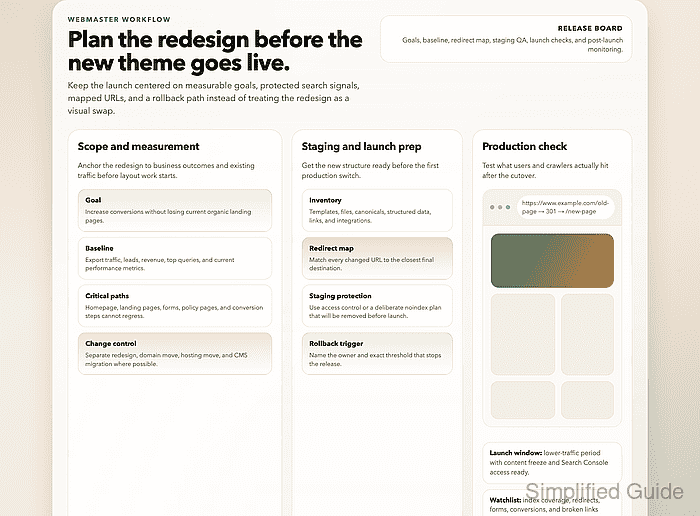
Keep a redesign separate from a domain move, CMS replacement, hosting cutover, or measurement reset whenever those changes can ship independently. Google recommends changing one major site variable at a time where possible; changed public URLs also need direct permanent redirects to their closest replacement pages.
Use one release board to connect each planning area with an accountable owner, readiness status, evidence location, and unresolved blocker. A machine-readable gate can then reject incomplete rows instead of relying on a meeting note that already says the plan is ready.
Steps to plan a website redesign launch:
- Define the redesign objective with its protected business outcomes.
Objective | Improve product discovery without reducing qualified leads
Protected outcomes | Organic landing traffic, form submissions, completed purchases
Critical journey | Landing page -> product page -> checkout confirmation
- Assign one owner plus one due date to each redesign workstream.
Workstream | Owner | Due date | Status
Content and navigation | Content lead | 2026-08-14 | In progress
Templates and components | Front-end lead | 2026-08-21 | In progress
Search and redirects | SEO lead | 2026-08-21 | Not started
Analytics and consent | Analytics lead | 2026-08-21 | Not started
Launch and rollback | Release lead | 2026-08-28 | Not started
- Capture the current production baseline for every protected outcome.
Organic landing pages | Export saved
Search queries | Export saved
Conversions and revenue | Export saved
Form submissions | Export saved
Core Web Vitals | Mobile and desktop field baseline saved
Accessibility findings | Current evaluation saved
Field performance data reflects real visits, while lab tests support pre-release diagnosis. Automated accessibility tools also need knowledgeable human evaluation for checks they cannot determine.
- Inventory every public resource plus third-party integration in redesign scope.
Page types | Home, category, product, article, contact, checkout, confirmation
Files and feeds | PDFs, images, XML sitemaps, RSS feeds
Integrations | Search, payments, forms, analytics, consent, support chat
Sitemap, analytics, server-log, and link-report inventories expose different parts of the live site.
Tool: Sitemap URL Extractor - Exclude separable infrastructure changes from the redesign release.
Combining a domain move, CMS replacement, hosting cutover, or measurement reset with the redesign enlarges the rollback scope and makes traffic, indexing, or conversion regressions harder to isolate.
- Map each changed public URL to its post-launch response.
Current URL | Launch response | Final URL
/services/seo | 301 | /services/search-audit
/blog/old-guide | 301 | /guides/new-guide
/summer-promo | 410 | —
Permanent URL moves need 301 or 308 server-side redirects that point directly to relevant destinations. A direct mapping avoids chains plus irrelevant home-page targets.
- Record the staging access rule with its removal owner.
Preferred staging control | Password, SSO, VPN, or IP allowlist
Public-review exception | Crawlable noindex response
Removal owner | Release lead
Removal checkpoint | Before production traffic opens
A robots.txt block does not reliably hide a staging URL from search results. Google must crawl a page to observe its noindex rule.
- Build an acceptance matrix for each critical template plus user journey.
Surface | Acceptance evidence
Navigation | Keyboard and pointer paths reach every primary destination
Forms and checkout | Successful submission reaches the expected confirmation state
Accessibility | Required WCAG 2.2 checks pass through automated and human evaluation
Performance | Agreed mobile and desktop budgets pass
Search | Status, canonical, robots, structured data, and internal links match the plan
Measurement | Analytics and consent events appear once with the expected values
Representative pages from every template expose navigation, content, metadata, and integration defects that a home-page-only or component-library review can miss.
- Prepare the production search plus measurement assets for the launch window.
Search Console property | Verified
Verification method | Preserved by the new templates
Canonical targets | Match the launch URL map
Launch sitemap | https://www.example.com/sitemap.xml
Analytics and consent tags | Included in production templates
A redesign that also changes domain or subdomain needs verified old and new properties before cutover.
Related: How to create an XML sitemap for your website - Define the launch window with rollback criteria.
Launch window | Saturday 22:00-23:30
Rollback owner | Release lead
Stop condition | A critical journey fails on production
Stop condition | A priority URL returns an unmapped error or redirect
Stop condition | Analytics or consent events are missing or duplicated
Recovery action | Restore the previous release and redirect configuration
Decision deadline | 30 minutes after traffic opens
The previous release and configuration must remain recoverable until the production checks pass and the rollback window closes.
- Create the redesign release-gate file with one row for every required approval area.
- redesign-release-gates.json
{
  "approval_rows": [
    {"area":"Objective and protected outcomes","owner":"Product sponsor","readiness_status":"Ready","evidence_link":"https://projects.example.net/redesign/evidence/objective","unresolved_blocker":""},
    {"area":"Owners and dates","owner":"Release lead","readiness_status":"Ready","evidence_link":"https://projects.example.net/redesign/evidence/workstreams","unresolved_blocker":""},
    {"area":"Live baseline","owner":"Analytics lead","readiness_status":"Not ready","evidence_link":"","unresolved_blocker":"Mobile field-data export is pending"},
    {"area":"Site inventory","owner":"Content lead","readiness_status":"Ready","evidence_link":"https://projects.example.net/redesign/evidence/site-inventory","unresolved_blocker":""},
    {"area":"Change separation","owner":"Release lead","readiness_status":"Ready","evidence_link":"https://projects.example.net/redesign/evidence/release-scope","unresolved_blocker":""},
    {"area":"URL response map","owner":"SEO lead","readiness_status":"Ready","evidence_link":"https://projects.example.net/redesign/evidence/url-map","unresolved_blocker":""},
    {"area":"Staging rule","owner":"Platform lead","readiness_status":"Ready","evidence_link":"https://projects.example.net/redesign/evidence/staging-access","unresolved_blocker":""},
    {"area":"Acceptance matrix","owner":"","readiness_status":"In review","evidence_link":"https://projects.example.net/redesign/evidence/acceptance-matrix","unresolved_blocker":"Checkout keyboard test is open"},
    {"area":"Search and measurement assets","owner":"SEO lead","readiness_status":"Ready","evidence_link":"https://projects.example.net/redesign/evidence/search-measurement","unresolved_blocker":""},
    {"area":"Rollback plan","owner":"Release lead","readiness_status":"Ready","evidence_link":"https://projects.example.net/redesign/evidence/rollback","unresolved_blocker":""}
  ]
}
projects.example.net represents a project system accessible to reviewers. The intentionally incomplete rows demonstrate the gate's failure path.
- Save the release-gate validator next to the planning file.
- validate-redesign-release-gates.py
import json
import sys
from pathlib import Path

rows = json.loads(Path(sys.argv[1]).read_text())["approval_rows"]
errors = []

for index, row in enumerate(rows, start=1):
    area = str(row.get("area", "")).strip() or f"Row {index}"
    owner = str(row.get("owner", "")).strip()
    evidence_link = str(row.get("evidence_link", "")).strip()
    readiness_status = str(row.get("readiness_status", "")).strip()
    unresolved_blocker = str(row.get("unresolved_blocker", "")).strip()

    if not owner:
        errors.append(f"{area}: missing owner")
    if not evidence_link:
        errors.append(f"{area}: missing evidence link")
    if readiness_status != "Ready":
        errors.append(f"{area}: readiness is {readiness_status or 'missing'}")
    if unresolved_blocker:
        errors.append(f"{area}: {unresolved_blocker}")

if errors:
    raise SystemExit("BLOCKED:\n" + "\n".join(errors))

print(f"READY: {len(rows)} approval rows passed")
- Run the release-gate validator against the incomplete plan.
$ python3 validate-redesign-release-gates.py redesign-release-gates.json
BLOCKED:
Live baseline: missing evidence link
Live baseline: readiness is Not ready
Live baseline: Mobile field-data export is pending
Acceptance matrix: missing owner
Acceptance matrix: readiness is In review
Acceptance matrix: Checkout keyboard test is open
- Replace the Live baseline row in redesign-release-gates.json with the completed field-performance export.
{"area":"Live baseline","owner":"Analytics lead","readiness_status":"Ready","evidence_link":"https://projects.example.net/redesign/evidence/live-baseline","unresolved_blocker":""} - Replace the Acceptance matrix row in redesign-release-gates.json with the signed accessibility plus journey report.
{"area":"Acceptance matrix","owner":"Accessibility lead","readiness_status":"Ready","evidence_link":"https://projects.example.net/redesign/evidence/acceptance-matrix","unresolved_blocker":""} - Rerun the release-gate validator to approve the completed plan.
$ python3 validate-redesign-release-gates.py redesign-release-gates.json
READY: 10 approval rows passed

Mohd Shakir Zakaria is a cloud architect with deep roots in software development and open-source advocacy. Certified in AWS, Red Hat, VMware, ITIL, and Linux, he specializes in designing and managing robust cloud and on-premises infrastructures.


