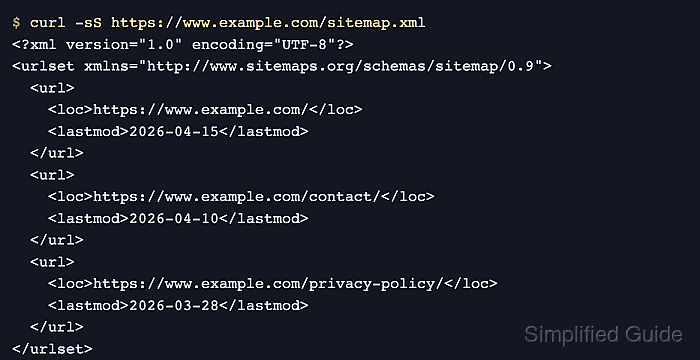
An XML sitemap tells search engines which canonical public URLs on a site are worth crawling. Create or review one when important pages are slow to be discovered through normal internal links, when the URL inventory changes often, or when a migration needs one clean crawl source.
If your CMS or hosting platform already publishes a reliable sitemap, use that generated file instead of maintaining a second hand-written list. Current Google guidance recommends UTF-8 encoding, fully qualified canonical URLs, and a root-level sitemap URL when practical because a root sitemap can cover the whole host and is easy to reference from robots.txt or Search Console.
List only URLs that should appear in search, keep lastmod only when the date matches the page's last significant change, and skip changefreq and priority because Google ignores them. Submitting a sitemap is still only a crawl hint, so the file must stay publicly fetchable and in sync with the live canonical URLs.
Steps to create an XML sitemap for your website:
- Choose the sitemap source you can keep accurate over time.
If the site runs on a CMS or managed platform that already generates a sitemap, publish and review that file instead of hand-maintaining a separate XML list. Google says manual sitemaps are practical mainly for smaller, stable URL sets, while larger sites should generate them automatically.
- Collect only the canonical public URLs that should return a normal 200 OK response and remain indexable.
Leave out redirects, alternate parameter URLs, staging hosts, login-only pages, blocked URLs, long-lived noindex pages, and other duplicates that should not compete as canonicals.
- Write the sitemap as UTF-8 XML with one url block per canonical page and an accurate lastmod only when you know the page's last significant update.
<?xml version="1.0" encoding="UTF-8"?> <urlset xmlns="http://www.sitemaps.org/schemas/sitemap/0.9"> <url> <loc>https://www.example.com/</loc> <lastmod>2026-04-20</lastmod> </url> <url> <loc>https://www.example.com/contact/</loc> </url> </urlset>loc is required, the URLs must be fully qualified and absolute, XML special characters must be entity escaped, and omitting lastmod is better than publishing a date you cannot keep true.
- Split the sitemap into multiple child files and publish a sitemap index when one file would exceed 50,000 URLs or 50 MB uncompressed.
<?xml version="1.0" encoding="UTF-8"?> <sitemapindex xmlns="http://www.sitemaps.org/schemas/sitemap/0.9"> <sitemap> <loc>https://www.example.com/sitemaps/pages-1.xml.gz</loc> </sitemap> <sitemap> <loc>https://www.example.com/sitemaps/pages-2.xml.gz</loc> </sitemap> </sitemapindex>You can gzip child sitemap files, and the sitemap index is the single URL to submit when the site is split across multiple sitemap files.
- Publish the sitemap at a stable public HTTPS URL on the live site, preferably at the site root.
https://www.example.com/sitemap.xml
A root sitemap can describe the whole host. If the file is published below the root and is discovered only through normal crawling, it affects only descendants of that parent directory.
- Add the sitemap URL to the live robots.txt file so crawlers can rediscover it automatically.
Sitemap: https://www.example.com/sitemap.xml
If the site publishes a sitemap index, list the index URL here instead of each child sitemap.
- Submit the same sitemap URL in Google Search Console or through the Search Console API for the matching property.
Submitting a sitemap tells Google where the file lives; it does not upload the file for you. If you do not have owner permission for the property, keep the sitemap listed in robots.txt so Google can still discover it.
Do not rely on Google's old sitemap ping endpoint. Google deprecated it, and direct requests to that endpoint now return 404.
- Fetch the published sitemap URL directly and confirm that it returns 200 from the public host with sitemap content rather than a redirect, login challenge, or HTML error page.
$ curl -I https://www.example.com/sitemap.xml HTTP/2 200 content-type: application/xml; charset=utf-8
If the site publishes a compressed sitemap, fetching the same URL may show a gzip content type or a Content-Disposition for sitemap.xml.gz. That is still acceptable as long as the published sitemap URL is the one you list in robots.txt and submit to Google.
- Recheck the sitemap in Search Console until the status is Success or the reported fetch and parsing errors are fixed.
If Google cannot fetch the file, test the sitemap URL with live inspection, then correct the property mismatch, access control, wrong host variant, stale lastmod values, or invalid XML before resubmitting.
Mohd Shakir Zakaria is a cloud architect with deep roots in software development and open-source advocacy. Certified in AWS, Red Hat, VMware, ITIL, and Linux, he specializes in designing and managing robust cloud and on-premises infrastructures.