Redirect rules carry visitors and crawlers from old website addresses to the pages that replace them. Before a DNS cutover, the public hostname still reaches the old stack, so an ordinary request cannot prove what the launch server will return.
The curl --resolve option sends one host-and-port pair to a chosen IP address while the request keeps the public hostname. This preserves virtual-host selection and normal TLS certificate validation without changing public DNS or the local hosts file.
Treat each old URL as a small contract with an expected first status, redirect destination, final URL, final status, and redirect count. Permanent moves should normally reach the correct replacement directly, while deleted content with no equivalent should return a deliberate 404 or 410 instead of falling through to the home page.
Steps to test website redirects before launch:
- Prioritize old URLs from XML sitemaps, analytics reports, internal links, and external links.
- Create a redirect test sheet with columns for the public hostname, destination IP address, old URL, first response, and final result.
Public host    | www.example.com
Launch IP      | 203.0.113.20
Old URL        | https://www.example.com/services/seo
First response | 301 -> https://www.example.com/services/search-audit
Final result   | 200 at https://www.example.com/services/search-audit

Old URL        | https://www.example.com/summer-promo
First response | 410 Gone
Final result   | 410 Gone
- Add every hostname and protocol variant that still receives traffic to the redirect test sheet.
- Request one old URL through the launch IP without following redirects.
$ curl --silent --show-error --output /dev/null \
    --write-out 'status=%{http_code}\nlocation=%{redirect_url}\n' \
    --resolve www.example.com:443:203.0.113.20 \
    https://www.example.com/services/seo
status=301
location=https://www.example.com/services/search-audit
--resolve changes the connection address only for the specified host and port. The public hostname stays in the URL, while --insecure would hide a certificate failure that must block launch.
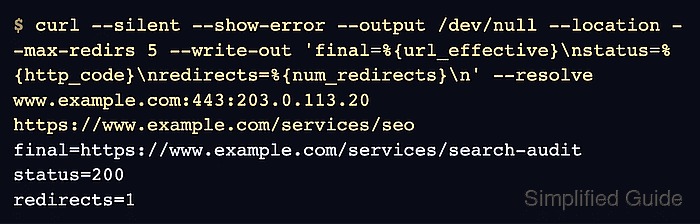
- Trace one old URL to its final response with a five-hop ceiling.
$ curl --silent --show-error --output /dev/null \
    --location --max-redirs 5 \
    --write-out 'final=%{url_effective}\nstatus=%{http_code}\nredirects=%{num_redirects}\n' \
    --resolve www.example.com:443:203.0.113.20 \
    https://www.example.com/services/seo
final=https://www.example.com/services/search-audit
status=200
redirects=1
A chain that crosses to another launch hostname or port needs a separate --resolve entry for that target. A limit error, unexpected final URL, non-success final status, or extra hop fails the route.
- Check each removed URL for its planned 404 or 410 response instead of a home-page redirect.
$ curl --silent --show-error --output /dev/null \
    --write-out 'status=%{http_code}\n' \
    --resolve www.example.com:443:203.0.113.20 \
    https://www.example.com/summer-promo
status=410
An unrelated home-page destination is a failed mapping. Consolidated content belongs at its closest replacement, while content with no replacement should return a real 404 or 410.
- Test each active hostname and protocol variant against the launch stack.
$ curl --silent --show-error --output /dev/null \
    --location --max-redirs 5 \
    --write-out 'final=%{url_effective}\nstatus=%{http_code}\nredirects=%{num_redirects}\n' \
    --resolve example.com:80:203.0.113.20 \
    --resolve www.example.com:443:203.0.113.20 \
    http://example.com/contact
final=https://www.example.com/contact
status=200
redirects=1
Each host-and-port pair needs its own --resolve entry. Active variants commonly include the bare domain, www, HTTP, HTTPS, and legacy hosts.
- Confirm that every test-sheet row matches its expected first response and final result.
/services/seo       | 301 -> /services/search-audit | 200 | 1 hop | Pass
/summer-promo       | 410 Gone                     | 410 | 0 hops | Pass
http://example.com/contact | 301 -> https://www.example.com/contact | 200 | 1 hop | Pass
A wrong destination, redirect loop, unexpected temporary status, home-page fallback, TLS error, or failed final response blocks the launch.
The public checker becomes useful after DNS points to the launch stack; it does not replace the pre-launch address override.
Tool: HTTP Redirect Checker

Mohd Shakir Zakaria is a cloud architect with deep roots in software development and open-source advocacy. Certified in AWS, Red Hat, VMware, ITIL, and Linux, he specializes in designing and managing robust cloud and on-premises infrastructures.


