Iterative classifiers can stop before their coefficients settle when feature scales differ greatly. In scikit-learn, a logistic regression convergence warning means the optimizer has not met its stopping criterion; scaling the features often resolves an iteration-limit failure.
The lbfgs solver stops after a limited number of iterations. When its warning says the iteration limit was reached, a larger budget may help, but poorly scaled inputs can make the optimization unnecessarily slow. Hiding ConvergenceWarning leaves that unfinished fit unchanged.
A Pipeline keeps feature scaling attached to the classifier during both training and prediction. Fitting it only on the training split prevents the scaler from learning from held-out data. The numeric, dense breast cancer dataset included with scikit-learn provides a reproducible case without a download or an external data file.
Steps to fix logistic regression convergence warnings in scikit-learn:
- Create fix_convergence.py in your text editor with the imports and a stratified test split.
- fix_convergence.py
import warnings

from sklearn.datasets import load_breast_cancer
from sklearn.exceptions import ConvergenceWarning
from sklearn.linear_model import LogisticRegression
from sklearn.model_selection import train_test_split
from sklearn.pipeline import make_pipeline
from sklearn.preprocessing import StandardScaler

X, y = load_breast_cancer(return_X_y=True)
X_train, X_test, y_train, y_test = train_test_split(
    X, y, test_size=0.2, random_state=42, stratify=y
)
If scikit-learn is not installed yet, set it up on Ubuntu or Debian, Windows, macOS, Fedora or Red Hat, SUSE, or conda first. To test an existing model, replace the dataset line with its own X and y, which must already be dense, numeric, and finite, and keep the same arrays before and after the fix.
Related: How to split data into train and test sets with scikit-learn - Add the unscaled fit to the end of the file with ConvergenceWarning treated as an error.
unscaled = LogisticRegression(solver="lbfgs", max_iter=100)

try:
    with warnings.catch_warnings():
        warnings.simplefilter("error", ConvergenceWarning)
        unscaled.fit(X_train, y_train)
except ConvergenceWarning as warning:
    print(warning)
The handler prints the original warning instead of stopping the script. solver and max_iter repeat the defaults so the same budget stays visible before and after the fix.
- Add the training features' standard deviations to the end of the file.
std = X_train.std(axis=0)
print(f"Smallest std: {std.min():.4f}")
print(f"Largest std: {std.max():.1f}")
- Save fix_convergence.py.
- Run the script in the Python environment that has scikit-learn installed.
$ python fix_convergence.py
lbfgs failed to converge after 100 iteration(s) (status=1):
STOP: TOTAL NO. OF ITERATIONS REACHED LIMIT
##### snipped #####
Smallest std: 0.0028
Largest std: 552.3
The large spread shows that these columns have very different scales. Changing units alone does not make their information more or less relevant, but it affects the optimizer's work.
Tested with scikit-learn 1.9.1, and warning wording can differ between releases. This fix targets the lbfgs iteration-limit message, so a warning from another solver, such as saga, needs its own diagnosis. With the SUSE system package, run python3 instead of python.
- Add a Pipeline with StandardScaler before LogisticRegression to the end of the file.
model = make_pipeline(
    StandardScaler(),
    LogisticRegression(solver="lbfgs", max_iter=100),
)

with warnings.catch_warnings():
    warnings.simplefilter("error", ConvergenceWarning)
    model.fit(X_train, y_train)
The scaler learns each feature's mean and standard deviation during training. Scaling also changes how regularization acts on the features, so convergence alone does not establish predictive quality. No try block surrounds this fit, so a warning that remains stops the script with a traceback instead of hiding the failure.
Related: How to standardize features with scikit-learn
Related: How to create a scikit-learn pipeline - Add the iteration count and held-out predictions to the end of the file.
classifier = model.named_steps["logisticregression"]
print("Iterations:", classifier.n_iter_)
print("Iteration limit:", classifier.max_iter)
print("Labels:", model.predict(X_test[:5]))
accuracy = model.score(X_test, y_test)
print(f"Held-out accuracy: {accuracy:.3f}")
Prediction uses the training-fitted scaler automatically. Passing raw test features to the classifier alone would skip that transformation.
- Save the file.
- Run the script again to confirm that the scaled fit converges.
$ python fix_convergence.py
lbfgs failed to converge after 100 iteration(s) (status=1):
##### snipped #####
Smallest std: 0.0028
Largest std: 552.3
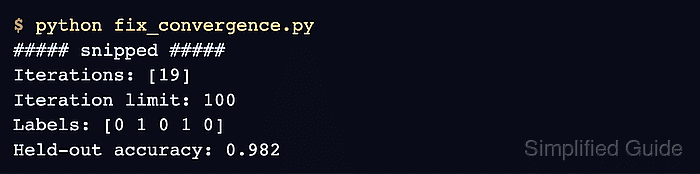
Iterations: [19]
Iteration limit: 100
Labels: [0 1 0 1 0]
Held-out accuracy: 0.982
The warning at the top comes from the unscaled fit, which stays in the file for comparison. The later lines show that the pipeline fit raised no warning and used fewer iterations than its limit. Exact counts can vary by release and platform, and the accuracy describes this split, not a guarantee for other data.
If a ConvergenceWarning traceback stops your script at the pipeline fit, change max_iter=100 to max_iter=1000 in the pipeline and run the script again. If 1000 still warns, confirm that every feature column passes through the scaler before raising the limit further.