On Ubuntu and Debian, operating-system tools and user projects can otherwise share the same Python interpreter. A project virtual environment gives scikit-learn its own package directory, so model code can use published wheels without placing pip packages into system-managed paths.
APT should provide Python 3, venv, and pip, while the activated virtual environment receives scikit-learn from PyPI. The upstream installation path recommends an isolated environment on Linux because mixing pip packages with distribution-managed Python files can create dependency conflicts.
The Debian and Ubuntu repositories also provide python3-sklearn packages for hosts that must stay entirely distribution-managed. A project-local .venv is the better fit when the project needs the current upstream scikit-learn release and a quick estimator smoke test confirms that the active interpreter can import sklearn and run model code.
Steps to install scikit-learn on Ubuntu or Debian with venv and pip:
- Open a terminal with sudo privileges.
- Refresh the APT package index.
$ sudo apt update
- Install Python 3, venv, and pip.
$ sudo apt install --assume-yes python3 python3-venv python3-pip
Reading package lists...
Building dependency tree...
Reading state information...
python3 is already the newest version (3.14.3-0ubuntu2).
Installing:
  python3-pip  python3-venv
##### snipped #####
Setting up python3-pip (25.1.1+dfsg-1ubuntu2) ...
Setting up python3-venv (3.14.3-0ubuntu2) ...
The exact package versions change with the active Ubuntu or Debian release. python3-venv provides the virtual-environment module, and python3-pip provides the package installer used inside that environment.
- Confirm that Python 3 is available.
$ python3 --version
Python 3.14.4
- Create a project directory.
$ mkdir -p ~/ml-project
- Change to the project directory.
$ cd ~/ml-project
- Create a virtual environment in .venv.
$ python3 -m venv .venv
The command normally returns no output when the environment is created.
Related: Create a Python virtual environment - Activate the virtual environment in the current shell.
$ source .venv/bin/activate
Activation changes only the current terminal session. Run the same command again in each new terminal before using the project environment.
Related: Activate a Python virtual environment - Confirm that python resolves inside .venv.
(.venv) $ command -v python
/home/analyst/ml-project/.venv/bin/python
- Upgrade pip inside the virtual environment.
(.venv) $ python -m pip install --upgrade pip
Requirement already satisfied: pip in ./.venv/lib/python3.14/site-packages (25.1.1)
Collecting pip
##### snipped #####
Successfully installed pip-26.1.2
- Install scikit-learn into the activated environment.
(.venv) $ python -m pip install --upgrade scikit-learn
Collecting scikit-learn
Collecting numpy>=1.24.1 (from scikit-learn)
Collecting scipy>=1.10.0 (from scikit-learn)
Collecting joblib>=1.4.0 (from scikit-learn)
Collecting narwhals>=2.0.1 (from scikit-learn)
Collecting threadpoolctl>=3.5.0 (from scikit-learn)
##### snipped #####
Installing collected packages: threadpoolctl, numpy, narwhals, joblib, scipy, scikit-learn
Successfully installed joblib-1.5.3 narwhals-2.22.1 numpy-2.5.0 scikit-learn-1.9.0 scipy-1.18.0 threadpoolctl-3.6.0
Use python -m pip from the activated environment instead of sudo pip. The exact wheel and dependency versions depend on the active Python version, CPU architecture, and package index state.
- Confirm that pip recorded scikit-learn inside .venv.
(.venv) $ python -m pip show scikit-learn
Name: scikit-learn
Version: 1.9.0
Summary: A set of python modules for machine learning and data mining
Home-page: https://scikit-learn.org
##### snipped #####
Location: /home/analyst/ml-project/.venv/lib/python3.14/site-packages
Requires: joblib, narwhals, numpy, scipy, threadpoolctl
Required-by:
- Check the installed dependency metadata.
(.venv) $ python -m pip check
No broken requirements found.
If pip check reports a conflict, recreate the virtual environment or pin compatible package versions before using it for training.
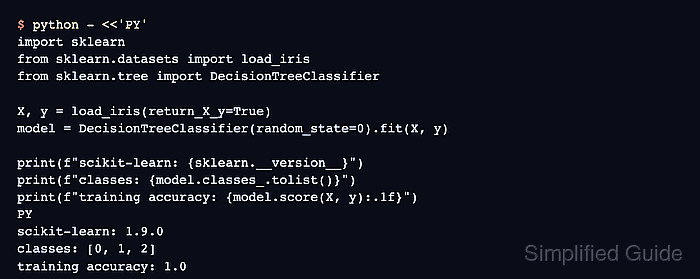
- Run an estimator smoke test through the active interpreter.
(.venv) $ python - <<'PY'
import sklearn
from sklearn.datasets import load_iris
from sklearn.tree import DecisionTreeClassifier

X, y = load_iris(return_X_y=True)
model = DecisionTreeClassifier(random_state=0).fit(X, y)

print(f"scikit-learn: {sklearn.__version__}")
print(f"classes: {model.classes_.tolist()}")
print(f"training accuracy: {model.score(X, y):.1f}")
PY
scikit-learn: 1.9.0
classes: [0, 1, 2]
training accuracy: 1.0

Mohd Shakir Zakaria is a cloud architect with deep roots in software development and open-source advocacy. Certified in AWS, Red Hat, VMware, ITIL, and Linux, he specializes in designing and managing robust cloud and on-premises infrastructures.


